Accounting: Monthly History Data
Goal: Create a persistent accounting information data store using the built-in WordPress Multisite database surfaces.
The table should follow some standard rules that will allow us to implement CRUD operations via REST endpoints in the MySLP Dashboard plugin.
Tasks
- One time task “Create Or Update The Database” when the MySLP Dashboard version indicates a change.
- Create a Monthly Ledger User Interface to allow for manual CRUD operations on the slp_accounting_monthly_history table.
Monthly History Data : Environment
Environment
All accounting history data will reside in tables for the main WordPress super admin account.
The Main WordPress Super Admin account site ID is stored in the PHP constant SITE_ID_CURRENT_SITE and should be 1.
The database table prefix should come up as wp_ unlike user accounts that start with wp_<user_site_id>.
slp_accounting_monthly_history Table
The table should be named $wpdb->prefix . “slp_accounting_monthly_history” resulting in a table name of wp_slp_accounting_history.
slp_accounting_monthly_history Structure
- ID – a unique ID to allow for explicit record I/O for CRUD operations.
- KEY – a short string indicating the type of monthly data for example:
- “SAAS_REVENUE”
- “PLUGIN_REVENUE”
- AMOUNT -an integer representing the numeric value for the key for example:
- 3500 which may represent “35.00” or 35 dollars in our UI surfaces
- DATE – a date and time for they entry representing the date this value represents NOT when the data was created or modified
- YEAR – the 4-digit year represented by DATE
- MONTH – the 2-digit month represented by DATE
- DAY – the 2-digit day represented by DATE
slp_accounting_monthly_history Example Data
- ID | KEY | AMOUNT | DATE | YEAR | MONTH | DAY
- 1 | SAAS_REVENUE | 299000 | 2026-03-01 00:00:00 | 2026 | 03 | 31
- 2 | SAAS_REVENUE | 302000 | 2026-04-01 00:00:00 | 2026 | 04 | 30
- 3 | SAAS_REVENUE | 303000 | 2026-05-01 00:00:00 | 2026 | 05 | 31
slp_accounting_monthly_history Data Use Case
This Accounting Monthly History Data interface will run various monthly cron jobs to collect data and store it in this table.
We will use this data to product things like monthly revenue graphs for the SaaS Account Overview dashboard.
The graph will show SaaS Revenue from active accounts on a monthly basis.
We will do the same providing a manual process to add other revenue such as WordPress plugin revenue under “PLUGIN_REVENUE” keys.
We will allow for users to change the Line Chart revenue graph to show “monthly” or “yearly” graphs.
Future data keys may warrant daily graphs.
Task: Create Or Update The Database
When the MySLP Dashboard module version (plugin version) changes, run a database “create or update” hook to create the table or modify it as needed.
Copy the design pattern in the Store Locator Plus plugin in the \SLP_Admin_Activation class.
wp-content/plugins/store-locator-plus/include/module/admin/SLP_Admin_Activation.php
This is fired from \SLPlus::initialize_after_plugins_loaded
When the Store Locator Plus version reported is newer than the installed version for the plugin (see version_compare( $this->installed_version, SLPLUS_VERSION, ‘<‘ )) , the MySLP Dashboard should follow that pattern.
Task: Monthly Ledger User Interface
Admin Menu
- Add a submenu with the label “Monthly Ledger” under the “Accounting” admin sidebar menu we created in \MySLP::create_network_admin_menu.
		$this->menu_hooks[ MYSLP_ACCOUNTING_MENU_SLUG ] =
			add_menu_page( __( 'Accounting', 'myslp' ),
				__( 'Accounting', 'myslp' ),
				'manage_network_options',
				MYSLP_ACCOUNTING_MENU_SLUG,
				array( $this, 'render_accounting_page' ),
				SLPlus::menu_icon,
				1.50
			);
Initial User Interface
- Add a new My MySLP_Account_MonthlyLedger PHP React loader and helper class.
Follow the design pattern of \MySLP_Accounting in wp-content/plugins/myslp-dashboard/include/accounting/MySLP_Accounting.php
Place it in the same directory as MySLP_Accounting.php as a sibling. - Create a new React component that allows basic CRUD operations on the slp_accounting_monthly_history Table.
Attach it to the MySLP_Account_MonthlyLedger PHP React loader.
Follow the UI design pattern of the AccountingPanel React component at wp-content/plugins/myslp-dashboard/src/accounting/accounting.tsx
Use a MUI X DataGridPro component as the primary table interface.
Allow for pagination, starting with a default page length of 25 records.
Sort the records by DATE descending on initial load so we see newer records at the top.
Provide an add record interface where a user can enter the KEY, AMOUNT, DATE.
Provide an inline edit record interface on the DataGridPro table to allow users to click on they KEY, AMOUNT, or DATE field on an existing record and change it.
Provide a delete option for each record.
Data Interface
Use REST for all CRUD operations and to fetch the initial data set.
When records are added the backend data interface should:
- Ensure all keys entered are trimmed (no leading/trailing spaces) and are shifted to uppercase.
- AMOUNT is stored only as an integer.
- DATE field needs to allow for flexible input converting text input into a best guess for the date to be stored as a date-time entry in the database. Examples:
- “05/2026” is May 2026 which should be recorded as the date time 2026-05-01 00:00:00
- “05/01/2026” is May 1st 2026 which should be recorded as the date time 2026-05-01 00:00:00
- “May 2026” is May 2026 which should be recorded as the date time 2026-05-01 00:00:00
- Allow for various separators such as / or – or .
- 05-01-2026 is the same as 05/01/2026
- 05.01.2026 is the same as 05/01/2026
- Use standard Date/Time JavaScript or React libraries for data manipulation.
- The manipulation can be not the front-end (React/JavaScript) before communicating with the REST endpoint.
- The backend should do basic sanitation before recording data.
The “Buffer” For Overages
Legacy billing was sometimes strict on the overage policy. The revised automated report, not so much as there is a 100 views “free buffer” on overages.
2026 : Jan | Feb | Mar | April | May
| Acct ID | Spreadsheet | New50 |
|---|---|---|
| BRmarket | 0 – 0 – 15 – 0 – 20 | 0 – 0 – 15 – 0 – ? |
| MKbevis | 0 – 0 – 5 – 0 – 0 | 0 – 0 – 0 – 5 – 5 |
| TKESeck | 0 – 0 – 0 – 5 – 0 | 0 – 0 – 0 – 0 – 0 |
| Arbor | 0 – 0 – 0 – 0 – 35 | 0 – 0 – 0 – 0 – 35 |
| UWS | 0 – 20 – 25 – 45 – 115 | 15 – 20 – 25 – 45 – 115 |
| Gary | 10 – 15 – 20 – 25 – 25 | 0 – 15 – 20 – 20 – 25 |
The actual billing and monthly views do not always match.
Part of this is the monthly view total is triggered when the Stripe billing renews.
When a Stripe renewal is successful the SLP SaaS platform records the current view count to a permanent record of views for the previous customer billing period (prior month).
The system is imperfect and need refinement as Stripe sometimes needs to reprocess subscription renewals for a myriad of reasons.
As such the view tally is sometimes recorded more than once and reset more than once.
This impacts the total view count recorded for the month as well as the billing.
Starting in June 2026, we are using the new monthly views report as the source of truth.
This may not be perfect during the period we work to resolve these corner cases with Stripe renewals.
The map views will never be OVER actual usage.
Worst case, we bill a little LESS due to this issue.
Overages remain billed at $5 for a block of 1,000 extra views.
As an unofficial policy while we work toward resolution, all accounts now have a “100 free overage views” allowed on their account.
Thus, if an account is over views we don’t charge for the block until the new block gets 101+ views.
Examples:
limit is 5,000 – actual views is 5099 – billing is 0 extra blocks as 99 is under the 100 grace = $0
limit is 5,000 – actual views is 5250 – billing is 1 extra block at 250 exceeds the 100 grace = $5
limit is 5,000 – actual views is 8099 – billing is 3 extra block as 99 is under the 100 grace = $15
limit is 5,000 – actual views is 8250 – billing is 4 extra blocks = $20
(1 extra block: up to 6,000 views, 2: up to 7,000 views, 3: up to 8,000 views, 4: up to 9,000 views) = $20
As a result, months prior to June 2026 may not align with billing and view count.
Create Accounting Dashboard
Goal: Create an accounting dashboard for the Store Locator Plus® SaaS application.
Primary Module: MySLP Dashboard (myslp-dashboard)
git repo: https://github.com/Store-Locator-Plus/myslp-dashboard
We are creating a full Store Locator Plus accounting dashboard to track both the SaaS platform as well as WordPress plugin sales.
Sales Data
The primary source of truth for sales data will come from Stripe.
Any references to PayPal payments or accounts can be considered legacy information and can be left out of the accounting panel.
Payment Module: MySLP Payments (myslp-payments)
git repo: https://github.com/Store-Locator-Plus/myslp-payments.git
The payment module holds the Stripe API module and related code for payment system communications.
User Interface
Stage 1 : Accounting Overview Scaffolding
Accounting Sidebar Menu
A new sidebar menu should be created in WordPress for super admin users only.
\MySLP::create_network_admin_menu should be used to create and attach the menu.
Follow the design pattern for the configure menu option, code snippet follows:
		$this->menu_hooks[ MYSLP_CONFIG_MENU_SLUG ] =
			add_menu_page( __( 'Configure', 'myslp' ),
				__( 'Configure', 'myslp' ),
				'manage_network_options',
				MYSLP_CONFIG_MENU_SLUG,
				array( $this, 'render_configuration_page' ),
				SLPlus::menu_icon,
				1.30
			);
Account Page Rendering
Unlike the main configure menu page that is rendered via \MySLP::render_configuration_page the new accounting module should load and render a React PHP helper class. We want this interface to be primarily React driven.
The WordPress PHP React Helper Class
Follow the \MySLP_Customer_Profile class for guidance on implementing a React user interface within WordPress.
I suggest creating a new class MySLP_Accounting in wp-content/plugins/myslp-dashboard/include/accounting.
The React AccountingPanel Component
The React components that \MySLP_Accounting loads with the help of the wp-scripts node package should live in wp-content/plugins/myslp-dashboard/src/accounting.
This directory should have a block.json and an accounting.tsx file.
block.json should probably look like this:
{
  "script": "file:profile.js"
}
The accounting.tsx TypeScript should contain the React accounting component.
This new React component should be named AccountingPanel.
It should follow the UX design pattern of the ProfilePanel component in wp-content/plugins/myslp-dashboard/src/profile/profile.tsx
The initial user interface will only have a single submenu (SLPTabsBar Tabs components) for the main page which should be labelled “Overview” which is already selected and open. It will render the AccountingOverviewPanel component noted below.
AccountingOverviewPanel Component
A supporting AccountingOverviewPanel React component should be created.
If the WordPress wp-scripts supports it, this can go in the same directory as the AccountingPanel component : if not place it in wp-content/plugins/myslp-dashboard/src/accounting_overview
This component should be a React Dashboard that shows overall accounting metrics.
To start with we will want to show the total number current active accounts and total amount of payments from those active accounts.
The ManageCustomers React component (wp-content/plugins/myslp-dashboard/src/manage_customers/manage_customers.tsx) displays this data in the AdminHeader children via a pair of Chips.
Use the same REST endpoints to fetch this data and display it.
The UX should try to follow the general design pattern at https://mui.com/material-ui/getting-started/templates/dashboard/.
Here is a screen shot of the Material UI Dashboard Template that is referenced.
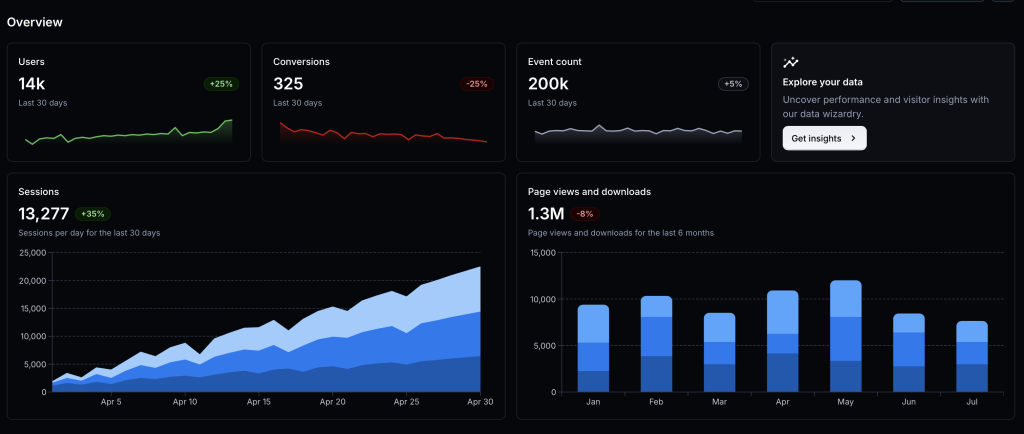
For now we need the cards for:
- Accounts in place of Users with the active count below. We will add a data table for historical trends and a graph below it in the future.
Clicking on the user count in the account card should redirect the UX to load the Manage Customers page at /wp-admin/network/admin.php?page=customer_list - Payments in place of Conversions with the total payment amount below. This too will eventually have trends stored in a data table that we will create later.
AI Summary
Junie Pro Summary
Completed setup and implementation prep for the accounting dashboard work in myslp-dashboard, including running required start-revision on branch accounting.

• Implemented Stage 1 accounting UI scaffold: new Accounting admin page, React entrypoint, and overview metrics/cards with click-through to Manage Customers.

• Added new files: include/accounting/MySLP_Accounting.php, src/accounting/accounting.tsx, and src/accounting/block.json.

• Updated integration points in include/MySLP.php and constants/version metadata in myslp-dashboard.php and package.json.

• Validation status: lint checks for new files passed (only a non-blocking TS import style warning noted earlier), diff checks passed, and you confirmed npm install + npm run build succeeded locally with generated build/accounting/accounting.js and build/accounting/accounting.asset.php present.

• Environment note: Junie shell still lacks local php tooling and direct GitHub auth; you requested follow-up guidance on PAT-based auth after task completion.
Junie Release Notes
• Scope: No new product-code changes were made after the previously summarized accounting dashboard work in myslp-dashboard.
• Skills/Environment updates this session: Reloaded skills via Vendors/JetBrains/relink_skills.sh; available skills now include /wordpress-release-notes.
• Code impact since last implementation summary: None.
• Build/Test status: No additional build or test runs were performed after the earlier confirmed successful npm install and npm run build for myslp-dashboard.
Included Previously Completed Work (for continuity)
• Added Accounting admin page scaffold and React entry (include/accounting/MySLP_Accounting.php, src/accounting/accounting.tsx, src/accounting/block.json).
• Wired menu/render integration in include/MySLP.php and version bump artifacts from start-revision (myslp-dashboard.php, package.json).
Directions 404 Error : marketing_at_am*(902.900)
Issue reported by customer: marketing_at_am*(902.900)
Add locations & generate embed.
In the resulting locations the Directions link is wrong.
New Manage Customers : Location Count Wrong
GitHub Project Issue: New Manage Customers : Location Count Wrong
Follow on to this task: Sysadmin : Manage Customers UX Improvement
Reproduction
- Login as a system admin
- Click Manage | Customers on the sidebar menu (lands on /wp-admin/network/admin.php?page=customer_list)
The list of customers shows locations 0 for multiple customers with locations.
- ID: 903.901 enterprise@st…
Locations: 0
Actual Locations: 25
Research
New Manage Customers Module (March 2026)
React manage_customers.tsx
File: WordPress/wp-content/plugins/myslp-dashboard/src/manage_customers/manage_customers.tsx
DataGridPro (from MUIx framework) properties…
— Data set
Most likely from
    React.useEffect( () => {
        fetchData();
    }, [ fetchData ] );

Calls REST endpoint from
const restBase: string = slpReact.url.rest + 'myslp/v2/customers';
— Column definitions
const columns = React.useMemo( () => buildColumns( homeUrl, isMonthEnd ), [ homeUrl, isMonthEnd ] );
- function buildColumns
- const cols: GridColDef[]…
- field: location_count
- const cols: GridColDef[]…
homeUrl most likely comes from the PHP class \MySLP_Manage_Customers::extendReactVars
set to WordPress get_home_url()
REST Backend
SaaS App backend via MySLP Dashboard plugin.
— Fetching Customers
PHP method \MySLP_REST_API::register_routes defines the registered routes for WordPress.
register_rest_route( $this->myslp_namespace, ‘/customers’,…)
Calls the PHP method \MySLP_REST_API::get_customers
Location count is coming from $this->myslp->User->location_count
Root Cause Theory
This appears to be using a meta_query to fetch the user location data.
This is NOT accurate.
In some cases the MySLP_User object does not have a location_count user_meta property set.
If that is the case, it should call \SLP_Location_Manager::get_location_count for that user and store the result with
User Location Count Architecture
\MySLP_User::__get
Fetched from user_meta with the location_count property.
This is likely where the AI decided to make this a source of truth for location counts.
				case 'location_count':
				case 'mapview_count':
					$this->__get( 'user_meta' );
					$this->$property = (int) ( $this->user_meta[ $property ][0] ?? 0 );
					break;
\MySLP_REST_API::get_location_count_for_user
Currently unused anywhere in the project.
This would ensure the app switched to the user’s blog and set_database_meta() then called:
\SLP_Location_Manager::get_location_count
\SLP_Location_Manager::get_location_count
This is the original method from the legacy app code to fetch location counts.
It queries the custom SLP database that is added for every user to get the count of records.
It comes from the linchpin Store Locator Plus base plugin.
				$the_count            = $this->slplus->database->get_Value( array(
					'selectall_count',
					'where_default'
				) );
Resolution
Update \MySLP_REST_API::get_customers must first call…
// Update count and user meta storing count.
$this->get_location_count_for_user( $user->ID );
This updates the myslp->User->location_count meta by querying the SLP custom table directly.
See myslp-dashboard git repo update SHA 4f54ff1154d0cf148c603000bdcd789a669ed8cc
Sysadmin : Manage Customers UX Improvement
With the SaaS dashboard there is a Manage | Customers option that displays the customer list. It is using a default WordPress table style presentation that has been modified by one of the SaaS plugins, most likely MySLP Dashboard (myslp-dashboard). I would like to make improvements to this interface.
Twenty Twelve Theme Does Not Exist
The theme directory "twentytwelve" does not exist.
This issue comes up for older accounts where their wp_options table has their theme set to twentytwelve. If these accounts time out it does NOT flush the cookie (shit WordPress design) and when you re-visit the SaaS dashboard site (staging or production) you get the error message noted above.
Canceling Account Immediate Expires Map
A user canceled their account. The website immediate showed the SLP maps as expired instead of checking the renewal/expiration date.
Reproduction
E2E Steps
- Login as professional@storelocatorplus.com
- Make sure the account is active
- Go to My Profile by clicking “My Profile” in the admin sidebar
xpath=//*[@id=”toplevel_page_myslp_profile”] - Affirm there is a Cancel Subscription button on the page
xpath=//*[@data-cy=”cancel-subscription-button”]
- Go to My Profile by clicking “My Profile” in the admin sidebar
- Click the Cancel Subscription button
- Go to Generate Embed by clicking “Generate Embed” in the admin sidebar
xpath=//*[@id=”toplevel_page_admin-page-myslp-dashboard-tab-deployment”]
If the account still has time left on the subscription.
The map display area on the Generate Embed page should not show the text “This Store Locator Plus® account has expired.”
Cancelling Subscription Creates New Subscription
I had to update the stripe connection which meant rewriting how subscription processing is managed including cancellations.
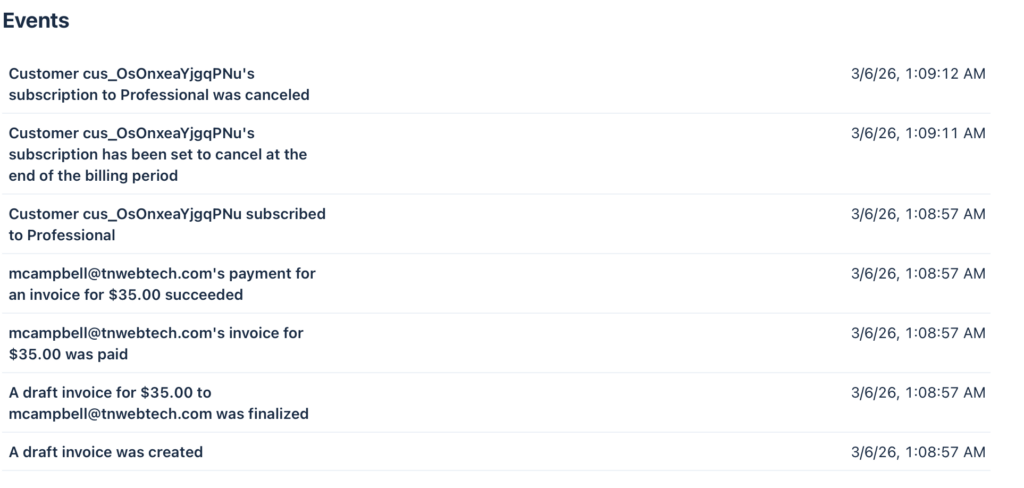
So for the customer mcampbell_at_tnwebtech_dot_com (830.828) this is what I have as the status:
original subscription 24th
last renewed feb 24th
cancelled mar 6th
stripe charged them mar 6th AND marked it cancelled april 6th
it should have marked the 24th subscription to cancel on mar 24th
Clearly a bug in the new cancellation processor.
Task: https://github.com/Store-Locator-Plus/myslp_aws_ecs_kit/issues/94
Dev Notes
Customer: mc…tnwebtech… (830.828)
customer: mcampbell@tnwebtech.com
Current status according to Stripe: they have set their account to cancel on April 5th
Current subscription: *z8ku is deleted on Stripe now meaning it will not auto-renew
Please ensure that is what they want.
From the Stripe history:
The original subscription *9h4z
Started Oct 24 2023
Cancelled via SLP Dashboard on Mar 6th 2026 at 1:05AM (server time)
Was set to stop providing SLP maps on Mar 24th 2026
They then renewed (created the new subscription) Mar 6th at 1:08AM (server time)
This is set to expire on April 5th 2026
Yes, we have an issue with RENEW
If the prior subscription is still active (*9h4z in this case) it should set the new subscription (renewal) to start when that ends (Mar 24th 2026 06:21AM server time)
The bug is that is started immediately , thus the new 6th to 5th dates
That is OK for renewals that happen AFTER the maps are disabled (most users) but in this unique situation it needs to be addressed.
Stripe
Current Subscription *z8ku
Started and cancelled March 6th 2026
Mar 6, 2026, 1:08:53 AM EDT POST/v1/subscriptions
{
  "id": "sub_1T7rZBBvHKfBw2LGODU6z8ku",
  "object": "subscription",
...
  "cancel_at": null,
  "cancel_at_period_end": false,
  "canceled_at": null,
  "cancellation_details": {
    "comment": null,
    "feedback": null,
    "reason": null,
   },
  "collection_method": "charge_automatically",
  "created": 1772777333,
  "currency": "usd",
  "current_period_end": 1775455733, // April 5 2026 06:22:13
  "current_period_start": 1772777333,
  "customer": "cus_OsOnxeaYjgqPNu",
...
  "items": {
    "object": "list",
    "data": [
      {
        "id": "si_U63gr60piiTUmH",
        "object": "subscription_item",
        "billing_thresholds": null,
        "created": 1772777334,
        "current_period_end": 1775455733,
        "current_period_start": 1772777333,
        "discounts": [],
        "metadata": {},
        "plan": {
          "id": "Professional",
          "object": "plan",
          "active": true,
          "aggregate_usage": null,
          "amount": 3500,
          "amount_decimal": "3500",
          "billing_scheme": "per_unit",
          "created": 1500935159,
          "currency": "usd",
          "interval": "month",
          "interval_count": 1,
          "livemode": true,
          "metadata": {},
          "meter": null,
          "nickname": null,
          "product": "prod_BU6KhAFcwnXTef",
          "tiers_mode": null,
          "transform_usage": null,
          "trial_period_days": null,
          "usage_type": "licensed"
        },
        "price": {
          "id": "Professional",
          "object": "price",
          "active": true,
          "billing_scheme": "per_unit",
          "created": 1500935159,
          "currency": "usd",
          "custom_unit_amount": null,
          "livemode": true,
          "lookup_key": null,
          "metadata": {},
          "nickname": null,
          "product": "prod_BU6KhAFcwnXTef",
          "recurring": {
            "aggregate_usage": null,
            "interval": "month",
            "interval_count": 1,
            "meter": null,
            "trial_period_days": null,
            "usage_type": "licensed"
          },
          "tax_behavior": "unspecified",
          "tiers_mode": null,
          "transform_quantity": null,
          "type": "recurring",
          "unit_amount": 3500,
          "unit_amount_decimal": "3500"
        },
        "quantity": 1,
        "subscription": "sub_1T7rZBBvHKfBw2LGODU6z8ku",
        "tax_rates": []
      }
    ],
...
  },
...
  "trial_settings": {
    "end_behavior": {
      "missing_payment_method": "create_invoice"
    }
  },
  "trial_start": null
}
Mar 6, 2026, 1:09:11 AM EDT POST /v1/subscriptions/sub_1T7rZBBvHKfBw2LGODU6z8ku
{
  "id": "sub_1T7rZBBvHKfBw2LGODU6z8ku",
  "object": "subscription",
...
  "cancel_at": 1775455733,
  "cancel_at_period_end": true,
  "canceled_at": 1772777351,
  "cancellation_details": {
    "comment": null,
    "feedback": null,
    "reason": "cancellation_requested"
  },
  "collection_method": "charge_automatically",
  "created": 1772777333,
  "currency": "usd",
  "current_period_end": 1775455733,
  "current_period_start": 1772777333,
  "customer": "cus_OsOnxeaYjgqPNu",
...
}
Mar 6, 2026, 1:09:12 AM EDT DELETE/v1/subscriptions/sub_1T7rZBBvHKfBw2LGODU6z8ku
Original Subscription: *h4z
Started: 2023-10-24
Ended: 2026-03-06 01:05AM
Mar 6, 2026, 1:05:04 AM EDT POST/v1/subscriptions/sub_1O4dzSBvHKfBw2LGsKZp9h4z
{
  "id": "sub_1O4dzSBvHKfBw2LGsKZp9h4z",
  "object": "subscription",
  "application": null,
  "application_fee_percent": null,
  "automatic_tax": {
    "disabled_reason": null,
    "enabled": false,
    "liability": null
  },
  "billing_cycle_anchor": 1698128482,
  "billing_cycle_anchor_config": null,
  "billing_mode": {
    "flexible": null,
    "type": "classic"
  },
  "billing_thresholds": null,
  "cancel_at": 1774333282, // Mar 24 2026 06:21:22 AM (correct)
  "cancel_at_period_end": true,
  "canceled_at": 1772777104, // Mar 6 2026 01:05:04 AM
  "cancellation_details": {
    "comment": null,
    "feedback": null,
    "reason": "cancellation_requested"
  },
  "collection_method": "charge_automatically",
  "created": 1698128482,
  "currency": "usd",
  "current_period_end": 1774333282, // Mar 24 2026 06:21:22 AM (correct)
  "current_period_start": 1771914082, // February 23 2026 11:21:22 PM
  "customer": "cus_OsOnxeaYjgqPNu",
  "customer_account": null,
  "days_until_due": null,
  "default_payment_method": null,
  "default_source": null,
  "default_tax_rates": [],
  "description": null,
  "discount": null,
  "discounts": [],
  "ended_at": null,
  "invoice_settings": {
    "account_tax_ids": null,
    "issuer": {
      "type": "self"
    }
  },
  "items": {
    "object": "list",
    "data": [
      {
        "id": "si_OsOnhVkp9iBCCb",
        "object": "subscription_item",
        "billing_thresholds": null,
        "created": 1698128483,
        "current_period_end": 1774333282,
        "current_period_start": 1771914082,
        "discounts": [],
        "metadata": {},
        "plan": {
          "id": "Professional",
          "object": "plan",
          "active": true,
          "aggregate_usage": null,
          "amount": 3500,
          "amount_decimal": "3500",
          "billing_scheme": "per_unit",
          "created": 1500935159,
          "currency": "usd",
          "interval": "month",
          "interval_count": 1,
          "livemode": true,
          "metadata": {},
          "meter": null,
          "nickname": null,
          "product": "prod_BU6KhAFcwnXTef",
          "tiers_mode": null,
          "transform_usage": null,
          "trial_period_days": null,
          "usage_type": "licensed"
        },
        "price": {
          "id": "Professional",
          "object": "price",
          "active": true,
          "billing_scheme": "per_unit",
          "created": 1500935159,
          "currency": "usd",
          "custom_unit_amount": null,
          "livemode": true,
          "lookup_key": null,
          "metadata": {},
          "nickname": null,
          "product": "prod_BU6KhAFcwnXTef",
          "recurring": {
            "aggregate_usage": null,
            "interval": "month",
            "interval_count": 1,
            "meter": null,
            "trial_period_days": null,
            "usage_type": "licensed"
          },
          "tax_behavior": "unspecified",
          "tiers_mode": null,
          "transform_quantity": null,
          "type": "recurring",
          "unit_amount": 3500,
          "unit_amount_decimal": "3500"
        },
        "quantity": 1,
        "subscription": "sub_1O4dzSBvHKfBw2LGsKZp9h4z",
        "tax_rates": []
      }
    ],
    "has_more": false,
    "total_count": 1,
    "url": "/v1/subscription_items?subscription=sub_1O4dzSBvHKfBw2LGsKZp9h4z"
  },
  "latest_invoice": "in_1T4EzzBvHKfBw2LGXjuYItOu",
  "livemode": true,
  "metadata": {},
  "next_pending_invoice_item_invoice": null,
  "on_behalf_of": null,
  "pause_collection": null,
  "payment_settings": {
    "payment_method_options": null,
    "payment_method_types": null,
    "save_default_payment_method": null
  },
  "pending_invoice_item_interval": null,
  "pending_setup_intent": null,
  "pending_update": null,
  "plan": {
    "id": "Professional",
    "object": "plan",
    "active": true,
    "aggregate_usage": null,
    "amount": 3500,
    "amount_decimal": "3500",
    "billing_scheme": "per_unit",
    "created": 1500935159,
    "currency": "usd",
    "interval": "month",
    "interval_count": 1,
    "livemode": true,
    "metadata": {},
    "meter": null,
    "nickname": null,
    "product": "prod_BU6KhAFcwnXTef",
    "tiers_mode": null,
    "transform_usage": null,
    "trial_period_days": null,
    "usage_type": "licensed"
  },
  "quantity": 1,
  "schedule": null,
  "start_date": 1698128482,
  "status": "active",
  "test_clock": null,
  "transfer_data": null,
  "trial_end": null,
  "trial_settings": {
    "end_behavior": {
      "missing_payment_method": "create_invoice"
    }
  },
  "trial_start": null
}
Mar 6, 2026, 1:05:05 AM EDT DELETE/v1/subscriptions/sub_1O4dzSBvHKfBw2LGsKZp9h4z
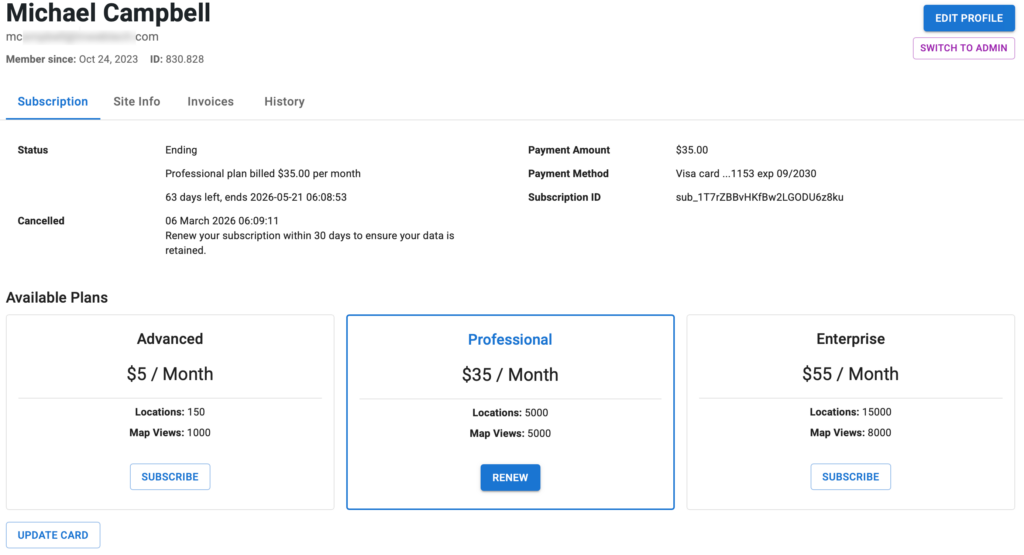
SLP SaaS
Currently on Professional Plan
Expires 2026-05-21 06:08:53
Cancelled 2026-03-06 06:09:11
Current Stripe subscription: sub_1T7rZBBvHKfBw2LGODU6z8ku
Stripe Notes
Currently using Classic billing mode.
Flexible Recommended: Provides accurate and predictable billing behavior and new capabilities. To access these improvements, which are only available in flexible billing mode, you must create new subscriptions with flexible billing mode or migrate your existing subscriptions.
*Classic: Uses the existing Stripe subscription behavior. This setting is maintained for backward compatibility with older integrations.
AI Resolution Assistance
Prompt
@Amelia -
In the MySLP Payments module (WordPress/wp-content/plugins/myslp-payments) there is an issue related to renewing cancelled subscriptions.

__
Make a note of this as general knowledge about the Store Locator Plus Saas Application:
- local (https://local.storelocatorplus.com) and staging (https://staging.storelocatorplus.com) servers may be using outdated data sets
- local and staging servers employ the Stripe TEST environment and related keys
- the production server uses live keys
- NEVER run tests against live Stripe customer data using live keys even on the staging or local servers

__

The following scenario is a real-world situation which played out on the production version of the SaaS application.

We have an issue with RENEW subscription.
- If the prior subscription is still active (sub_1O4dzSBvHKfBw2LGsKZp9h4z in this case) it should set the new subscription (sub_1T7rZBBvHKfBw2LGODU6z8ku) to start when the still-active subscription ends (Mar 24th 2026 06:21AM server time).
- The bug is that the new subscription started immediately setting a March 6th start date when an April 5th end date.
- The new subscription should have started on March 24th 2026 at 6:21AM.
- If the  prior subscription is past the end (cancel_at) date, only then should the renewal start immediately.  That was not the case in this situation.


Meta data about the customer and their interaction with the application:

customer: mcampbell@tnwebtech.com

Current status according to Stripe: they have set their account to cancel on April 5th
Current subscription: *z8ku is deleted on Stripe now meaning it will not auto-renew

Please ensure that is what they want.

From the Stripe history:
The original subscription *9h4z
Started Oct 24 2023
Cancelled via SLP Dashboard on Mar 6th 2026 at 1:05AM (server time)
Was set to stop providing SLP maps on Mar 24th 2026
They then renewed (created the new subscription) Mar 6th at 1:08AM (server time)
This is set to expire on April 5th 2026
AI Fix
in \stripe\MySLP_Stripe_Payments::renew_subscription add the trial_end argument.
		// If the old subscription still has remaining paid time, defer the new
		// subscription so it starts when the old period ends.
		$prior_period_end = $this->subscription->current_period_end ?? null;
		if ( $prior_period_end && $prior_period_end > time() ) {
			$args['trial_end'] = $prior_period_end;
		}

		try {
			$this->subscription    = Subscription::create( $args );
E2E Testing
Write a new E2E Test Specification "subscription_renewals".

The first test in the specification needs to test "Can renew a subscription before it has expired".
This is a corner case with some specific requirements.
- Login as a user with a current active subscription
- Go to My Profile and look for the current subscription ID, remember this value
- Go to My Profile and cancel the subscription
-- The current Stripe subscription ID should be posted and marked in Stripe as canceled
-- The current subscription should have a cancellation date at the end of the current period
- Go to My Profile and renew the subscription
-- This should create a new Stripe subscription ID
-- The new Stripe subscription ID should start when the current period ends
-- The new Stripe subscription should NOT start at the date/time of the renewal
-- The new Stripe subscription should be set to renew in a month (current period ends a month later)
Update SLP_Country_Manager To Include All Regions
Contains the map and other data that drives SLP for each country.
ccTLD is the region parameter for Google Maps
ccTLD is any of the Unicode region subtag identifiers

See https://developers.google.com/maps/coverage for a list of supported regions, 2D/3D map tiles apply here
\SLP_Country_Manager::load_country_data sets up the list of country meta data for this purpose.
It has not been updated since 2018.
Map Center Fallback Not Rendering Map
Under Settings | Map the map center fallback is not rendering the map.
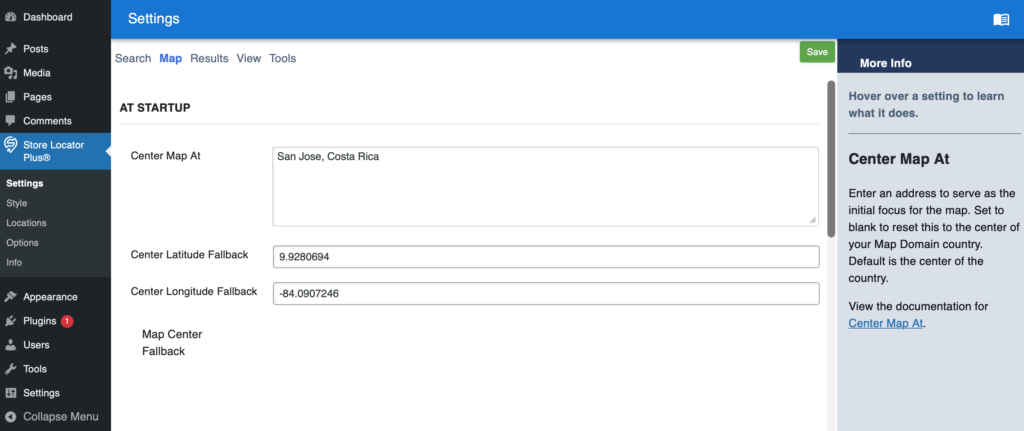
Settings ID: center_map
This is a Premier feature.
May be related to Google Maps and SLP Core script enqueue
Map Bubble Description Format (Default Style)
Went to locator styles: default and selected it to get the baseline form the style server first.
The map bubble description format is not retaining whitespace (returns) with the default style.