Issue reported by customer: marketing_at_am*(902.900)
Add locations & generate embed.
In the resulting locations the Directions link is wrong.
Store Locator Plus® Internal Docs
SLP Internal Documentation
Issue reported by customer: marketing_at_am*(902.900)
Add locations & generate embed.
In the resulting locations the Directions link is wrong.
In JavaScript console on the Location Details page:
Description
[Error] Warning: ReactDOM.render is no longer supported in React 18. Use createRoot instead. Until you switch to the new API, your app will behave as if it’s running React 17. Learn more: https://reactjs.org/link/switch-to-createroot
printWarning (react-dom.js:73)
error (react-dom.js:47)
render (react-dom.js:29680)
(anonymous function) (script.js:101:67958)
Global Code (script.js:101:68032)
Contains the map and other data that drives SLP for each country.
ccTLD is the region parameter for Google Maps
ccTLD is any of the Unicode region subtag identifiers

See https://developers.google.com/maps/coverage for a list of supported regions, 2D/3D map tiles apply here
\SLP_Country_Manager::load_country_data sets up the list of country meta data for this purpose.
It has not been updated since 2018.
Under Settings | Map the map center fallback is not rendering the map.
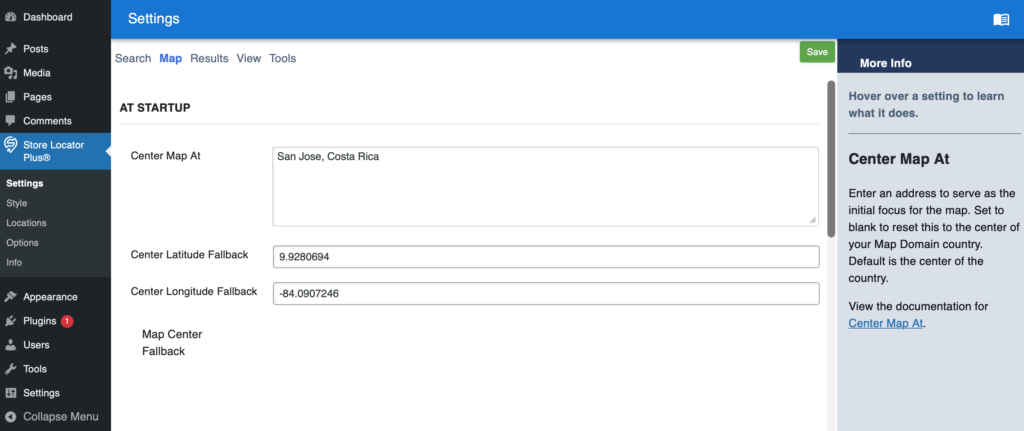
Settings ID: center_map
This is a Premier feature.
May be related to Google Maps and SLP Core script enqueue
The pre-production release of the 2602.XX.YY versions of the SaaS are setup with a revised React-based subscription processor.
The My Profile | Subscription tab allows the user to…
The update card process appears to be calling the backend, however how Stripe stores payment data and how it is rendered has changed.
When a user is logged in, the application stack is calling \MySLP_Contact_Us::initialize on every page load on the MySLP SaaS system. This should only be loaded when a user is interacting with the Contact Us page in the app.
This is being called via \MySLP_loader in the myslp-dashboard code. This happens when plugins_loaded action hooks are called from WordPress per this code block:
	// Load the Customer Profile module AFTER history logger (pri; 15)
	add_action( 'plugins_loaded', function () {
		/**
		 * @return void
		 */
		function myslp_customer_interfaces_loader(): void {
			require_once( MYSLP_PLUGIN_DIR . 'include/customer_profile/MySLP_Customer_Profile.php' );
			require_once( MYSLP_PLUGIN_DIR . 'include/MySLP_Contact_Us.php' );
			require_once( MYSLP_PLUGIN_DIR . 'include/MySLP_Customer_Maintenance.php' );

			MySLP_Contact_Us::get_instance();
		}

		myslp_customer_interfaces_loader();
	}, 15 );
A recent update to the Store Locator Plus® WordPress plugin or Power add on have re-introduced the Pages menu item on the sidebar in the SaaS application.
Remove “Pages” from the sidebar menu on the SaaS application.
Pages appears on the sidebar.
Do not show pages on the sidebar until this is fully functional.