Goal: Create an accounting dashboard for the Store Locator Plus® SaaS application.
Primary Module: MySLP Dashboard (myslp-dashboard)
git repo: https://github.com/Store-Locator-Plus/myslp-dashboard
We are creating a full Store Locator Plus accounting dashboard to track both the SaaS platform as well as WordPress plugin sales.
Sales Data
The primary source of truth for sales data will come from Stripe.
Any references to PayPal payments or accounts can be considered legacy information and can be left out of the accounting panel.
Payment Module: MySLP Payments (myslp-payments)
git repo: https://github.com/Store-Locator-Plus/myslp-payments.git
The payment module holds the Stripe API module and related code for payment system communications.
User Interface
Stage 1 : Accounting Overview Scaffolding
Accounting Sidebar Menu
A new sidebar menu should be created in WordPress for super admin users only.
\MySLP::create_network_admin_menu should be used to create and attach the menu.
Follow the design pattern for the configure menu option, code snippet follows:
		$this->menu_hooks[ MYSLP_CONFIG_MENU_SLUG ] =
			add_menu_page( __( 'Configure', 'myslp' ),
				__( 'Configure', 'myslp' ),
				'manage_network_options',
				MYSLP_CONFIG_MENU_SLUG,
				array( $this, 'render_configuration_page' ),
				SLPlus::menu_icon,
				1.30
			);
Account Page Rendering
Unlike the main configure menu page that is rendered via \MySLP::render_configuration_page the new accounting module should load and render a React PHP helper class. We want this interface to be primarily React driven.
The WordPress PHP React Helper Class
Follow the \MySLP_Customer_Profile class for guidance on implementing a React user interface within WordPress.
I suggest creating a new class MySLP_Accounting in wp-content/plugins/myslp-dashboard/include/accounting.
The React AccountingPanel Component
The React components that \MySLP_Accounting loads with the help of the wp-scripts node package should live in wp-content/plugins/myslp-dashboard/src/accounting.
This directory should have a block.json and an accounting.tsx file.
block.json should probably look like this:
{
  "script": "file:profile.js"
}
The accounting.tsx TypeScript should contain the React accounting component.
This new React component should be named AccountingPanel.
It should follow the UX design pattern of the ProfilePanel component in wp-content/plugins/myslp-dashboard/src/profile/profile.tsx
The initial user interface will only have a single submenu (SLPTabsBar Tabs components) for the main page which should be labelled “Overview” which is already selected and open. It will render the AccountingOverviewPanel component noted below.
AccountingOverviewPanel Component
A supporting AccountingOverviewPanel React component should be created.
If the WordPress wp-scripts supports it, this can go in the same directory as the AccountingPanel component : if not place it in wp-content/plugins/myslp-dashboard/src/accounting_overview
This component should be a React Dashboard that shows overall accounting metrics.
To start with we will want to show the total number current active accounts and total amount of payments from those active accounts.
The ManageCustomers React component (wp-content/plugins/myslp-dashboard/src/manage_customers/manage_customers.tsx) displays this data in the AdminHeader children via a pair of Chips.
Use the same REST endpoints to fetch this data and display it.
The UX should try to follow the general design pattern at https://mui.com/material-ui/getting-started/templates/dashboard/.
Here is a screen shot of the Material UI Dashboard Template that is referenced.
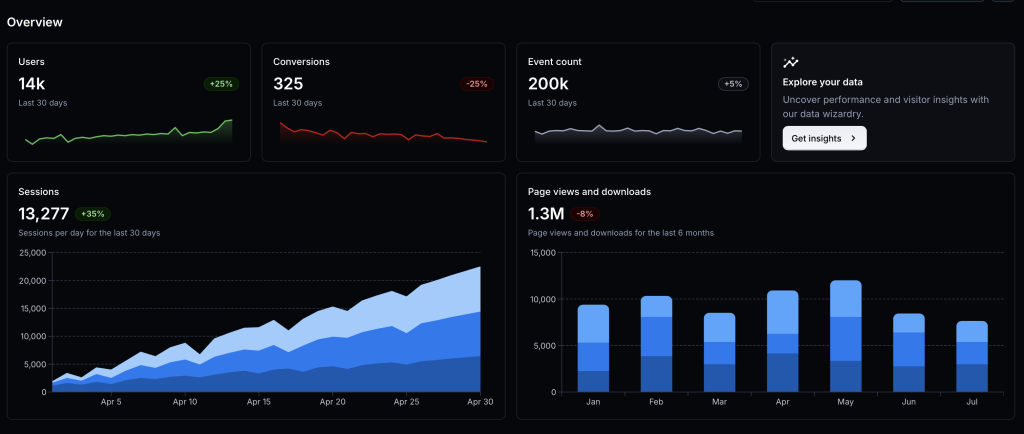
For now we need the cards for:
- Accounts in place of Users with the active count below. We will add a data table for historical trends and a graph below it in the future.
Clicking on the user count in the account card should redirect the UX to load the Manage Customers page at /wp-admin/network/admin.php?page=customer_list - Payments in place of Conversions with the total payment amount below. This too will eventually have trends stored in a data table that we will create later.
AI Summary
Junie Pro Summary
Completed setup and implementation prep for the accounting dashboard work in myslp-dashboard, including running required start-revision on branch accounting.

• Implemented Stage 1 accounting UI scaffold: new Accounting admin page, React entrypoint, and overview metrics/cards with click-through to Manage Customers.

• Added new files: include/accounting/MySLP_Accounting.php, src/accounting/accounting.tsx, and src/accounting/block.json.

• Updated integration points in include/MySLP.php and constants/version metadata in myslp-dashboard.php and package.json.

• Validation status: lint checks for new files passed (only a non-blocking TS import style warning noted earlier), diff checks passed, and you confirmed npm install + npm run build succeeded locally with generated build/accounting/accounting.js and build/accounting/accounting.asset.php present.

• Environment note: Junie shell still lacks local php tooling and direct GitHub auth; you requested follow-up guidance on PAT-based auth after task completion.
Junie Release Notes
• Scope: No new product-code changes were made after the previously summarized accounting dashboard work in myslp-dashboard.
• Skills/Environment updates this session: Reloaded skills via Vendors/JetBrains/relink_skills.sh; available skills now include /wordpress-release-notes.
• Code impact since last implementation summary: None.
• Build/Test status: No additional build or test runs were performed after the earlier confirmed successful npm install and npm run build for myslp-dashboard.
Included Previously Completed Work (for continuity)
• Added Accounting admin page scaffold and React entry (include/accounting/MySLP_Accounting.php, src/accounting/accounting.tsx, src/accounting/block.json).
• Wired menu/render integration in include/MySLP.php and version bump artifacts from start-revision (myslp-dashboard.php, package.json).