Dynamic Site URL / Home URL

The SaaS platform uses internal processing hooks to auto-detect the hostname and update the WordPress data accordingly to change the site and home URL. This makes it easier to transfer the data set from production to staging and production. See the Creating A Development or Staging Database Copy post for more details on that process.

A fully qualified domain name (FQDN) example would be ‘dashboard.storelocatorplus.com’.
A uniform resource locator (URL) example would be ‘https://dashboard.storelocatorplus.com’.

Places site URL data is stored

Database Tables

  • wp_blogs
  • wp_options / wp_<site#>_options
    • option_name: siteurl set to the URL
    • option_name: home set to the URL
    • option_name: myslp_dashboard_theme_options , option_value array key ‘dashboard_site’ set to the URL
  • wp_site
    • record id: 1, domain column set to FQDN

Environment Variables

  • WP_HOME, value URL
  • WP_HOSTURL , value FQDN
  • WP_SITEURL, value URL

Dynamic URL Management

The SaaS platform uses the sunrise.php early-loading PHP code to set the domain from the web server provided $_SERVER[‘HTTP_HOST’]. It leverages the WordPress : home_url filter to set the URL for the site impacting WordPress functions such as get_rest_url() and home_url() among a dozen others.

The sunrise.php file will change home_url, site_url, and admin_url dynamically via WordPress filters.

Via MySLP Dashboard

\MySLP_Addon::updateUserBlogDomain()

Runs on the dashboard hook to WordPress : init

  • \MySLP_Addon::updateUserBlogDomain()
    • \MySLP_Addon::performUserBlogUpdates()
      • \MySLP_Addon::change_blog_urls_if_needed()

This will update the wp_<site#>_options entries for siteurl and home.

Via MySLP Dashboard Theme

The MySLP Dashboard theme contains some default URLs that are used to create links, including logout, recover password, etc. These options are stored in the wp_options table in the myslp_dashboard_theme_options option key under a subkey in option_value named dashboard_site.

User Profile (MySLP_User class)

Account Creation

\MySLP_DSRA::add_account()

Calls \MySLP_Recurring_Payments::add_payment_data()

Params include the user_id and the new payment data array:

Array
(
    [customer_details] => Array
        (
            [id] => cus_RcHfOPMYNHRgo7
            [object] => customer
            [address] => 
            [balance] => 0
            [created] => 1737310780
            [currency] => 
            [default_source] => 
            [delinquent] => 
            [description] => 
            [discount] => 
            [email] => test14@lancecleveland.com
            [invoice_prefix] => 2FDC81BB
            [invoice_settings] => Array
                (
                    [custom_fields] => 
                    [default_payment_method] => 
                    [footer] => 
                    [rendering_options] => 
                )

            [livemode] => 
            [metadata] => Array
                (
                )

            [name] => Lance Cleveland
            [next_invoice_sequence] => 1
            [phone] => 
            [preferred_locales] => Array
                (
                )

            [shipping] => 
            [tax_exempt] => none
            [test_clock] => 
        )

    [latest_response_code] => 200
    [coupon_code] => 
    [PROCESSOR] => stripe
    [PROFILEID] => sub_1Qj360BvHKfBw2LG0LkOaHbg
    [STATUS] => active
    [PROFILESTARTDATE] => 19 January 2025 18:19:40
    [NEXTBILLINGDATE] => 19 February 2025 18:19:40
    [LASTPAYMENTDATE] => 19 January 2025 18:19:40
    [LASTPAYMENTAMT] => 35
    [DESC] => Professional plan billed $35.00 per month
    [PLAN] => Professional
    [AMT] => 35
    [PERIOD] => month
    [IS_GOOD] => 1
    [status] => succeeded
    [referring_site] => 
)

Subscription Creation

\stripe\MySLP_Stripe_Payments::create_subscription()

Creates a Stripe Customer.
Creates a Stripe Subscription.

Returns a subscription data array

Array
(
    [customer_details] => Array
        (
            [id] => cus_RcHfOPMYNHRgo7
            [object] => customer
            [address] => 
            [balance] => 0
            [created] => 1737310780
            [currency] => 
            [default_source] => 
            [delinquent] => 
            [description] => 
            [discount] => 
            [email] => test14@lancecleveland.com
            [invoice_prefix] => 2FDC81BB
            [invoice_settings] => Array
                (
                    [custom_fields] => 
                    [default_payment_method] => 
                    [footer] => 
                    [rendering_options] => 
                )

            [livemode] => 
            [metadata] => Array
                (
                )

            [name] => Lance Cleveland
            [next_invoice_sequence] => 1
            [phone] => 
            [preferred_locales] => Array
                (
                )

            [shipping] => 
            [tax_exempt] => none
            [test_clock] => 
        )

    [latest_response_code] => 200
    [coupon_code] => 
    [PROCESSOR] => stripe
    [PROFILEID] => sub_1Qj360BvHKfBw2LG0LkOaHbg
    [STATUS] => active
    [PROFILESTARTDATE] => 19 January 2025 18:19:40
    [NEXTBILLINGDATE] => 19 February 2025 18:19:40
    [LASTPAYMENTDATE] => 19 January 2025 18:19:40
    [LASTPAYMENTAMT] => 35
    [DESC] => Professional plan billed $35.00 per month
    [PLAN] => Professional
    [AMT] => 35
    [PERIOD] => month
    [IS_GOOD] => 1
    [status] => succeeded
)

Subscription Details

Map Views

These are coming from $myslp->User->mapview_count.

This is coming from \MySLP_User::mapview_count which is managed with magic method setters and getters. The data is stored in the user_meta object within \MySLP_User in a key names “mapview_count”.

Incrementing Map View Counts

This count is updated whenever \MySLP_REST_API::get_map_options() is called (theoretically/assumed to be whenever the map is rendered).

Resetting Map View Count

This is reset to 0 via \myslp_extend_plan() within the myslp-dashboard-helpers module.

Called By
  • \MySLP_Dashboard_Controller::check_subscription()
    Runs when a subscription status is checked, has expired, and is renewed automatically.
    • \myslp_extend_plan()
  • \MySLP_Recurring_Payments::initialize()
    ONLY if payment type is PayPal…
    • \MySLP_Recurring_Payments::get_paypal_checkout_details()
      • \myslp_extend_plan()
  • WPSLP Hook personal_options_update or WPSLP Hook : edit_user_profile_update
    • \MySLP_Customer_Maintenance::update_myslp_profile_management()
      • \myslp_extend_plan()

Payment Info : \MySLP_User::recurring_payments

Your Sites

These are coming from the user meta “user_subscription_status” key as a subarray named “referer_urls”.

\MySLP_User::log_referer()

This adds to the list of referring URLs any time a map URL is requested.

If you look through the documentation (or code) for the slp_rest_geocode_invalid_referer hook, you will see that this is only called when running a geocoding request.

This means that up to the current 2501.XX.YY release of MySLP, the list of sites only shows sites where a geocoding request was called from. This is NOT necessarily all the sites that have requested that a map be displayed.

Used By

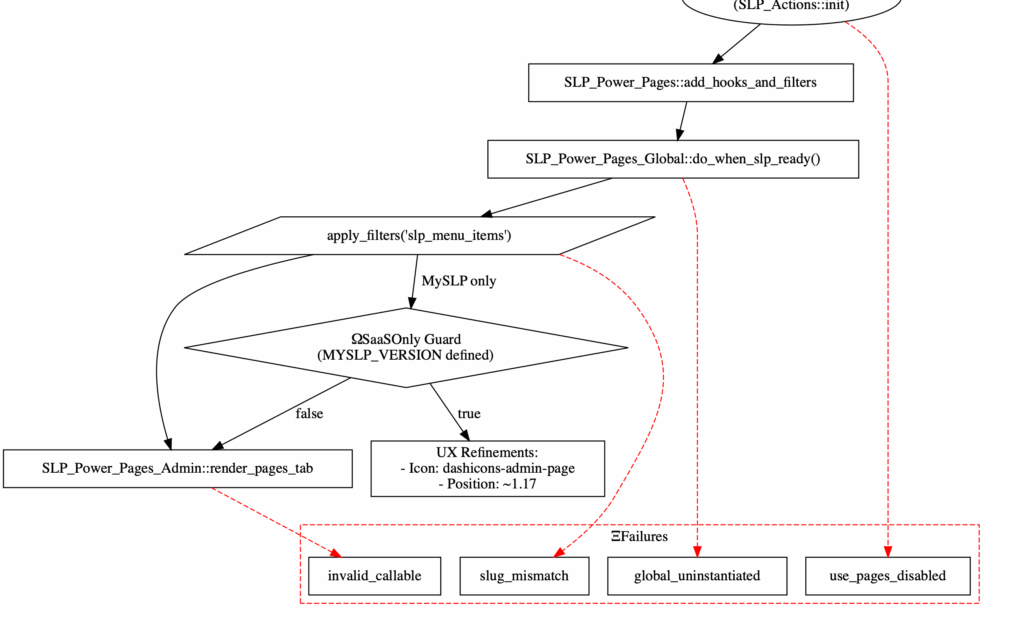
WordPress / SaaS Menu Ordering

WordPress

add_menu_page()


add_menu_page( 
string $page_title, 
string $menu_title, 
string $capability, 
string $menu_slug, 
callable $callback = ”, 
string $icon_url = ”, 
int|float $position = null 
): string
WordPress Default Admin Menu Positions
StandardNetwork Admin
2 – Dashboard2 – Dashboard
4 – Separator4 – Separator
5 – Posts5 – Sites
10 – Media10 – Users
15 – Links15 – Themes
20 – Pages20 – Plugins
25 – Comments25 – Settings
30 – Updates
59 – Separator
60 – Appearance
65 – Plugins
70 – Users
75 – Tools
80 – Settings
99 – Separator99 – Separator

add_submenu_page()

SaaS Menu Positions

Standard / UserNetwork Admin
1.10 – MySLP
myslp-dashboard
1.10 – Manage
MYSLP_MANAGE_MENU_SLUG
‘myslp-manage-menu’

10 – Customers
30 – History Log
50 – Cron : System
51 – Cron : User
80 – Database
70 – Addressess
1.20 – Store Locator Plus®
csl-slplus
1.30 – Config
MYSLP_CONFIG_MENU_SLUG
‘myslp-config-menu’

10 – Plans
15 – Plan Limits
20 – Plugins
25 – Email Settings
30 – Payments
70 – System Settings
80- Cache
2 – Dashboard2 – Dashboard
4 – Separator4 – Separator
5 – Posts5 – Sites
10 – Media10 – Users
15 – Links15 – Themes
20 – Pages20 – Plugins
25 – Comments25 – Settings
30 – Updates
59 – Separator
60 – Appearance
65 – Plugins
70 – Users
75 – Tools
80 – Settings
99 – Separator99 – Separator

User Selected Locator Style Not Highlighted

Problem

On staging the user selected styles are not highlighted.

For example , Feeding America San Diego —
On production the “Feeding America” style is highlighted.
On staging NONE are highlighted.

Reproduction

  • Login as a user , or switch to a user from a SA account.
  • Go to menu item Store Locator Plus | Settings
  • Click “View” tab

The user’s selected style should appear – “Feeding America” for the *_feedingsandiego* map for instance. It is not highlighted as selected.

Dev Notes

related architecture notes about style

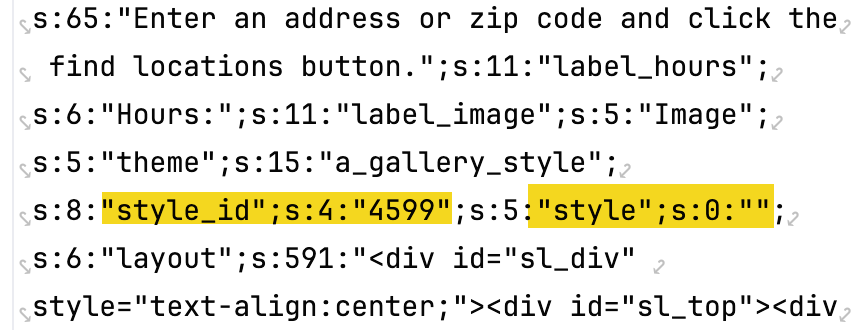
Production data for FA SD from options_nojs[]…

options_nojs[‘style_id’] is set to 4599 = the post ID for the style we have selected
options_nojs[‘style’] is set to “” = empty string

Somehow production is using the style_id NOT the style name. A better design, but staging is not tracking that for some reason.


options_nojs[‘style_id’]

The ‘style_id’ Smart Option is a hidden type on the Settings | View page.
It fires the JavaScript “change_style_id()” when the value changes.

This is setup via \SLP_SmartOptions::view_appearance()


\MySLP_Customer_Management->fix_active_style_css()

This method uses the options_nojs[‘style_id’] when it loops over all users and set the active_style_css. It uses the \SLP_Style_Manager->apply_style( $style_id , ‘active_style_css’ ) to set the value, then saves it.

This is called from the Admin UI via a Super Admin on menu MySLP | Manage Customers and clicking “Fix Active Style CSS” via the Customers section.

Notes

On the develop database (outdated) the ‘style’ setting is “” (like production) but the ‘style_id’ is set to 0 (does not match production, on production it is something like 4599 — the post id for the “Feeding America” style).

This indicates the develop database is out of sync , as happens during development and testing.

As such the production database definitely needs to be copied to develop to re-test this update and make sure it retains existing customer settings and renders properly. This MAY need to happen on staging as well.

Development Database Updated, Problem Persisted

Turns out the SLP Smart Options were being loaded via \SLP_SmartOptions::initialize_after_plugins_loaded() which is called from…

  • SLP_SmartOptions.php:1515, SLP_SmartOptions->initialize_after_plugins_loaded()
    SLPlus.php:386, SLPlus->initialize_after_plugins_loaded()

    WordPress :: plugins_loaded

This is BEFORE the multisite user is logged in, which loads the smart options prematurely (from the main site) and thus is wrong with the current underlying platform (WP 6.4.X, PHP 8, MySQL 8).

Resolution

The options_nojs[‘style_id’] seems to hold the actual post ID of the selected style.
For some reason on production options_nojs[‘style’] is empty indicating this method of saving the locator style is partly deprecated in the codebase.

For the 2411.XX.YY releases, starting with SLP 2411.19.01 the code now uses the style_id to determine which locator style is the active one when rendering the vision list.

This required a new is_selected() method in the \SLP_Settings_card_list class which is overridden in the extended \SLP_Settings_style_vision_list class. In \SLP_Settings_style_vision_list it compares the options_nojs[‘style_id’] against the post-id for each locator style listed, and if they match returns true.

This seems to address the issue on local develop box.

This did NOT fix the issue — see notes about Smart Options being loaded prematurely above.

Had to create a new method – \SLP_SmartOptions::slp_init_complete() that fires after the WordPress :: init hook and load the user options then.

revised in SLP version: 2411.21.01

Recap

The code that worked for years to load a users settings (talking multisite i.e. SaaS specifically) has been firing off too early.

I have no idea WHEN this started happening, but probably when the SaaS was upgraded to run on WordPress 6.0 (18 months ago) — at least partially.

WordPress 6.4.X changed when users are activated in their startup cycle, it is much later than before. Always.

The impact –

TONS (all) of user settings on staging are loading from the main site (site #1) instead of their own site.

SOME user settings on production are likely doing the same. No idea why not ALL users, but my guess is WordPress 6.0 was a partial change. 6.4 finished that change (it is undocumented as far as I can tell).

The update –

SLP 2411.21.01 which should be on staging soon should address that problem.

All of the SLP options (user settings) are now loaded later, after WordPress 6.4.5 finished logging the user in.

This should resolve a lot of oddities we are seeing in testing with user settings.

Update : 2025.01.06 (Jan 6th)

It does not look like the admin-settings-tab.js file is being loaded in the new SaaS interface, likely due to changing of the menu position which changes the WordPress hook name for the page.

This is very fragile.

The new hook name is toplevel_page_slp_experience

The scripts are enqueued from a WP hook that calls

Related

See saving/changing style id.

Categories Bug

Reproduce

  • Login as Super Admin (SA)
  • menu item : MySLP / Customers
  • switch to <???>
  • menu item: SLP / Categories

Report

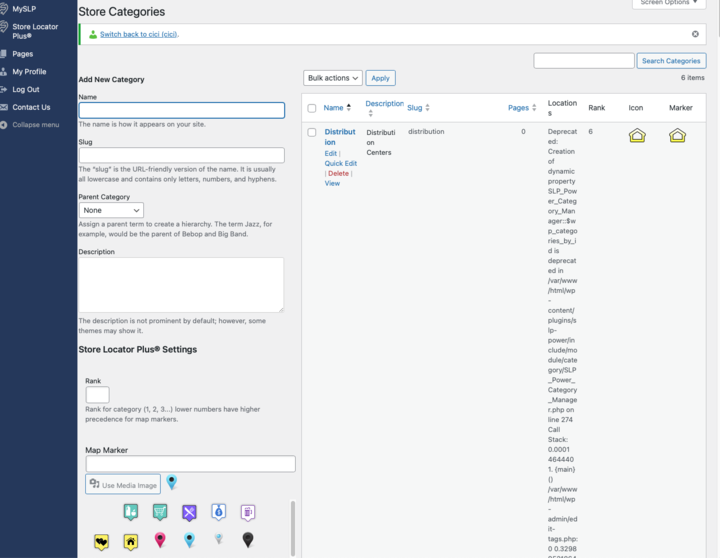
See screen shot as how it shows in Staging , on the Categories page,

a bunch of script under locations but only the first one Named Distribution shows the script

[19-Nov-2024 15:11:30 UTC] 
PHP Deprecated:  Creation of dynamic property SLP_Power_Category_Manager::$wp_categories_by_id is deprecated 
in /var/www/html/wp-content/
plugins/slp-power/include/module/category/SLP_Power_Category_Manager.php 
on line 274

MySLP_REST_API Ajax Not Initialized

Generate Embed is not populating the embed map as the REST API call is generating an internal error.

The MySLP_REST_API is expecting the SLP AJAX property to be set and it is null.

Related Call Stack

class.myslp.rest.api.php:438, MySLP_REST_API->get_options()
class.myslp.rest.api.php:279, MySLP_REST_API->get_map_options()
MySLP.php:257, MySLP->rest_dispatch_request_filter()
class-wp-hook.php:324, WP_Hook->apply_filters()
plugin.php:205, apply_filters()
class-wp-rest-server.php:1187, WP_REST_Server->respond_to_request()
class-wp-rest-server.php:1041, WP_REST_Server->dispatch()
class-wp-rest-server.php:431, WP_REST_Server->serve_request()
rest-api.php:424, rest_api_loaded()
class-wp-hook.php:324, WP_Hook->apply_filters()
class-wp-hook.php:348, WP_Hook->do_action()
plugin.php:565, do_action_ref_array()
class-wp.php:418, WP->parse_request()
class-wp.php:813, WP->main()
functions.php:1336, wp()
wp-blog-header.php:16, require()
index.php:17, {main}()

Dev Notes

Stack tracing…

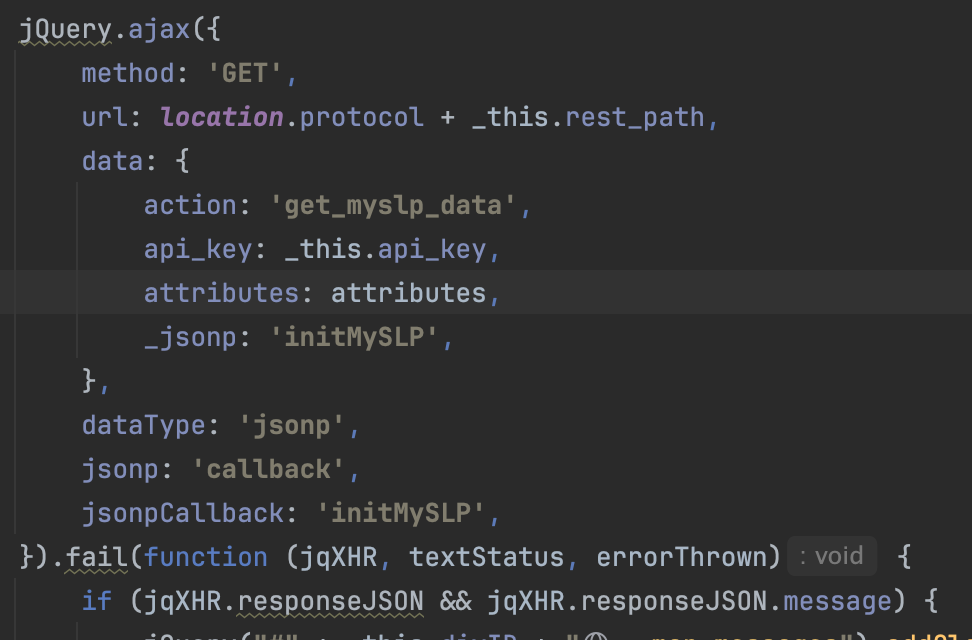
  1. On the initial call the store-locator-plus.php MUP is called first an is loading with the initMySLP _jsonp call from the embed script.
  2. the SLPlus::initialize_after_plugins_loaded() is being called.
    • DOING_AJAX is not set, so createobject_AJAX() is not called.
  3. MySLP_REST_API->get_options() is called, which expects SLP->AJAX to be set, but it is not.

The front-end/locations.js is using jQuery.ajax() but it is calling a REST API url, not an AJAX listener endpoint… from the locations.js call…

Update the MySLP_REST_API->get_options() method to use SLP_Ajax::get_instance() to ensure that object is instantiated before use when not doing an AJAX call.

Use the main MySLP::getUserBlogId() to fetch blog IDs.
Use SLP_Ajax::get_instance() versus the uninitialized slplus->AjaxHandler to get the SLP AJAX instance.

slplus->AJAX (slplus->AJAX_Handler) was not initialized because the call is a REST call not an AJAX call.

SaaS Returning Wrong Location List

Users are seeing the wrong locations when logged in, seeing the main super admin locations.

Reproduction

  • Login as a super admin (CiCi?)
  • Bring up the customer list and switch to any customer (bhinson)

The default location list is not correct. For bhinson it shows 2 locations that belong to super admin. bhinson has 0 locations.

Testing Update : 2024.11.14

  • Correct locations show up on MySLP menu, but NOT the SLP menu.

Dev Notes

SaaS is using a custom REST endpoint to find locations: …/myslp/v2/locations

This is running a custom interface in the MySLP Dashboard defined wp-content/plugins/myslp-dashboard/include/class.myslp.rest.api.php which fetches locations from include/location/MySLP_Location.php get_locations();

This leverages wp-content/plugins/store-locator-plus/include/module/location/SLP_Location_Utilities.php to provide the location data interface.

In MySLP_Locations the slptbl is set in __construct() which may be too early.
it is coming back as wp_store_locator which is incorrect
It appears switch_to_blog() has not yet been called.
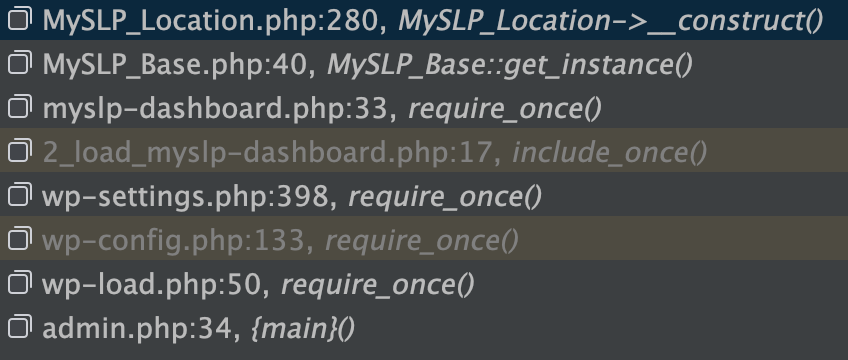
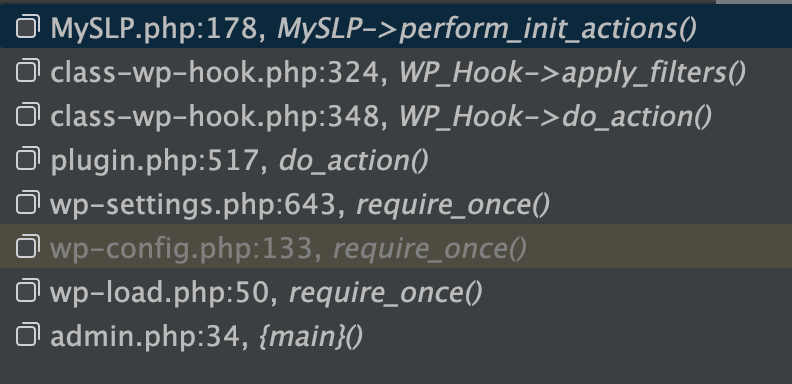
The call stack at this point..

switch_to_blog is called in MySLP class via perform_init_actions()
which is attached to the WP hook ‘init’ with no order of precedence set

SLP not returning proper locations

The SLP Location Manager is rendered via SLP_Admin_Locations::display_manage_locations_table()
./wp-content/plugins/store-locator-plus/include/module/admin/SLP_Admin_Locations.php

It is pulling locations vis the $slplus->database property which is an instantiation of SLP_Data::
./wp-content/plugins/store-locator-plus/include/module/data/SLP_Data.php

SLP_Data::initialize is setting the SLP_Data::from_slp_table property via SLP_Data::set_database_meta()
This pulls from SLP_Data::db which is an instantiation of the WordPress wpdb class. The table is set by adding wpdb->prefix to the ‘store_locator’ fixed string.

wpdb->prefix is not pulling the proper user prefix , likely due to switch_to_blog() not being called yet.

Call Sequence

  • store-locator-plus.php is loaded…
  • slp_setup_environment() is called…
  • SLPLUS::initialize() is executed
    • $this->database = new SLP_Data()
  • SLP_Actions::initialize()
    • add_action( ‘init’, array( $this, ‘init’ ), 11 );
  • SLP_Actions::init() via WP init hook
  • MySLP::perform_init_actions()

Resolution

MySLP

The main MySLP dashboard loader (wp-content/plugins/myslp-dashboard/myslp-dashboard.php) was initializing the MySLP_Location class which immediate set the properties for SLP table and Extendo table names.

This needed to be deferred until after the MySLP::perform_init_actions() was called.

Added a new method in MySLP_Location::perform_init_actions() that sets the slp and extendo class properties. It is called from within the MySLP::perform_init_actions() to ensure proper timing on the reading of those table names.

SLP

Initialize the $slplus->data (SLP_Data) object AFTER the user login, performing the setup in the init action hook within SLP_Actions.

Payment Method undefined In SysAdmin View Profile

Deprecated: str_replace(): Passing null to parameter #3 ($subject) of type array|string is deprecated in /var/www/html/wp-content/plugins/myslp-customer-maintenance/include/MySLP_SysAdmin_View_Profile.php on line 275

Reproduction

  • Login as SA
  • List Customers
  • Choose a customer , highlight the row and click “view profile” under the menu.

When the page renders the debug.log entry will show the message above.

Resolution

Stop Gap

A stop-gap measure is in place to default to text “stripe”, but we need to find out why the myslp->User object does not have a payment method set.

$payment_method = $myslp->User->payment_method ?? 'stripe';

Various PHP 8 Errors

Related To Blog ID Not Set

  • [08-Nov-2024 20:28:43 UTC] PHP Warning: Undefined variable $user_blog in /var/www/html/wp-content/plugins/myslp-customer-maintenance/include/MySLP_SysAdmin_View_Profile.php on line 387
  • [08-Nov-2024 20:28:43 UTC] PHP Warning: Attempt to read property “blog_id” on null in /var/www/html/wp-content/plugins/myslp-customer-maintenance/include/MySLP_SysAdmin_View_Profile.php on line 387
  • [08-Nov-2024 20:28:43 UTC] PHP Warning: Undefined variable $user_blog in /var/www/html/wp-content/plugins/myslp-customer-maintenance/include/MySLP_SysAdmin_View_Profile.php on line 391
  • [08-Nov-2024 20:28:43 UTC] PHP Warning: Attempt to read property “path” on null in /var/www/html/wp-content/plugins/myslp-customer-maintenance/include/MySLP_SysAdmin_View_Profile.php on line 391
  • [08-Nov-2024 20:28:43 UTC] PHP Warning: Undefined variable $user_blog in /var/www/html/wp-content/plugins/myslp-customer-maintenance/include/MySLP_SysAdmin_View_Profile.php on line 393
  • [08-Nov-2024 20:28:43 UTC] PHP Warning: Attempt to read property “path” on null in /var/www/html/wp-content/plugins/myslp-customer-maintenance/include/MySLP_SysAdmin_View_Profile.php on line 393
  • [08-Nov-2024 20:41:38 UTC] PHP Warning: Attempt to read property “path” on int in /var/www/html/wp-content/plugins/myslp-customer-maintenance/include/MySLP_SysAdmin_View_Profile.php on line 409

Invalid submenu call

  • [08-Nov-2024 20:28:43 UTC] PHP Deprecated: strip_tags(): Passing null to parameter #1 ($string) of type string is deprecated in /var/www/html/wp-admin/admin-header.php on line 36

Reproduction

  • Login as SA
  • Customers | All Users
  • Search CiCi
  • Hover and click profile
  • errors are in the debug.log

Resolution

Related To Blog ID Not Set

These errors are all related to an issue in the MySLP Customer Maintenance plugin where the $user_blog var was not set to a proper WP_Site object when the user was an SA.

Added a line to fetch WP_Site based on the $myslp->User->blog_id in those cases.

Invalid Submenu Call

This strip_tags() error is coming from WP core admin functions. Turns out the admin-header rendering expected a call to add_submenu_page to actually name a menu in the first param, not pass ” as a string. Apparently you need to attach all submenus to a parent menu of some kind.


Attached the View Profile admin page to the ‘users.php’ (Customers) menu as a submenu.

ECS Cluster for Staging

Cluster Tech Eggs by ChatGPT

Store Locator Plus® is being migrated to an Elastic Container Service (ECS) cluster that is expected to be active Q4 2024. This cluster is to be automatically updated via the myslp_aws_ecs_kit git repo which triggers a CodePipeline build that deploys updates to the cluster.

ECS Cluster

The ECS cluster that is accessed by the pipeline is myslp-ecs-cluster.
arn:aws:ecs:us-east-1:744590032041:cluster/myslp-staging-cluster

This cluster is designed to run EC2 instances that host the SLP SaaS containers.

Infrastructure

The instances are managed by the following Auto Scaling Group (ASG):

Infra-ECS-Cluster-myslp-staging-cluster-a97a9fa8-ECSAutoScalingGroup-zoFBNbZvjeFk

arn:aws:autoscaling:us-east-1:744590032041:autoScalingGroup:e0255cb5-e03b-4f35-adb4-398b947028b8:autoScalingGroupName/Infra-ECS-Cluster-myslp-staging-cluster-a97a9fa8-ECSAutoScalingGroup-zoFBNbZvjeFk

This provides the compute capacity (EC2 instances here) to run the container service that defined services will use to run tasks.

Auto Scaling Group Details

Should have a minimum capacity of 1.

The group uses the following launch template: lt-07e8f4ebedbe1c2ff

That launch template runs image ID: ami-05a490ca1a643e9ea

It runs on an “gravitron compute” instance which is ARM64 compatible. Currently it runs on a c6g.xlarge.

The system tags help associate any resources launched by this ASG with the ECS cluster. The special sauce is in the launch template inline scripts, however.

Launch Template Details

The following “advanced details” in the launch template seem to be what registers any EC2 instances that this ASG fires up with the ECS Cluster:

User data contains scripts or other things that run as soon as the container comes online.

The AMI likely has AWS libraries loaded, one of which is an ECS tool that works with the AWS fabric and reads the /etc/ecs/ecs.config file to figure out how to connect a resource to the cluster on boot or on a daemon service refresh.

Tasks

These are the ECS equivalent of Docker Composer files with added information about what type of container to create.

The task definition on AWS Console for the configuration below is named slp_saas_staging:3 (as of Oct 31 2024). In addition to the environment variables noted below, an addition environment variable is added when creating the task definitions via the console to set the WORDPRESS_DB_PASSWORD environment variable. This is set for the myslp_dashboard database (baked into the ECR image that is built with CodePipeline via the WORDPRESS_DB_NAME environment variable) with a user of myslp_genesis (also per the ECR image in the WORDPRESS_DB_USER environment variable).

From the myslp_aws_ecs_kit repo AWS/ECS/tasks/slp_saas_staging.json

{
"family": "slp_saas_staging",
"requiresCompatibilities": ["EC2"],
"runtimePlatform": {
"operatingSystemFamily": "LINUX",
"cpuArchitecture": "ARM64"
},
"networkMode": "awsvpc",
"cpu": "3 vCPU",
"memory": "6 GB",
"executionRoleArn": "arn:aws:iam::744590032041:role/ecsTaskExecutionRole",
"containerDefinitions": [
{
"name": "slp_saas",
"essential": true,
"image": "744590032041.dkr.ecr.us-east-1.amazonaws.com/myslp2024-aarch64:staging",
"portMappings": [
{
"containerPort": 80,
"hostPort": 80
}
],
"environment" : [
{
"name" : "WP_HOSTURL",
"value" : "staging.storelocatorplus.com"
},
{
"name" : "WP_HOME",
"value" : "https://staging.storelocatorplus.com/"
},
{
"name" : "WP_SITEURL",
"value" : "https://staging.storelocatorplus.com/"
},
{
"name" : "WORDPRESS_DB_HOST",
"value" : "slp-staging-2023-aug-cluster-cluster.cluster-c0glwpjjxt7q.us-east-1.rds.amazonaws.com"
},
{
"name" : "WORDPRESS_DEBUG",
"value" : "true"
},
{
"name" : "WORDPRESS_CONFIG_EXTRA",
"value": "define( 'WP_DEBUG_LOG', '/var/www/html/debug.log');define( 'WP_DEBUG_DISPLAY', true);define( 'WP_DEBUG_SCRIPT', true);@ini_set('display_errors',1);define('SUNRISE', true);defined('DOMAIN_CURRENT_SITE') || define('DOMAIN_CURRENT_SITE', getenv_docker('WP_HOSTURL', 'staging.storelocatorplus.com') );define('WP_ALLOW_MULTISITE', true );define('MULTISITE', true);define('SUBDOMAIN_INSTALL', false);define('PATH_CURRENT_SITE', '/');define('SITE_ID_CURRENT_SITE', 1);define('BLOG_ID_CURRENT_SITE', 1);if ( ! defined( 'WPMU_PLUGIN_DIR' ) ){define('WPMU_PLUGIN_DIR', dirname( __FILE__ ) . '/wp-content/mu-plugins' );}"
}
]
}
]
}

Services

Services run various parts of the application. For SLP in the initial Q4 2024 state there is only one service – the SLP SaaS web service.

The staging service that runs the SaaS staging task is at:
arn:aws:ecs:us-east-1:744590032041:service/myslp-staging-cluster/myslp-staging-service

The service is set to run the slp_saas_staging task in daemon mode. That means it will run one task per container.

The service definition sets up the containers.
Container Image (on ECR): 744590032041.dkr.ecr.us-east-1.amazonaws.com/myslp2024-aarch64:staging

It also sets up the environment variables passed into the container.

Updating Staging SaaS Server

This process is for updating the staging Store Locator Plus® SaaS server running on an ECS cluster after performing code updates.

These processes require a locally installed copy of the MySLP AWS ECS Kit repository which can be found at ssh://git-codecommit.us-east-1.amazonaws.com/v1/repos/myslp_aws_ecs_kit.

Edit your code or deployment kit files first. This can include WordPress plugins or themes, the Docker composer or image builder commands, helper scripts, or various configuration files used to manage and deploy the Store Locator Plus® SaaS container images.

Once your updates are ready, make sure the WordPress stack is up-to-date by updating the submodule links, then commit all of your updates to the MySLP AWS ECS Kit repository on the proper branch. There are AWS CodePipeline services running that will monitor the repository for changes, build any images as needed with ECR and deploy them via the Elastic Container Service if possible. Details on the processes are noted below.

Update The Submodules

From the MySLP AWS ECS Kit git project root:

./tools/create_mustuseplugins_stubs.sh

Commit The Code Updates To The Repo

Commit any changes to the MySLP AWS ECS Kit repository.

When you push the changes from your local develop, staging, or production branch an AWS listener service will detect the code changes and run Code Pipeline tied to services such as CodeBuild and ECS to deploy the final Store Locator Plus® SaaS container in the AWS cloud.

Commits to local branches will not trigger a change in the AWS deployments.

Commits to any branch not specifically named develop, staging, or production will not trigger changes in the AWS cloud deployments.

CodePipeline Notes

The CodePipeline that is configured to deploy the staging containers is named myslp-webserver-staging-pipeline.

Stage: Source

The pipeline monitors the staging branch on the AWS CodeCommit repo for the MySLP AWS ECS Kit project at ssh://git-codecommit.us-east-1.amazonaws.com/v1/repos/myslp_aws_ecs_kit

Stage: Build

The source will be read from the URL above and a series of commands will be executed in the cloud to create an container image. This image is stored in the AWS Elastic Container Registry as a private image.

The Store Locator Plus® SaaS (internal name: MySLP) container images are stored in the 744590032041.dkr.ecr.us-east-1.amazonaws.com/myslp2024-aarch64 docker image repository.

Staging branches will tag the latest build with the :staging tag.

Stage: Deploy

The deploy stage will execute if the build stage completes successfully. This stage will attempt to take the latest myslp2024-aarch64:staging ECR image and launch an active container in the AWS Elastic Container Service.

The deploy stage will attempt to launch a running container in the myslp-staging-cluster on the myslp-staging-service service within that cluster.

Manual Container Image Update

Build The Container Image and Store On AWS ECR

aws sso login --profile lance.cleveland

aws ecr get-login-password --region us-east-1 --profile lance.cleveland | docker login --username AWS --password-stdin 744590032041.dkr.ecr.us-east-1.amazonaws.com/myslp2024-aarch64

cd ./Docker/Images

docker build --platform=linux/arm64 -t 744590032041.dkr.ecr.us-east-1.amazonaws.com/myslp2024-aarch64:staging .
docker push 744590032041.dkr.ecr.us-east-1.amazonaws.com/myslp2024-aarch64:staging