0 comments on “The Docker Directory Standard”

The Docker Directory Standard

Git repositories that support projects needing Docker images and containers should follow this directory standard. Any project that uses vendor tools or apps should store support data in a similar subdirectory structure. Notes here are relative to the Repository Root.

Docker Files

Composer

The Docker compose file should end up here:
./Vendors/Docker/Composers

This is for files the build and launch containers.

Images

This is for stuff that builds images used to launch custom containers.

The files that support building images should end up here:
./Vendors/Docker/Images
Dockerfile or Dockerfile-openclaw may live here.

Supporting files for building images go in these directories:
./Vendors/Docker/Images/Files
For files that are put in the SLP SaaS repo that support image building, public files.
This often contains subdirectories for files to copy from the host (stored in the SLP_SaaS repo) to the guest.
For example:
./apache/sites-avaiable/000-default.conf – for a Docker container with Apache websites
./php/docker-php-ext-redix.ini – for a Docker container with PHP and Redis support
./ssl/_wildcard.storelocatorplus.com+2.pem – for an SSL cert
Things in Files/* in this Docker folder are often copied via Dockerfile to build the image

./Vendors/Docker/Images/Secrets
It can contains supporting secret files that do not get commited to the repo.
For example: do-not-commit-codebuild-vars.env
This is for environment variables needed for Code Build on AWS with values set like AWS_DEFAULT_REGION=us-east-1
The README instructions would say something like “copy ./Images/Secrets-Examples/codebuild-vars.env to ./Images/Secrets/do-not-commit-codebuild-vars.env

SLP_SaaS_Docker_Directory_Standard.md

# SLP SaaS — Docker Directory Standard

This document captures the current **directory layout conventions** for Docker-related assets used with the **SLP SaaS** project, as described by Lance.

## Project roots (MBP)

- **SLP SaaS repo root**
  - `/Users/lancecleveland/phpStorm Projects/SLP_SaaS`

- **Testing area (under SLP_SaaS)**
  - `/Users/lancecleveland/phpStorm Projects/SLP_SaaS/Testing/`

- **myslp-cypress repo (local checkout)**
  - `/Users/lancecleveland/phpStorm Projects/SLP_SaaS/Testing/myslp-cypress`

## Canonical Docker directory structure (within myslp-cypress)

All Docker-related standards below are relative to:

- `/Users/lancecleveland/phpStorm Projects/SLP_SaaS/Testing/myslp-cypress/Vendors/Docker/`

### 1) Compose files

**Docker Compose files** should live here:

- `Vendors/Docker/Composers/`

Example (full path):

- `/Users/lancecleveland/phpStorm Projects/SLP_SaaS/Testing/myslp-cypress/Vendors/Docker/Composers`

Notes:
- This is the standard landing zone for any new compose setup (e.g., an E2E Eddie/OpenClaw + Cypress compose).

### 2) Image build definitions

**Files that support building images** should live here:

- `Vendors/Docker/Images/`

Example (full path):

- `/Users/lancecleveland/phpStorm Projects/SLP_SaaS/Testing/myslp-cypress/Vendors/Docker/Images`

Notes:
- Dockerfiles may live here, including variants like `Dockerfile` or `Dockerfile-openclaw`.

### 3) Public build-support files (committed)

**Supporting files used during image builds** (intended to be committed) should live here:

- `Vendors/Docker/Images/Files/`

Example (full path):

- `/Users/lancecleveland/phpStorm Projects/SLP_SaaS/Testing/myslp-cypress/Vendors/Docker/Images/Files`

Conventions:
- This directory often contains subdirectories that mirror container filesystem targets.
- Contents are typically copied into an image via `Dockerfile` using `COPY ...`.

Examples of typical contents:
- `./apache/sites-available/000-default.conf` — Apache site config
- `./php/docker-php-ext-redix.ini` — PHP extension/config file (example)
- `./ssl/_wildcard.storelocatorplus.com+2.pem` — SSL cert material (example)

### 4) Secrets (NOT committed)

**Supporting secret files** (not committed to the repo) should live here:

- `Vendors/Docker/Images/Secrets/`

Example (full path):

- `/Users/lancecleveland/phpStorm Projects/SLP_SaaS/Testing/myslp-cypress/Vendors/Docker/Images/Secrets`

Conventions:
- This may contain env var files or other sensitive build/runtime inputs.
- Example secret file:
  - `do-not-commit-codebuild-vars.env`

Example usage pattern to document in READMEs:
- “Copy `./Images/Secrets-Examples/codebuild-vars.env` to `./Images/Secrets/do-not-commit-codebuild-vars.env` and edit values (e.g., `AWS_DEFAULT_REGION=us-east-1`).”

### 5) Secrets examples (committed templates)

**Example secret files** (templates that *are* committed) should live here:

- `Vendors/Docker/Images/Secrets-Examples/`

Example (full path):

- `/Users/lancecleveland/phpStorm Projects/SLP_SaaS/Testing/myslp-cypress/Vendors/Docker/Images/Secrets-Examples`

Purpose:
- Provide safe-to-commit starter files that developers can copy into `Secrets/`.

## Recommended README conventions (optional)

When adding a new compose or image:
- Put the compose YAML in `Vendors/Docker/Composers/`.
- Put the Dockerfile(s) in `Vendors/Docker/Images/`.
- Put committed build inputs in `Vendors/Docker/Images/Files/`.
- Put local-only secrets in `Vendors/Docker/Images/Secrets/`.
- Put example secrets in `Vendors/Docker/Images/Secrets-Examples/`.

## Source

Captured from Lance Cleveland’s notes in Slack (2026-03-21).


Dynamic Site URL / Home URL

The SaaS platform uses internal processing hooks to auto-detect the hostname and update the WordPress data accordingly to change the site and home URL. This makes it easier to transfer the data set from production to staging and production. See the Creating A Development or Staging Database Copy post for more details on that process.

A fully qualified domain name (FQDN) example would be ‘dashboard.storelocatorplus.com’.
A uniform resource locator (URL) example would be ‘https://dashboard.storelocatorplus.com’.

Places site URL data is stored

Database Tables

  • wp_blogs
  • wp_options / wp_<site#>_options
    • option_name: siteurl set to the URL
    • option_name: home set to the URL
    • option_name: myslp_dashboard_theme_options , option_value array key ‘dashboard_site’ set to the URL
  • wp_site
    • record id: 1, domain column set to FQDN

Environment Variables

  • WP_HOME, value URL
  • WP_HOSTURL , value FQDN
  • WP_SITEURL, value URL

Dynamic URL Management

The SaaS platform uses the sunrise.php early-loading PHP code to set the domain from the web server provided $_SERVER[‘HTTP_HOST’]. It leverages the WordPress : home_url filter to set the URL for the site impacting WordPress functions such as get_rest_url() and home_url() among a dozen others.

The sunrise.php file will change home_url, site_url, and admin_url dynamically via WordPress filters.

Via MySLP Dashboard

\MySLP_Addon::updateUserBlogDomain()

Runs on the dashboard hook to WordPress : init

  • \MySLP_Addon::updateUserBlogDomain()
    • \MySLP_Addon::performUserBlogUpdates()
      • \MySLP_Addon::change_blog_urls_if_needed()

This will update the wp_<site#>_options entries for siteurl and home.

Via MySLP Dashboard Theme

The MySLP Dashboard theme contains some default URLs that are used to create links, including logout, recover password, etc. These options are stored in the wp_options table in the myslp_dashboard_theme_options option key under a subkey in option_value named dashboard_site.

ECS Cluster for Staging

Cluster Tech Eggs by ChatGPT

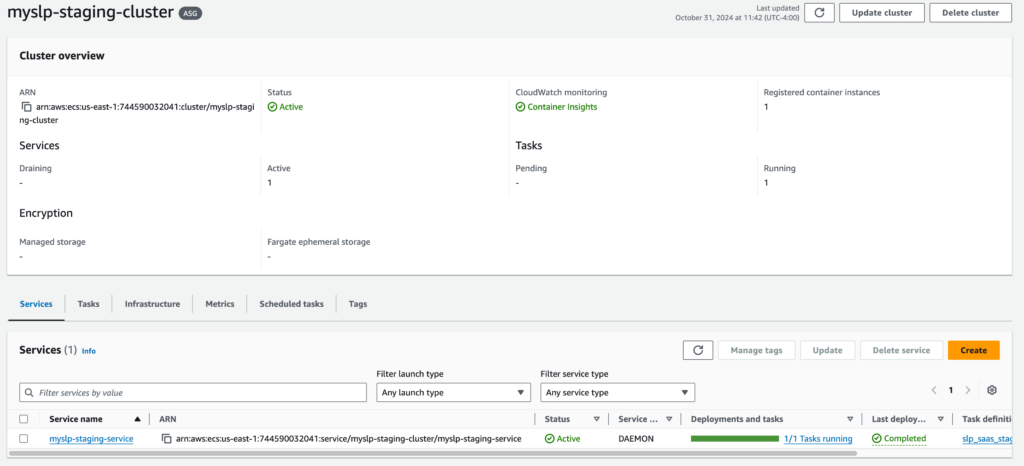
Store Locator Plus® is being migrated to an Elastic Container Service (ECS) cluster that is expected to be active Q4 2024. This cluster is to be automatically updated via the myslp_aws_ecs_kit git repo which triggers a CodePipeline build that deploys updates to the cluster.

ECS Cluster

The ECS cluster that is accessed by the pipeline is myslp-ecs-cluster.
arn:aws:ecs:us-east-1:744590032041:cluster/myslp-staging-cluster

This cluster is designed to run EC2 instances that host the SLP SaaS containers.

Infrastructure

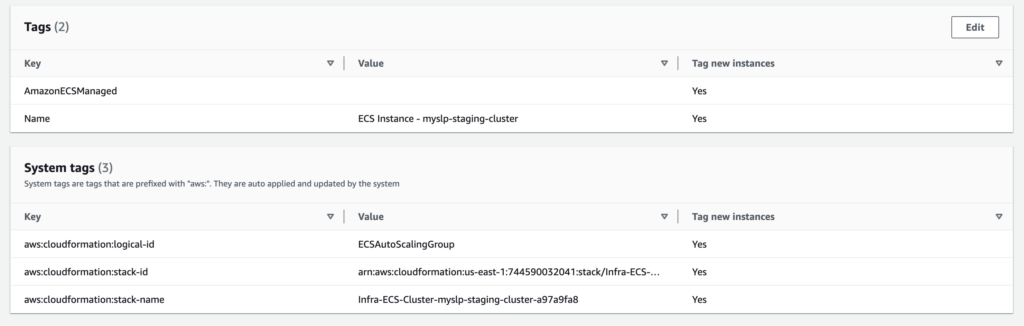
The instances are managed by the following Auto Scaling Group (ASG):

Infra-ECS-Cluster-myslp-staging-cluster-a97a9fa8-ECSAutoScalingGroup-zoFBNbZvjeFk

arn:aws:autoscaling:us-east-1:744590032041:autoScalingGroup:e0255cb5-e03b-4f35-adb4-398b947028b8:autoScalingGroupName/Infra-ECS-Cluster-myslp-staging-cluster-a97a9fa8-ECSAutoScalingGroup-zoFBNbZvjeFk

This provides the compute capacity (EC2 instances here) to run the container service that defined services will use to run tasks.

Auto Scaling Group Details

Should have a minimum capacity of 1.

The group uses the following launch template: lt-07e8f4ebedbe1c2ff

That launch template runs image ID: ami-05a490ca1a643e9ea

It runs on an “gravitron compute” instance which is ARM64 compatible. Currently it runs on a c6g.xlarge.

The system tags help associate any resources launched by this ASG with the ECS cluster. The special sauce is in the launch template inline scripts, however.

Launch Template Details

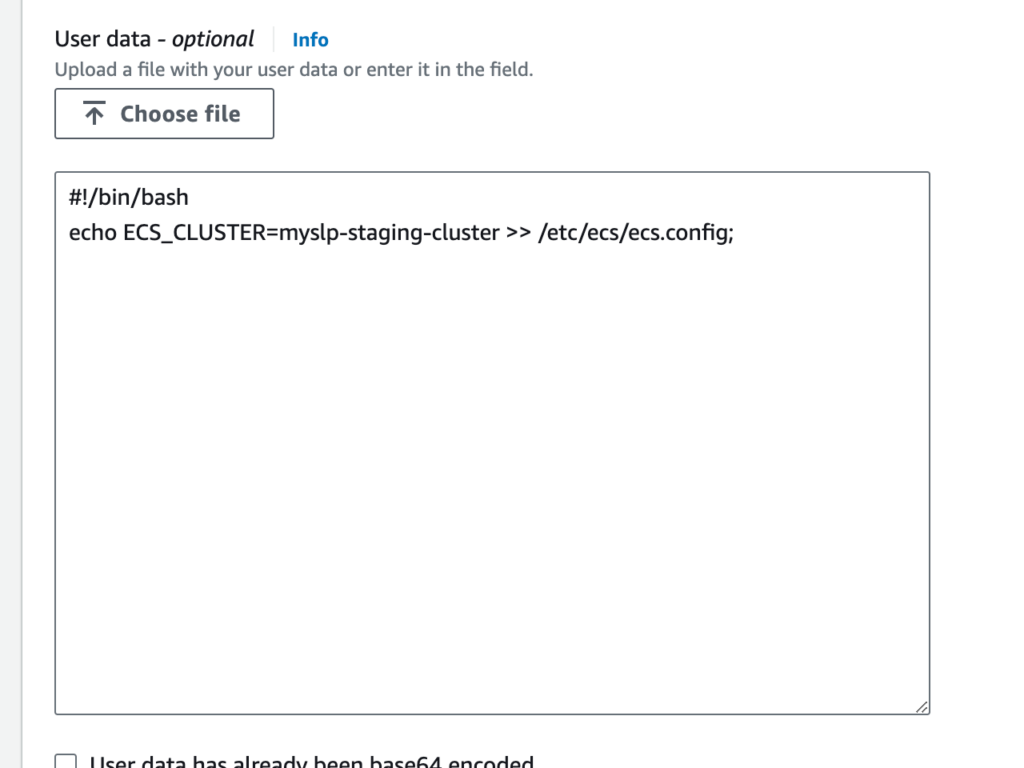
The following “advanced details” in the launch template seem to be what registers any EC2 instances that this ASG fires up with the ECS Cluster:

User data contains scripts or other things that run as soon as the container comes online.

The AMI likely has AWS libraries loaded, one of which is an ECS tool that works with the AWS fabric and reads the /etc/ecs/ecs.config file to figure out how to connect a resource to the cluster on boot or on a daemon service refresh.

Tasks

These are the ECS equivalent of Docker Composer files with added information about what type of container to create.

The task definition on AWS Console for the configuration below is named slp_saas_staging:3 (as of Oct 31 2024). In addition to the environment variables noted below, an addition environment variable is added when creating the task definitions via the console to set the WORDPRESS_DB_PASSWORD environment variable. This is set for the myslp_dashboard database (baked into the ECR image that is built with CodePipeline via the WORDPRESS_DB_NAME environment variable) with a user of myslp_genesis (also per the ECR image in the WORDPRESS_DB_USER environment variable).

From the myslp_aws_ecs_kit repo AWS/ECS/tasks/slp_saas_staging.json

{
"family": "slp_saas_staging",
"requiresCompatibilities": ["EC2"],
"runtimePlatform": {
"operatingSystemFamily": "LINUX",
"cpuArchitecture": "ARM64"
},
"networkMode": "awsvpc",
"cpu": "3 vCPU",
"memory": "6 GB",
"executionRoleArn": "arn:aws:iam::744590032041:role/ecsTaskExecutionRole",
"containerDefinitions": [
{
"name": "slp_saas",
"essential": true,
"image": "744590032041.dkr.ecr.us-east-1.amazonaws.com/myslp2024-aarch64:staging",
"portMappings": [
{
"containerPort": 80,
"hostPort": 80
}
],
"environment" : [
{
"name" : "WP_HOSTURL",
"value" : "staging.storelocatorplus.com"
},
{
"name" : "WP_HOME",
"value" : "https://staging.storelocatorplus.com/"
},
{
"name" : "WP_SITEURL",
"value" : "https://staging.storelocatorplus.com/"
},
{
"name" : "WORDPRESS_DB_HOST",
"value" : "slp-staging-2023-aug-cluster-cluster.cluster-c0glwpjjxt7q.us-east-1.rds.amazonaws.com"
},
{
"name" : "WORDPRESS_DEBUG",
"value" : "true"
},
{
"name" : "WORDPRESS_CONFIG_EXTRA",
"value": "define( 'WP_DEBUG_LOG', '/var/www/html/debug.log');define( 'WP_DEBUG_DISPLAY', true);define( 'WP_DEBUG_SCRIPT', true);@ini_set('display_errors',1);define('SUNRISE', true);defined('DOMAIN_CURRENT_SITE') || define('DOMAIN_CURRENT_SITE', getenv_docker('WP_HOSTURL', 'staging.storelocatorplus.com') );define('WP_ALLOW_MULTISITE', true );define('MULTISITE', true);define('SUBDOMAIN_INSTALL', false);define('PATH_CURRENT_SITE', '/');define('SITE_ID_CURRENT_SITE', 1);define('BLOG_ID_CURRENT_SITE', 1);if ( ! defined( 'WPMU_PLUGIN_DIR' ) ){define('WPMU_PLUGIN_DIR', dirname( __FILE__ ) . '/wp-content/mu-plugins' );}"
}
]
}
]
}

Services

Services run various parts of the application. For SLP in the initial Q4 2024 state there is only one service – the SLP SaaS web service.

The staging service that runs the SaaS staging task is at:
arn:aws:ecs:us-east-1:744590032041:service/myslp-staging-cluster/myslp-staging-service

The service is set to run the slp_saas_staging task in daemon mode. That means it will run one task per container.

The service definition sets up the containers.
Container Image (on ECR): 744590032041.dkr.ecr.us-east-1.amazonaws.com/myslp2024-aarch64:staging

It also sets up the environment variables passed into the container.