Git repositories that support projects needing Docker images and containers should follow this directory standard. Any project that uses vendor tools or apps should store support data in a similar subdirectory structure. Notes here are relative to the Repository Root.
Docker Files
Composer
The Docker compose file should end up here: ./Vendors/Docker/Composers
This is for files the build and launch containers.
Images
This is for stuff that builds images used to launch custom containers.
The files that support building images should end up here: ./Vendors/Docker/Images Dockerfile or Dockerfile-openclaw may live here.
Supporting files for building images go in these directories: ./Vendors/Docker/Images/Files For files that are put in the SLP SaaS repo that support image building, public files. This often contains subdirectories for files to copy from the host (stored in the SLP_SaaS repo) to the guest. For example: ./apache/sites-avaiable/000-default.conf – for a Docker container with Apache websites ./php/docker-php-ext-redix.ini – for a Docker container with PHP and Redis support ./ssl/_wildcard.storelocatorplus.com+2.pem – for an SSL cert Things in Files/* in this Docker folder are often copied via Dockerfile to build the image
./Vendors/Docker/Images/Secrets It can contains supporting secret files that do not get commited to the repo. For example: do-not-commit-codebuild-vars.env This is for environment variables needed for Code Build on AWS with values set like AWS_DEFAULT_REGION=us-east-1 The README instructions would say something like “copy ./Images/Secrets-Examples/codebuild-vars.env to ./Images/Secrets/do-not-commit-codebuild-vars.env
SLP_SaaS_Docker_Directory_Standard.md
# SLP SaaS — Docker Directory Standard

This document captures the current **directory layout conventions** for Docker-related assets used with the **SLP SaaS** project, as described by Lance.

## Project roots (MBP)

- **SLP SaaS repo root**
  - `/Users/lancecleveland/phpStorm Projects/SLP_SaaS`

- **Testing area (under SLP_SaaS)**
  - `/Users/lancecleveland/phpStorm Projects/SLP_SaaS/Testing/`

- **myslp-cypress repo (local checkout)**
  - `/Users/lancecleveland/phpStorm Projects/SLP_SaaS/Testing/myslp-cypress`

## Canonical Docker directory structure (within myslp-cypress)

All Docker-related standards below are relative to:

- `/Users/lancecleveland/phpStorm Projects/SLP_SaaS/Testing/myslp-cypress/Vendors/Docker/`

### 1) Compose files

**Docker Compose files** should live here:

- `Vendors/Docker/Composers/`

Example (full path):

- `/Users/lancecleveland/phpStorm Projects/SLP_SaaS/Testing/myslp-cypress/Vendors/Docker/Composers`

Notes:
- This is the standard landing zone for any new compose setup (e.g., an E2E Eddie/OpenClaw + Cypress compose).

### 2) Image build definitions

**Files that support building images** should live here:

- `Vendors/Docker/Images/`

Example (full path):

- `/Users/lancecleveland/phpStorm Projects/SLP_SaaS/Testing/myslp-cypress/Vendors/Docker/Images`

Notes:
- Dockerfiles may live here, including variants like `Dockerfile` or `Dockerfile-openclaw`.

### 3) Public build-support files (committed)

**Supporting files used during image builds** (intended to be committed) should live here:

- `Vendors/Docker/Images/Files/`

Example (full path):

- `/Users/lancecleveland/phpStorm Projects/SLP_SaaS/Testing/myslp-cypress/Vendors/Docker/Images/Files`

Conventions:
- This directory often contains subdirectories that mirror container filesystem targets.
- Contents are typically copied into an image via `Dockerfile` using `COPY ...`.

Examples of typical contents:
- `./apache/sites-available/000-default.conf` — Apache site config
- `./php/docker-php-ext-redix.ini` — PHP extension/config file (example)
- `./ssl/_wildcard.storelocatorplus.com+2.pem` — SSL cert material (example)

### 4) Secrets (NOT committed)

**Supporting secret files** (not committed to the repo) should live here:

- `Vendors/Docker/Images/Secrets/`

Example (full path):

- `/Users/lancecleveland/phpStorm Projects/SLP_SaaS/Testing/myslp-cypress/Vendors/Docker/Images/Secrets`

Conventions:
- This may contain env var files or other sensitive build/runtime inputs.
- Example secret file:
  - `do-not-commit-codebuild-vars.env`

Example usage pattern to document in READMEs:
- “Copy `./Images/Secrets-Examples/codebuild-vars.env` to `./Images/Secrets/do-not-commit-codebuild-vars.env` and edit values (e.g., `AWS_DEFAULT_REGION=us-east-1`).”

### 5) Secrets examples (committed templates)

**Example secret files** (templates that *are* committed) should live here:

- `Vendors/Docker/Images/Secrets-Examples/`

Example (full path):

- `/Users/lancecleveland/phpStorm Projects/SLP_SaaS/Testing/myslp-cypress/Vendors/Docker/Images/Secrets-Examples`

Purpose:
- Provide safe-to-commit starter files that developers can copy into `Secrets/`.

## Recommended README conventions (optional)

When adding a new compose or image:
- Put the compose YAML in `Vendors/Docker/Composers/`.
- Put the Dockerfile(s) in `Vendors/Docker/Images/`.
- Put committed build inputs in `Vendors/Docker/Images/Files/`.
- Put local-only secrets in `Vendors/Docker/Images/Secrets/`.
- Put example secrets in `Vendors/Docker/Images/Secrets-Examples/`.

## Source

Captured from Lance Cleveland’s notes in Slack (2026-03-21).
I had to update the stripe connection which meant rewriting how subscription processing is managed including cancellations.
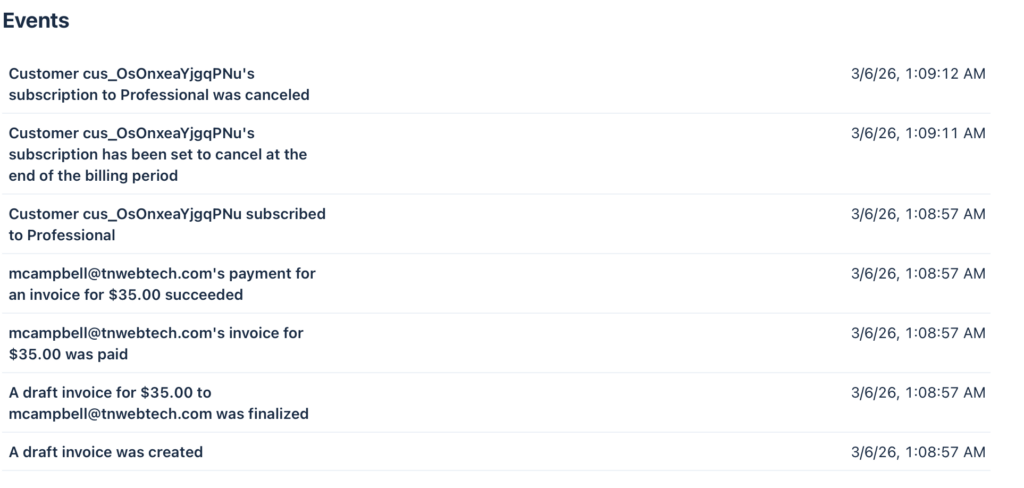
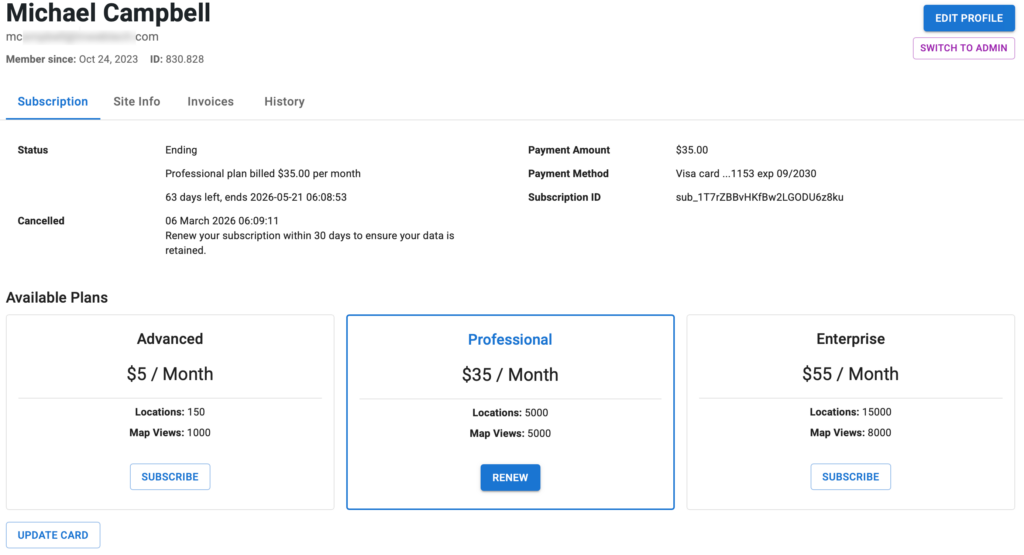
So for the customer mcampbell_at_tnwebtech_dot_com (830.828) this is what I have as the status: original subscription 24th last renewed feb 24th cancelled mar 6th stripe charged them mar 6th AND marked it cancelled april 6th it should have marked the 24th subscription to cancel on mar 24th
Current status according to Stripe: they have set their account to cancel on April 5th Current subscription: *z8ku is deleted on Stripe now meaning it will not auto-renew
Please ensure that is what they want.
From the Stripe history: The original subscription *9h4z Started Oct 24 2023 Cancelled via SLP Dashboard on Mar 6th 2026 at 1:05AM (server time) Was set to stop providing SLP maps on Mar 24th 2026 They then renewed (created the new subscription) Mar 6th at 1:08AM (server time) This is set to expire on April 5th 2026
Yes, we have an issue with RENEW If the prior subscription is still active (*9h4z in this case) it should set the new subscription (renewal) to start when that ends (Mar 24th 2026 06:21AM server time) The bug is that is started immediately , thus the new 6th to 5th dates That is OK for renewals that happen AFTER the maps are disabled (most users) but in this unique situation it needs to be addressed.
Flexible Recommended: Provides accurate and predictable billing behavior and new capabilities. To access these improvements, which are only available in flexible billing mode, you must create new subscriptions with flexible billing mode or migrate your existing subscriptions.
*Classic: Uses the existing Stripe subscription behavior. This setting is maintained for backward compatibility with older integrations.
AI Resolution Assistance
Prompt
@Amelia -
In the MySLP Payments module (WordPress/wp-content/plugins/myslp-payments) there is an issue related to renewing cancelled subscriptions.

__
Make a note of this as general knowledge about the Store Locator Plus Saas Application:
- local (https://local.storelocatorplus.com) and staging (https://staging.storelocatorplus.com) servers may be using outdated data sets
- local and staging servers employ the Stripe TEST environment and related keys
- the production server uses live keys
- NEVER run tests against live Stripe customer data using live keys even on the staging or local servers

__

The following scenario is a real-world situation which played out on the production version of the SaaS application.

We have an issue with RENEW subscription.
- If the prior subscription is still active (sub_1O4dzSBvHKfBw2LGsKZp9h4z in this case) it should set the new subscription (sub_1T7rZBBvHKfBw2LGODU6z8ku) to start when the still-active subscription ends (Mar 24th 2026 06:21AM server time).
- The bug is that the new subscription started immediately setting a March 6th start date when an April 5th end date.
- The new subscription should have started on March 24th 2026 at 6:21AM.
- If the  prior subscription is past the end (cancel_at) date, only then should the renewal start immediately.  That was not the case in this situation.


Meta data about the customer and their interaction with the application:

customer: mcampbell@tnwebtech.com

Current status according to Stripe: they have set their account to cancel on April 5th
Current subscription: *z8ku is deleted on Stripe now meaning it will not auto-renew

Please ensure that is what they want.

From the Stripe history:
The original subscription *9h4z
Started Oct 24 2023
Cancelled via SLP Dashboard on Mar 6th 2026 at 1:05AM (server time)
Was set to stop providing SLP maps on Mar 24th 2026
They then renewed (created the new subscription) Mar 6th at 1:08AM (server time)
This is set to expire on April 5th 2026
AI Fix
in \stripe\MySLP_Stripe_Payments::renew_subscription add the trial_end argument.
		// If the old subscription still has remaining paid time, defer the new
		// subscription so it starts when the old period ends.
		$prior_period_end = $this->subscription->current_period_end ?? null;
		if ( $prior_period_end && $prior_period_end > time() ) {
			$args['trial_end'] = $prior_period_end;
		}

		try {
			$this->subscription    = Subscription::create( $args );
E2E Testing
Write a new E2E Test Specification "subscription_renewals".

The first test in the specification needs to test "Can renew a subscription before it has expired".
This is a corner case with some specific requirements.
- Login as a user with a current active subscription
- Go to My Profile and look for the current subscription ID, remember this value
- Go to My Profile and cancel the subscription
-- The current Stripe subscription ID should be posted and marked in Stripe as canceled
-- The current subscription should have a cancellation date at the end of the current period
- Go to My Profile and renew the subscription
-- This should create a new Stripe subscription ID
-- The new Stripe subscription ID should start when the current period ends
-- The new Stripe subscription should NOT start at the date/time of the renewal
-- The new Stripe subscription should be set to renew in a month (current period ends a month later)
Contains the map and other data that drives SLP for each country. ccTLD is the region parameter for Google Maps ccTLD is any of the Unicode region subtag identifiers
Duplicate code creates a larger code footprint to search through when trying to add new features are resolve bugs.
Duplicate code creates more workload for the PHP pre-compiler. This means it will consume more memory and processing time on every single PHP interaction.
Duplicate code consumes more space on disk, more space in the repositories, and in memory for processing.
Overall duplicate code makes the application less performant and more brittle.
In the JavaScript this is referenced as google.maps.*
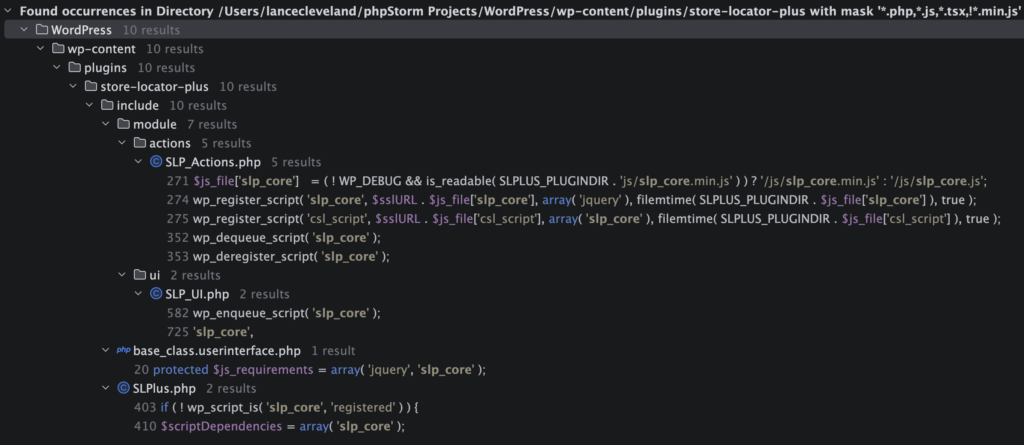
Google Maps is only enqueued here with the google_maps hook: \SLPlus::enqueue_google_maps_script * @used-by \SLPlus::nqGoogleMaps * @used-by \SLP_Actions::wp_enqueue_scripts * @used-by \SLP_Admin_UI::initialize via the WordPress admin_enqueue_scripts hook
Non Admin Implementation
google_maps is used for users that are not logged in (non-admin) when rendering the SLPLUS shortcode.
\SLP_Power_UI::at_startup adds google_maps as a js_requirement (managed by \SLP_BaseClass_UI as part of normal UI interface management). This is likely unnecessary.
JavaScript References
SLP
js/slp_core.js
Power add on (slp-power)
slp-power_userinterface.js
Premier add on (slp-premier)
js/markerclusterer.js
slp-premier_userinterface.js
Admin Implementation
This is called on the slp_manage_locations (Location Details) admin page: \SLP_Admin_UI::initialize via add_action( ‘admin_enqueue_scripts’, array( $this, ‘enqueue_slp_core_and_google_maps’ ) );
JavaScript References
SLP
js/slp_core.js
admin-locations-tab.js
Premier add on (slp-premier)
admin-locations-tab.js
admin-settings-tab.js
admin.js
AI Actions
Prompt
@amelia – We need to fix a script enqueue issue on the Location Details page ___ The script with the handle “google_maps” was enqueued with dependencies that are not registered: slp_core. __
This error is caused because the WordPress script with the handle slp_core is not enqueued.
For the JavaScript in slp_core to be fully functional it requires localized variables. Currently this only happens in \SLP_UI::render_shortcode The problem is that \SLP_UI::render_shortcode has the extra overhead: – Generating a large HTML output string – Firing a slp_after_render_shortcode action We only want the JavaScript variables configured and then localized via \SLP_UI::localize_script
If we use this method, we would need to bypass the HTML output and slp_after_render_shortcode action hook processing.
The best way to hook that would be to rewrite \SLP_Admin_UI::initialize to call a new method: – Replace add_action( ‘admin_enqueue_scripts’, array( $this->slplus, ‘enqueue_google_maps_script’ ) ); – With add_action( ‘admin_enqueue_scripts’, array( $this, ‘enqueue_slp_core_and_google_maps’ ) );
Create a new method \SLP_UI::enqueue_slp_core – Extracts the first chunk of \SLP_UI::render_shortcode up to the wp_enqueue_script( ‘slp_core’ ); – It needs to accept the parameters from \SLP_UI::render_shortcode
Create a new method \SLP_Admin_UI::enqueue_slp_core_and_google_maps – call the new \SLP_UI::enqueue_slp_core method – call \SLPlus::enqueue_google_maps_script
Update \SLP_UI::render_shortcode to call \SLP_UI::enqueue_slp_core to replace the code that was moved to the new \SLP_UI::enqueue_slp_core method
AI Results
\SLP_UI::register_slp_scripts_if_needed is a duplicate of \SLP_Actions::wp_enqueue_scripts. This unnecessary extra code. Duplicate code should be avoided when possible.
Created \SLP_UI::enqueue_slp_core with admin_safe flag resulting in inefficient architecture. This is only called with the admin_safe flag from \SLP_Admin_UI::enqueue_slp_core_and_google_maps. The register_slp_scripts_if_needed call in the admin_safe short circuit block can be put inline in the calling method as a call to \SLP_Actions::wp_enqueue_scripts. The admin_safe only method localize_script_admin_safe could should be in SLP_Admin_UI as it is an admin only method: \SLP_Admin_UI::localize_script_admin_safe. The wp_enqueue_script( ‘slp_core’ ); call can be in the calling method as well. Returning the $attributes array is not necessary.
My fixes to the AI work:
Rip out the admin_safe short circuit from SLP_UI and place the equivalent code in SLP_Admin_UI as these updates only related to admin hooks. SLP_UI relates to non-admin code and should not have admin-only methods in there. Us nqGoogleMaps in admin as that can certainly load in async versus defer mode.
in SLP_Admin_UI
	public function enqueue_slp_core_and_google_maps( string $hook = '' ): void {
		$slp_actions = SLP_Actions::get_instance();
		$slp_actions->wp_enqueue_scripts(); // misnomer - registers the slp_core script

		$this->localize_script_admin_safe();
		wp_enqueue_script( 'slp_core' );

		$this->slplus->nqGoogleMaps( $hook );
	}

	/**
	 * Localize only the data needed for admin enqueue paths without invoking shortcode SmartOptions callbacks.
	 */
	private function localize_script_admin_safe(): void {
		$scriptData = array(
			'options'              => is_array( $this->slplus->options ) ? $this->slplus->options : array(),
			'environment'          => array(
				'addons'      => $this->slplus->AddOns->get_versions(),
				'slp_version' => SLPLUS_VERSION,
			),
			'plugin_url'           => SLPLUS_PLUGINURL,
			'ajaxurl'              => admin_url( 'admin-ajax.php' ),
			'nonce'                => wp_create_nonce( 'wp_rest' ),
			'apikey'               => SLPlus::get_instance()->get_apikey(),
			'rest_url'             => rest_url( 'store-locator-plus/v2/' ),
			'messages'             => $this->get_messages(),
			'shortcode_attributes' => $this->js_attributes,
		);

		ksort( $scriptData['options'] );
		wp_add_inline_script(
			'slp_core',
			'const slplus = ' . wp_json_encode( $scriptData )
		);
	}

	/**
	 * Set the messages for us in the JS array.
	 *
	 * @return string[]
	 */
	private function get_messages(): array {
		$messages = $this->slplus->Text->get_text_group( 'messages' );

		return apply_filters( 'slp_js_messages', $messages );
	}
In SLP_UI
Move the localize_script_admin_save to the SLP_Admin_UI module where it belongs. Have register_slp-scripts_if_needed method call SLP_Actions->wp_enqueue_scripts in SLP_Actions.
	private function register_slp_scripts_if_needed(): void {
		$slp_actions = SLP_Actions::get_instance();
		$slp_actions->wp_enqueue_scripts();
	}
Update
The latest update needs to be reviewed. It is calling enqueue_google_maps_script from \SLP_Admin_UI::initialize With add_action( ‘admin_enqueue_scripts’, array( $this, ‘enqueue_slp_core_and_google_maps’ ) );
Need to look at Premier interfaces listed above for Google Maps interactions.
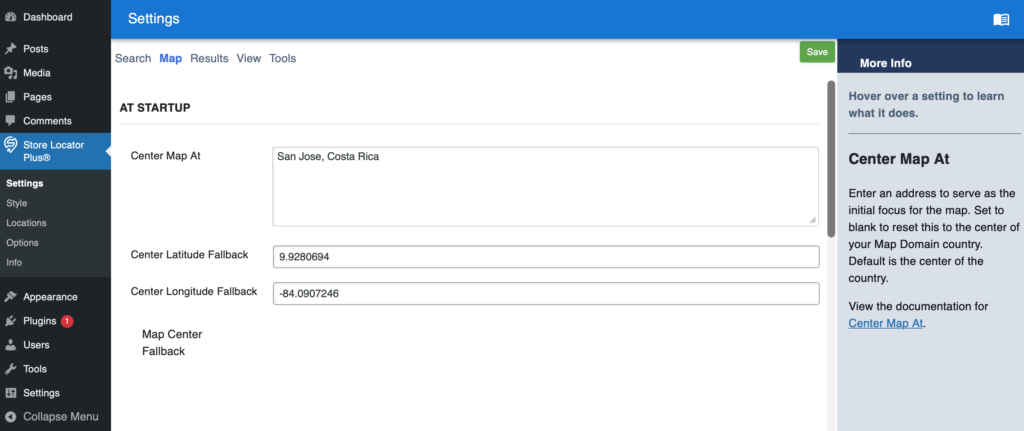
Settings | Map | Map Center Fallback
This should be showing the Google Map to show the map center.
This issue is specific to the WordPress plugin stack and does not affect SaaS installations.
Widget areas are special places on a classic theme that can accept blocks — typically areas like your sidebar or footer. This guide will explain how to use widgets on your website.
Sites using modern block themes do not use widgets, so you won’t find Appearance → Widgets in your dashboard.
Without a theme that supports widgets, the only place you’ll get Appearance -> Widgets support is with the Power add on for the Store Pages “no store page” template. The “no store page” template has not been updated to use blocks instead of widgets.
The ultimate objective for the project is to have AI write clear and concise end-to-end (E2E) test specifications in Cypress.IO.
Unlike standard PHP and JavaScript, which AI has become fairly proficient at when writing new code, it turns out writing Cypress test specifications appears to be a new challenge for AI. It is likely due to the fact that things like Cypress specifications are built on a myriad of higher level JavaScript layers, frameworks to be more precise, that are combined in novel ways. The AI has far less training with these models as few companies write E2E test cases for their applications and of those that do few publish online. These extra layers of logic also rely on some knowledge of the application output specifically the exact HTML structure that is rendered by the underlying SaaS application.
The theory we are testing in this research paper is that some AI models will be more proficient than others at writing complex Cypress.IO test specification. Our initial testing that led to this paper was the discovery that AI is straight up awful at writing Cypress test specifications. Even after multiple prompt revisions, AGENTS.md precursor rules to assist in writing better scripts, AI still struggles. We have yet to build an AI prompt stack that generates specifications that come anywhere close to a final proper specification.
This research is meant to find the best LLM as a foundation on which to build these prompt stacks.
Notice: Function WP_Scripts::add was called incorrectly. The script with the handle “google_maps” was enqueued with dependencies that are not registered: slp_core. Please see Debugging in WordPressfor more information. (This message was added in version 6.9.1.) in /var/www/html/wp-includes/functions.php on line 6131