On the WordPress Test Site (https://qc.storelocatorplus.com/) the Location Import feature of Store Locator Plus® for WordPress (SLP for WP) is not working.
Location import does work on the local Docker container.
Location import does work on staging and production versions of the SaaS application.
The version of the SLP, Power, Experience, and Premier plugins are the same on QC, localhost (the docker container), and the SaaS deployments.
Ensure the Store Locator Plus® and Power plugins are active.
Go to Store Locator Plus | Locations on the sidebar menu.
Click the import tab.
Click the upload CSV button.
Choose a sample CSV file like the one noted below.
Result
The import never starts. The progress meter never appears. No new locations that are in the CSV are added to the location list.
Expected Result
An import information window should show the circular loading progress meter and the location import count when finished. New locations appear on the location list.
Resolution
Status: Partially Resolved
Findings
Turns out that if a user downloads a new version of the Power add on (a zip file) and already has a prior version of the slp-power.zip file in the download directory on their laptop, the browser may create a new file named slp-power-2.zip without direct notification or confirmation it has done so.
If the user uploads this file to the WordPress installation it will create a NEW installation of the Power plugin at ./wp-content/plugins/slp-power-2/. This may or may not reside alongside a version of the older installation at ./wp-content/plugins/slp-power/ which is the standard installation path.
Even if a user deactivates and deletes the existing Power add on , which is best practice, before uploading the new slp-power-2.zip , the new path for the plugin will not match the prior path.
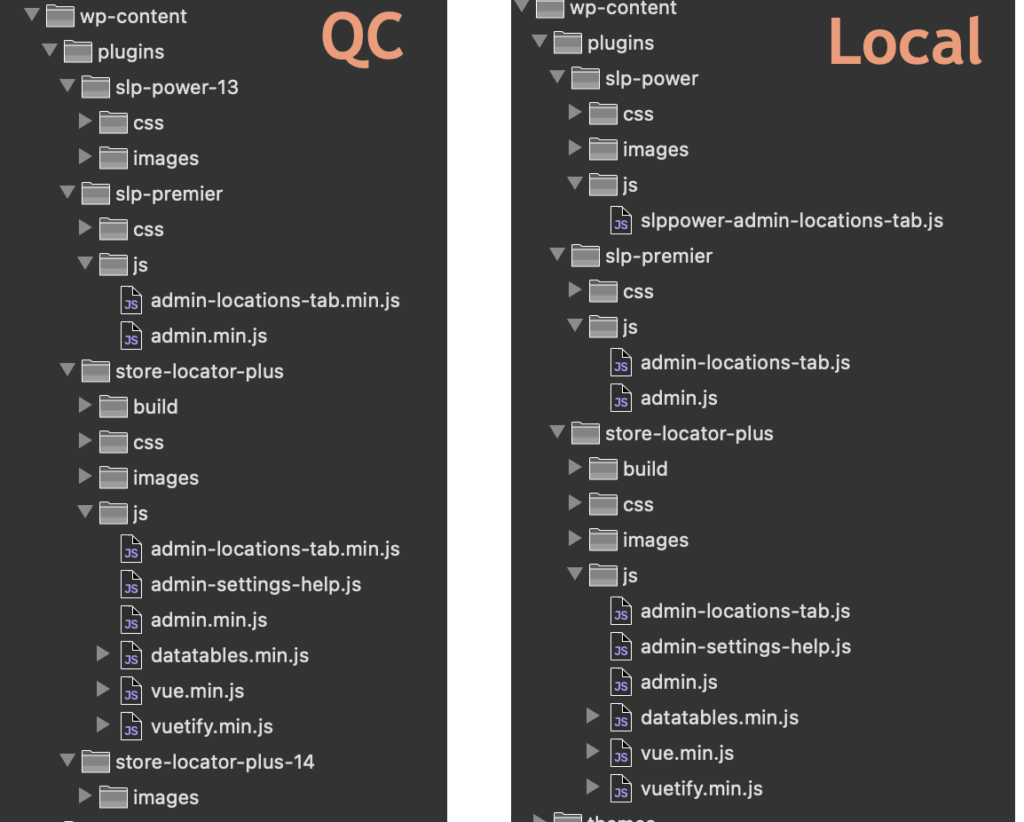
This causes the JavaScript for location imports included in the Power add on to not be loaded.
Workaround
Make sure the downloaded zip files for the plugin follow the standard naming convention:
SLP plugin should be named store-locator-plus.zip
Power add on should be named slp-power.zip
Deactivate and delete the installed versions of any plugins that are being updated.
Upload and install the most recent plugin zip file.
Meta
The Location Import feature is provided by the Power add on (a plugin that works with SLP for WP).
sl_id,sl_store,sl_address,sl_address2,sl_city,sl_state,sl_zip,sl_country,sl_latitude,sl_longitude,sl_tags,sl_description,sl_email,sl_url,sl_hours,sl_phone,sl_fax,sl_image,sl_private,sl_neat_title,featured,rank,category,category_slug,contact,contact_address,contact_email,contact_fax,contact_image,county,department,district,facility_type,first_name,identifier,introduction,last_name,marker,mobile_phone,notes,office_hours,office_phone,region,territory,title,training,year_established
5136,"Amalfi's Italian Restaurant & Pizzeria","664 Long Point Rd",#E,"Mt Pleasant",SC,29464,,32.83928400,-79.85446600,,,,,,,,,,,0,,,,,,,,,,,,,,,,,,,,,,,,,,
5138,"The Wine Bar","664 Long Point Rd","Unit G","Mt Pleasant",SC,29464,,32.83930200,-79.85423300,,,,,,,,,,,0,,,,,,,,,,,,,,,,,,,,,,,,,,
5140,"Burtons Grill & Bar","1876 North Highway 17",,"Mt Pleasant",SC,29464,,32.83029500,-79.83291900,,,,,,,,,,,0,,,,,,,,,,,,,,,,,,,,,,,,,,
Info Gathering Toward Resolution
Path Disclosure
Searching for the difference in the URLs in the JavaScript:
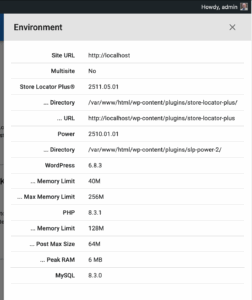
Added additional information to the SLP | Info | Environment tab within the SLP plugin showing the plugin directory and path.
updated \SLP_REST_Environment::get() to add new environment variables
If you upload slp-power-12.zip to a WordPress site your new power directory will be ./wp-content/plugins/slp-power-12/
That is NOT and issue if you’ve NEVER had power installed before (my plugins detect whatever random directory you put in the first time).
However if you UPDATE an existing Power plugin that was already installed at wp-content/plugins/slp-power with a zip file named slp-power-12.zip the app will break. First of all you’ll likely end up with TWO power plugins listed in your plugin directory. Out of habit you will likely delete the older one, which inevitably will be the one in wp-content/plugins/slp-power, leaving the revised path of wp-content/plugins/slp-power-12/ as the new path.
Plugin Update Best Practices
Rename your zip files to the base name only:
store-locator-plus.zip (or store-locator-le.zip if you are an original old-school SLP user from version 5 or earlier)
slp-power.zip
slp-experience.zip
slp-premier.zip
If it won’t let you, sort folder on your computer by name and delete the old copies…. then rename the downloaded zip file t one of the above.
Install the properly named zip file on WordPress:
First delete the original plugin (deactivate/delete) then upload the new zip file.
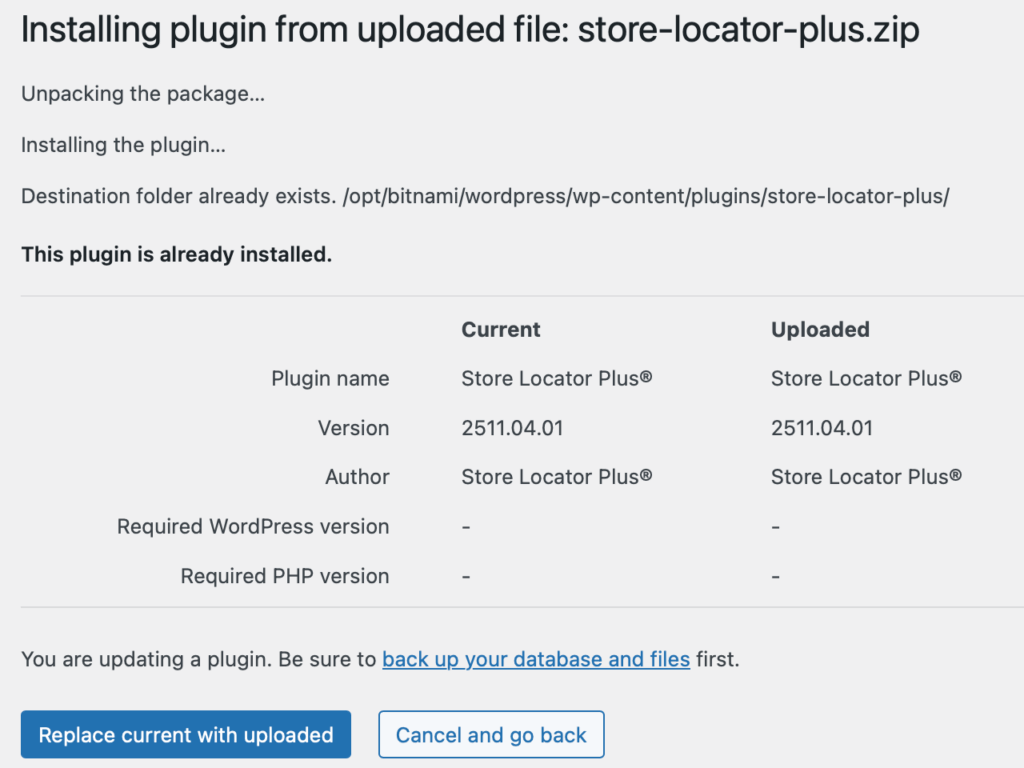
This process MIGHT work with the inline update like the pic below, but some systems cannot handle the duplicate directory on the server automatically (some do, but not all) . Thus it is safer to deactivate/delete first versus using the “fancy updater” that does an inline replace in WordPress.
The inline update process.
New Research : Reproduced On Localhost
I realized renaming the directory from slp-power to slp-power-2 (or 3) in the IDE will NOT change the mount point in the Docker container.  To change that the Docker composer file needs to change the mount point of the volumes.

I created a new composer file that mounts the wp-content/plugins/slp-power directory in the IDE (on the host laptop for Docker) to wp-content/plugins/slp-power-2 in the Docker container.

Shut down the prior Docker container and started a new container with the revised path.

Sure enough, the Power import breaks if the Power add on is NOT installed in ./wp-content/plugins/slp-power/

This indicates an error in the base plugin (SLP) or Power add on that is not allowing the install path to be flexible.  It skips loading the required JavaScript library.
Work Toward Resolution
UX Update Show Directories
Let’s show the add on directory paths in the SLP | Info | Environment panel.
Updated \SLP_REST_Environment::get() to show the directory path for any add on directly underneath the plugin version.
\SLP_BaseClass_Admin::enqueue_admin_javascript is the likely culprit which is NOT loading wp-content/plugins/slp-power/js/slppower-admin-locations-tab.js if the directory changes to wp-content/plugins/slp-power-2/js/slppower-admin-locations-tab.js
In the following code snippet from \SLP_BaseClass_Admin::enqueue_admin_javascript
In addition to the fix, I renamed wp-content/plugins/slp-power/js/slppower-admin-locations-tab.js to wp-content/plugins/slp-power/js/admin-locations-tab.js

This makes it more consistent with other plugins.  It also allows \SLP_BaseClass_Admin::enqueue_admin_javascript to be simplified to:
			case 'manage_locations':
				$files = array( 'js/admin-locations-tab.min.js', 'js/admin-locations-tab.js' );
				break;
Power 2511.05.01 now requires SLP 2511.05.01 with the primary fix being in the SLP main plugin.
Since containers are ephemeral and each instance handles requests independently, sharing session data requires using a centralized session storage such as AWS ElastiCache.
ElastiCache can be configured for Valkey (open source Reddis) or Memcache. Valkey is lower cost.
Set up ElastiCache
Create a Valkey server.
Configure a publicly accessible or VPC-limited endpoint, depending on your ECS networking setup.
Choose 3 subnets on same network as ECS containers
Choose the ECS security group
Configure The Docker Image
Add the Redis extension to PHP and enable it in the php.ini configuration. This configuration uses environment variables so the Redis server can be configured with environment variables for each container instance.
Update the host Dockerfile to install Redis and the libs needed to support it. Copy the php ini file into conf.d so it is loaded when PHP starts. This example is from a WordPress 6 image running PHP 8 on Apache.
Docker Composer is for local development container setup. ECS Task definitions are for AWS Cloud Elastic Container Services.
For our local Docker Composer configuration we use a docker-compose secrets file that is not committed to our repository for setting sensitive environment variables.
In this example the PHP_SESSION_* environment variables are read by the PHP startup and substituted in the session.* variables.
For a PHP connection to a cluster, like we have on our AWS fault-tolerant container clusters you and fault-tolerant ElastiCache clusters you need to set something similar in the Task Definition environment variables using the same names as above.
Configure your Application Load Balancer (or Elastic Load Balancer) to enable sticky sessions to reduce the need to share session data across containers. Sticky sessions ensure that a user is always directed to the same container instance during their session.
– Application Load Balancer: Enable Session Stickiness. – Set a **duration-based stickiness** cookie to control how long the user remains connected to the same task/container.
**Note**: Sticky sessions are not ideal for auto-scaling environments or when maintaining container independence is critical, so this should complement, not replace, shared session storage.
Additional Considerations
1. **Security**: – Encrypt session data in transit using TLS (especially when connecting to Redis or RDS). – Ensure that only trusted ECS tasks and resources can access session storage by restricting permissions through IAM roles and security groups.
2. **Performance Tuning**: – Cache session data effectively using low TTLs for Redis or Memcached. – Monitor ElastiCache or RDS instance performance to prevent bottlenecks caused by session sharing.
3. **Scaling and Resilience**: – Use multi-AZ configurations for Redis or RDS. – Consider Redis Cluster for read/write scaling and high availability.
By offloading session management to centralized storage and using ECS best practices, your WordPress instances can efficiently share session information while scaling seamlessly.
Tweaking The Configuration
The cluster is not working exactly as expected.
One container will connect and appears to work properly, but the user experience will swap form a logged in page to a not logged in page mid-session. The assumption is that this is due to the user connection jumping to a different server in the container cluster.
Attempted Resolution: Set PHP session.save_handler to rediscluster
On the staging server the initial php session_save handler (set via environment variable) was set to redis.
Changing this to rediscluster did not change the session switching behavior.
Attempted Resolution: Revise the PHP session_start() call
In WordPress the session_start() was moved from the prior invocation in the WordPress init() hook to the muplugins_loaded hook which loads earlier in the process. This did not seem to have an impact on the issue. Some minor updates to deal with configurations using a Redis Cluster and not were made as well as ensuring we check if a session was already started.
Our Redis Cluster code, invoked during muplugins_loaded with a MySLP_RedisCluster::get_instance() call.
<?php
defined( 'MYSLP_VERSION' ) || exit;


/**
 *
 */
class RedisClusterSessionHandler implements SessionHandlerInterface {
	private $redis;

	public function __construct() {
		$redisClusterEndpoint = get_cfg_var( 'session.save_path' );
		if ( empty( $redisClusterEndpoint ) ) {
			throw new RuntimeException( 'No Redis Cluster endpoint configured' );
		}


		// Parse and extract host/port (handle both single node and cluster)
		$parsedUrl = parse_url( $redisClusterEndpoint );
		$redisHost = $parsedUrl['host'] ?? 'localhost';
		$redisPort = $parsedUrl['port'] ?? 6379;

		// Use an array format required by RedisCluster
		$redisClusterNodes = [ "$redisHost:$redisPort" ];

		try {
			// Initialize RedisCluster
			$this->redis = new RedisCluster( null, $redisClusterNodes, 5, 5, true );
		} catch ( RedisClusterException $e ) {
			throw new RuntimeException( 'Failed to connect to Redis Cluster: ' . $e->getMessage() );
		}

	}

	/**
	 * Initialize session
	 * @link https://php.net/manual/en/sessionhandlerinterface.open.php
	 *
	 * @param $savePath
	 * @param $sessionName
	 *
	 * @return bool <p>
	 * The return value (usually TRUE on success, FALSE on failure).
	 * Note this value is returned internally to PHP for processing.
	 * </p>
	 * @since 5.4
	 */
	public function open( $savePath, $sessionName ): bool {
		return true; // No need to do anything here
	}

	/**
	 * Close the session
	 * @link https://php.net/manual/en/sessionhandlerinterface.close.php
	 * @return bool <p>
	 * The return value (usually TRUE on success, FALSE on failure).
	 * Note this value is returned internally to PHP for processing.
	 * </p>
	 * @since 5.4
	 */
	public function close(): bool {
		return true; // No need to close anything explicitly
	}

	/**
	 * Read session data
	 * @link https://php.net/manual/en/sessionhandlerinterface.read.php
	 *
	 * @param $sessionId
	 *
	 * @return string <p>
	 * Returns an encoded string of the read data.
	 * If nothing was read, it must return false.
	 * Note this value is returned internally to PHP for processing.
	 * </p>
	 * @since 5.4
	 */
	public function read( $sessionId ): string {
		$sessionData = $this->redis->get( "PHPREDIS_SESSION:$sessionId" );

		return $sessionData ?: ''; // Return session data or empty string if not found
	}

	/**
	 * Write session data
	 * @link https://php.net/manual/en/sessionhandlerinterface.write.php
	 *
	 * @param $sessionId
	 * @param string $data <p>
	 * The encoded session data. This data is the
	 * result of the PHP internally encoding
	 * the $_SESSION superglobal to a serialized
	 * string and passing it as this parameter.
	 * Please note sessions use an alternative serialization method.
	 * </p>
	 *
	 * @return bool <p>
	 * The return value (usually TRUE on success, FALSE on failure).
	 * Note this value is returned internally to PHP for processing.
	 * </p>
	 * @since 5.4
	 */
	public function write( $sessionId, $data ): bool {
		return $this->redis->setex( "PHPREDIS_SESSION:$sessionId", 3600, $data ); // 1-hour TTL
	}

	/**
	 * Destroy a session
	 * @link https://php.net/manual/en/sessionhandlerinterface.destroy.php
	 *
	 * @param $sessionId
	 *
	 * @return bool <p>
	 * The return value (usually TRUE on success, FALSE on failure).
	 * Note this value is returned internally to PHP for processing.
	 * </p>
	 * @since 5.4
	 */
	public function destroy( $sessionId ): bool {
		return $this->redis->del( [ "PHPREDIS_SESSION:$sessionId" ] ) > 0;
	}

	/**
	 * Cleanup old sessions
	 * @link https://php.net/manual/en/sessionhandlerinterface.gc.php
	 *
	 * @param $maxLifetime
	 *
	 * @return int|false <p>
	 * Returns the number of deleted sessions on success, or false on failure. Prior to PHP version 7.1, the function returned true on success.
	 * Note this value is returned internally to PHP for processing.
	 * </p>
	 * @since 5.4
	 */
	public function gc( $maxLifetime ): int|false {
		return true; // Redis handles expiration via TTL, so no need to do anything
	}
}

/**
 *
 */
class MySLP_RedisCluster extends MySLP_Base {
	private $redis;

	/**
	 * Catch cluster redirects (MOVED) using the built-in PHP RedisCluster lib
	 * @return void
	 * @throws RedisClusterException
	 */
	final function initialize() {
		$redisClusterEndpoint = get_cfg_var( 'session.save_path' );
		if ( class_exists( 'RedisCluster' ) && ! empty( $redisClusterEndpoint ) ) {
			try {
				$handler = new RedisClusterSessionHandler();
				session_set_save_handler( $handler, true );

			} catch ( RuntimeException $e ) {
				error_log( 'Error initializing RedisClusterSessionHandler: ' . $e->getMessage() );
			}
		}
		if ( ! session_id() && ! headers_sent() ) {
			session_start();
		}
	}
}
SaaS WP Login Processing
wp-login.php
$reauth = empty( $_REQUEST[‘reauth’] ) ? false : true; is set to false.
$user = wp_signon( array() , $secure_cookie “” )
do_action( ‘wp_login’ , $user->user_login “lcleveland” , $user “WP_User” is set)
if ( empty( $_COOKIE[ LOGGED_IN_COOKIE ] )) is NOT empty
LOGGED_IN_COOKIE is something like “wordpress_logged_in_e2ec4afff4940eebb6cd200cc8206825” which IS set on this session
$requested_redirect_to ==> ‘https://staging.storelocatorplus.com/wp-admin/” as set in $_REQUEST[‘redirect_to’]
if ( ! is_wp_error( $user ) && ! $reauth ) { // This is executing because user is set and reauth is not set.
Need to set the WP Secrets the same (keys and salts) on ALL nodes in the cluster that share login. The auth (login) cookies have salt and keys in them and with each server generating their own they will not be validated.
Docker has a method to pass these in via an ENV setting.
The SaaS platform uses internal processing hooks to auto-detect the hostname and update the WordPress data accordingly to change the site and home URL. This makes it easier to transfer the data set from production to staging and production. See the Creating A Development or Staging Database Copy post for more details on that process.
A fully qualified domain name (FQDN) example would be ‘dashboard.storelocatorplus.com’. A uniform resource locator (URL) example would be ‘https://dashboard.storelocatorplus.com’.
Places site URL data is stored
Database Tables
wp_blogs
wp_options / wp_<site#>_options
option_name: siteurl set to the URL
option_name: home set to the URL
option_name: myslp_dashboard_theme_options , option_value array key ‘dashboard_site’ set to the URL
wp_site
record id: 1, domain column set to FQDN
Environment Variables
WP_HOME, value URL
WP_HOSTURL , value FQDN
WP_SITEURL, value URL
Dynamic URL Management
The SaaS platform uses the sunrise.php early-loading PHP code to set the domain from the web server provided $_SERVER[‘HTTP_HOST’]. It leverages the WordPress : home_url filter to set the URL for the site impacting WordPress functions such as get_rest_url() and home_url() among a dozen others.
The sunrise.php file will change home_url, site_url, and admin_url dynamically via WordPress filters.
This will update the wp_<site#>_options entries for siteurl and home.
Via MySLP Dashboard Theme
The MySLP Dashboard theme contains some default URLs that are used to create links, including logout, recover password, etc. These options are stored in the wp_options table in the myslp_dashboard_theme_options option key under a subkey in option_value named dashboard_site.
These are coming from $myslp->User->mapview_count.
This is coming from \MySLP_User::mapview_count which is managed with magic method setters and getters. The data is stored in the user_meta object within \MySLP_User in a key names “mapview_count”.
Incrementing Map View Counts
This count is updated whenever \MySLP_REST_API::get_map_options() is called (theoretically/assumed to be whenever the map is rendered).
Resetting Map View Count
This is reset to 0 via \myslp_extend_plan() within the myslp-dashboard-helpers module.
Called By
\MySLP_Dashboard_Controller::check_subscription() Runs when a subscription status is checked, has expired, and is renewed automatically.
\myslp_extend_plan()
\MySLP_Recurring_Payments::initialize() ONLY if payment type is PayPal…
These are coming from the user meta “user_subscription_status” key as a subarray named “referer_urls”.
\MySLP_User::log_referer()
This adds to the list of referring URLs any time a map URL is requested.
If you look through the documentation (or code) for the slp_rest_geocode_invalid_referer hook, you will see that this is only called when running a geocoding request.
This means that up to the current 2501.XX.YY release of MySLP, the list of sites only shows sites where a geocoding request was called from. This is NOT necessarily all the sites that have requested that a map be displayed.
	/**
	 * Check if it is OK to enqueue the admin JavaScript, assume so if the hook starts with our prefix.
	 *
	 * @param $hook
	 *
	 * @return boolean
	 */
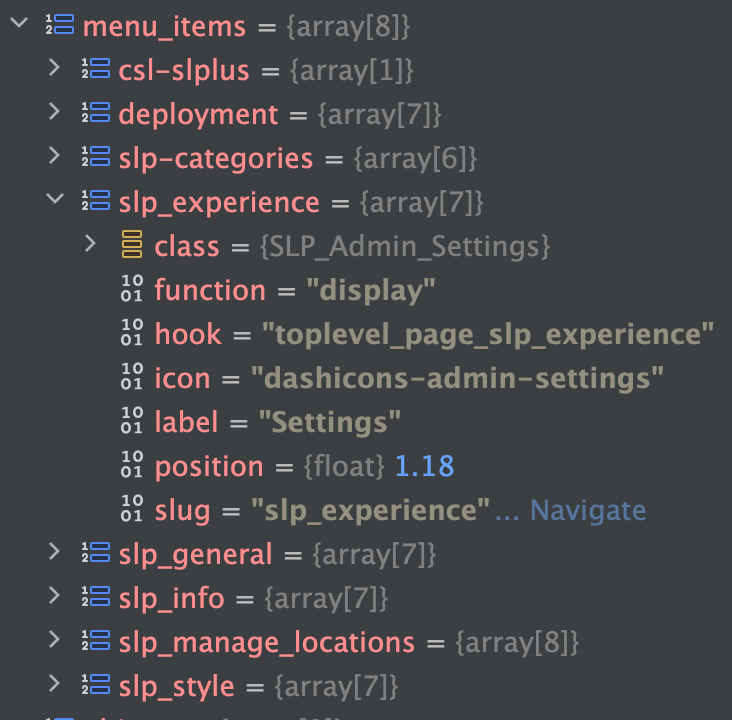
Loops over the \SLP_Admin_UI::menu_items[] array which is an array of arrays where the key is the page key and the subarray contains the dislpay class, the hook name, label, etc. like this:
Saving/changing the Style ID (Smart Option: style_id) is what applies the pre-made styles from the Style Server (running on the main SLP site at the moment).
\SLP_SmartOptions::view_appearance()
This method defines the Smart Option for style_id. It is a hidden field (changed with JS on the old Settings | View interface). When changed it calls \SLP_SmartOptions::change_style_id() which directly calls \SLP_Style_Manager->change_style() to load the style changes from the style server.
This also sets up related style Smart Option which displays the “style_vision_list” vue based listing.
The now-defunct theme Smart Option is also set, but this is for legacy support and no longer used.
Only the Style Vision list currently caches style info by setting a transient via \SLP_Style_Manager::cache_style(), it does this as it renders each style response returned from the style server while rendering the vision list.
The cache is kept for one week.
The current style comes from a transient that caches the style server responses.
This is also used to cache the style settings from the server by comparing \SLP_Style_Manager::current_style->slug versus the \SLP_SmartOptions::style value
Used By
\SLP_Style_Manager::style_matches_slug()
which is used by \SLP_Style_Manager::set_active_style()
which is used by \SLP_Style_Manager::apply_style()
This setting is stored in the options_nojs[‘style’] option setting.
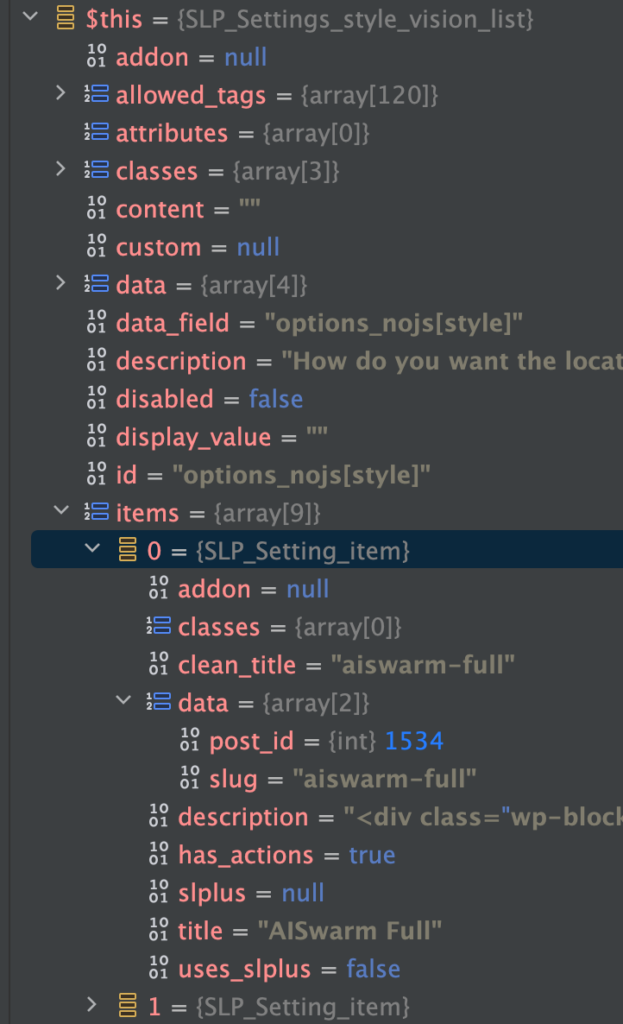
It is managed by an instantiation of the SLP_Settings_style_vision_list object.
data_field: options_nojs[style]
label: ‘Locator Style’
type: ‘style_vision_list’
This is a “smart option” managed by SLP_SmartOptions. It is defined in \SLP_SmartOptions:view_appearance() It has a ‘vue’ object type for rendering assistance.
Stack Trace : SLP | Settings
Triggered selecting – Menu : Store Locator Plus® | Settings
Fires once activated plugins have loaded. The hook is generally used for immediate filter setup, or plugin overrides. The plugins_loaded action hook fires early, and precedes the setup_theme, after_setup_theme, init and wp_loaded action hooks.
Sets up the slplus->database object with slplus->database = SLP_Data::get_instance(). This needs to happen AFTER the WoredPress:set_current_user is called so MySLP has the proper user meta to set the database attributes.
\SLP_REST_Handler::valid_referer() for any site that is not coming from get_site_url() or get_home_url(). This is run via the WordPress REST API handler via the register_rest_route() for the readable request for geocoding at the wp-json/store-locator-plus/v2/geocode/<address> endpoint. This happens via the permission_callback property.
This process is for updating the staging Store Locator Plus® SaaS server running on an ECS cluster after performing code updates.
These processes require a locally installed copy of the MySLP AWS ECS Kit repository which can be found at ssh://git-codecommit.us-east-1.amazonaws.com/v1/repos/myslp_aws_ecs_kit.
Edit your code or deployment kit files first. This can include WordPress plugins or themes, the Docker composer or image builder commands, helper scripts, or various configuration files used to manage and deploy the Store Locator Plus® SaaS container images.
Once your updates are ready, make sure the WordPress stack is up-to-date by updating the submodule links, then commit all of your updates to the MySLP AWS ECS Kit repository on the proper branch. There are AWS CodePipeline services running that will monitor the repository for changes, build any images as needed with ECR and deploy them via the Elastic Container Service if possible. Details on the processes are noted below.
Update The Submodules
From the MySLP AWS ECS Kit git project root:
./tools/create_mustuseplugins_stubs.sh
Commit The Code Updates To The Repo
Commit any changes to the MySLP AWS ECS Kit repository.
When you push the changes from your local develop, staging, or production branch an AWS listener service will detect the code changes and run Code Pipeline tied to services such as CodeBuild and ECS to deploy the final Store Locator Plus® SaaS container in the AWS cloud.
Commits to local branches will not trigger a change in the AWS deployments.
Commits to any branch not specifically named develop, staging, or production will not trigger changes in the AWS cloud deployments.
CodePipeline Notes
The CodePipeline that is configured to deploy the staging containers is named myslp-webserver-staging-pipeline.
Stage: Source
The pipeline monitors the staging branch on the AWS CodeCommit repo for the MySLP AWS ECS Kit project at ssh://git-codecommit.us-east-1.amazonaws.com/v1/repos/myslp_aws_ecs_kit
Stage: Build
The source will be read from the URL above and a series of commands will be executed in the cloud to create an container image. This image is stored in the AWS Elastic Container Registry as a private image.
The Store Locator Plus® SaaS (internal name: MySLP) container images are stored in the 744590032041.dkr.ecr.us-east-1.amazonaws.com/myslp2024-aarch64 docker image repository.
Staging branches will tag the latest build with the :staging tag.
Stage: Deploy
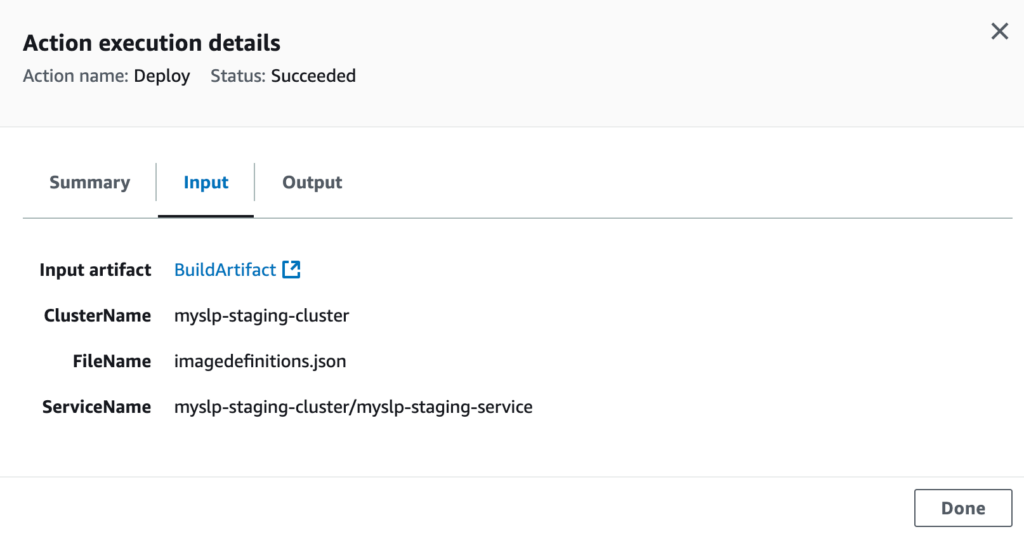
The deploy stage will execute if the build stage completes successfully. This stage will attempt to take the latest myslp2024-aarch64:staging ECR image and launch an active container in the AWS Elastic Container Service.
The deploy stage will attempt to launch a running container in the myslp-staging-cluster on the myslp-staging-service service within that cluster.