The Datatables JavaScript library is outdated based on a legacy jQuery oriented approach. The goal is to replace DataTables.js with the licensed MUI DataGridPro interface.
With the current version of Store Locator Plus® the DataTables jQuery interface was unused. It used to be part of the location table list interface to try to modernize the WordPress list tables.
Goal: Create a persistent accounting information data store using the built-in WordPress Multisite database surfaces.
The table should follow some standard rules that will allow us to implement CRUD operations via REST endpoints in the MySLP Dashboard plugin.
Tasks
One time task “Create Or Update The Database” when the MySLP Dashboard version indicates a change.
Create a Monthly Ledger User Interface to allow for manual CRUD operations on the slp_accounting_monthly_history table.
Monthly History Data : Environment
Environment
All accounting history data will reside in tables for the main WordPress super admin account.
The Main WordPress Super Admin account site ID is stored in the PHP constant SITE_ID_CURRENT_SITE and should be 1. The database table prefix should come up as wp_ unlike user accounts that start with wp_<user_site_id>.
slp_accounting_monthly_history Table
The table should be named $wpdb->prefix . “slp_accounting_monthly_history” resulting in a table name of wp_slp_accounting_history.
slp_accounting_monthly_history Structure
ID – a unique ID to allow for explicit record I/O for CRUD operations.
KEY – a short string indicating the type of monthly data for example:
“SAAS_REVENUE”
“PLUGIN_REVENUE”
AMOUNT -an integer representing the numeric value for the key for example:
3500 which may represent “35.00” or 35 dollars in our UI surfaces
DATE – a date and time for they entry representing the date this value represents NOT when the data was created or modified
This Accounting Monthly History Data interface will run various monthly cron jobs to collect data and store it in this table. We will use this data to product things like monthly revenue graphs for the SaaS Account Overview dashboard. The graph will show SaaS Revenue from active accounts on a monthly basis.
We will do the same providing a manual process to add other revenue such as WordPress plugin revenue under “PLUGIN_REVENUE” keys.
We will allow for users to change the Line Chart revenue graph to show “monthly” or “yearly” graphs. Future data keys may warrant daily graphs.
Task: Create Or Update The Database
When the MySLP Dashboard module version (plugin version) changes, run a database “create or update” hook to create the table or modify it as needed.
Copy the design pattern in the Store Locator Plus plugin in the \SLP_Admin_Activation class. wp-content/plugins/store-locator-plus/include/module/admin/SLP_Admin_Activation.php This is fired from \SLPlus::initialize_after_plugins_loaded When the Store Locator Plus version reported is newer than the installed version for the plugin (see version_compare( $this->installed_version, SLPLUS_VERSION, ‘<‘ )) , the MySLP Dashboard should follow that pattern.
Task: Monthly Ledger User Interface
Admin Menu
Add a submenu with the label “Monthly Ledger” under the “Accounting” admin sidebar menu we created in \MySLP::create_network_admin_menu.
Add a new My MySLP_Account_MonthlyLedger PHP React loader and helper class. Follow the design pattern of \MySLP_Accounting in wp-content/plugins/myslp-dashboard/include/accounting/MySLP_Accounting.php Place it in the same directory as MySLP_Accounting.php as a sibling.
Create a new React component that allows basic CRUD operations on the slp_accounting_monthly_history Table. Attach it to the MySLP_Account_MonthlyLedger PHP React loader. Follow the UI design pattern of the AccountingPanel React component at wp-content/plugins/myslp-dashboard/src/accounting/accounting.tsx Use a MUI X DataGridPro component as the primary table interface. Allow for pagination, starting with a default page length of 25 records. Sort the records by DATE descending on initial load so we see newer records at the top. Provide an add record interface where a user can enter the KEY, AMOUNT, DATE. Provide an inline edit record interface on the DataGridPro table to allow users to click on they KEY, AMOUNT, or DATE field on an existing record and change it. Provide a delete option for each record.
Data Interface
Use REST for all CRUD operations and to fetch the initial data set.
When records are added the backend data interface should:
Ensure all keys entered are trimmed (no leading/trailing spaces) and are shifted to uppercase.
AMOUNT is stored only as an integer.
DATE field needs to allow for flexible input converting text input into a best guess for the date to be stored as a date-time entry in the database. Examples:
“05/2026” is May 2026 which should be recorded as the date time 2026-05-01 00:00:00
“05/01/2026” is May 1st 2026 which should be recorded as the date time 2026-05-01 00:00:00
“May 2026” is May 2026 which should be recorded as the date time 2026-05-01 00:00:00
Allow for various separators such as / or – or .
05-01-2026 is the same as 05/01/2026
05.01.2026 is the same as 05/01/2026
Use standard Date/Time JavaScript or React libraries for data manipulation.
The manipulation can be not the front-end (React/JavaScript) before communicating with the REST endpoint.
The backend should do basic sanitation before recording data.
The “Buffer” For Overages
Legacy billing was sometimes strict on the overage policy. The revised automated report, not so much as there is a 100 views “free buffer” on overages.
2026 : Jan | Feb | Mar | April | May
Acct ID
Spreadsheet
New50
BRmarket
0 – 0 – 15 – 0 – 20
0 – 0 – 15 – 0 – ?
MKbevis
0 – 0 – 5 – 0 – 0
0 – 0 – 0 – 5 – 5
TKESeck
0 – 0 – 0 – 5 – 0
0 – 0 – 0 – 0 – 0
Arbor
0 – 0 – 0 – 0 – 35
0 – 0 – 0 – 0 – 35
UWS
0 – 20 – 25 – 45 – 115
15 – 20 – 25 – 45 – 115
Gary
10 – 15 – 20 – 25 – 25
0 – 15 – 20 – 20 – 25
The actual billing and monthly views do not always match.
Part of this is the monthly view total is triggered when the Stripe billing renews. When a Stripe renewal is successful the SLP SaaS platform records the current view count to a permanent record of views for the previous customer billing period (prior month). The system is imperfect and need refinement as Stripe sometimes needs to reprocess subscription renewals for a myriad of reasons. As such the view tally is sometimes recorded more than once and reset more than once. This impacts the total view count recorded for the month as well as the billing.
Starting in June 2026, we are using the new monthly views report as the source of truth. This may not be perfect during the period we work to resolve these corner cases with Stripe renewals. The map views will never be OVER actual usage. Worst case, we bill a little LESS due to this issue.
Overages remain billed at $5 for a block of 1,000 extra views. As an unofficial policy while we work toward resolution, all accounts now have a “100 free overage views” allowed on their account. Thus, if an account is over views we don’t charge for the block until the new block gets 101+ views. Examples: limit is 5,000 – actual views is 5099 – billing is 0 extra blocks as 99 is under the 100 grace = $0 limit is 5,000 – actual views is 5250 – billing is 1 extra block at 250 exceeds the 100 grace = $5
limit is 5,000 – actual views is 8099 – billing is 3 extra block as 99 is under the 100 grace = $15
limit is 5,000 – actual views is 8250 – billing is 4 extra blocks = $20 (1 extra block: up to 6,000 views, 2: up to 7,000 views, 3: up to 8,000 views, 4: up to 9,000 views) = $20
As a result, months prior to June 2026 may not align with billing and view count.
We are creating a full Store Locator Plus accounting dashboard to track both the SaaS platform as well as WordPress plugin sales.
Sales Data
The primary source of truth for sales data will come from Stripe. Any references to PayPal payments or accounts can be considered legacy information and can be left out of the accounting panel.
The payment module holds the Stripe API module and related code for payment system communications.
User Interface
Stage 1 : Accounting Overview Scaffolding
Accounting Sidebar Menu
A new sidebar menu should be created in WordPress for super admin users only. \MySLP::create_network_admin_menu should be used to create and attach the menu. Follow the design pattern for the configure menu option, code snippet follows:
Unlike the main configure menu page that is rendered via \MySLP::render_configuration_page the new accounting module should load and render a React PHP helper class. We want this interface to be primarily React driven.
The WordPress PHP React Helper Class
Follow the \MySLP_Customer_Profile class for guidance on implementing a React user interface within WordPress. I suggest creating a new class MySLP_Accounting in wp-content/plugins/myslp-dashboard/include/accounting.
The React AccountingPanel Component
The React components that \MySLP_Accounting loads with the help of the wp-scripts node package should live in wp-content/plugins/myslp-dashboard/src/accounting. This directory should have a block.json and an accounting.tsx file.
block.json should probably look like this:
{
  "script": "file:profile.js"
}
The accounting.tsx TypeScript should contain the React accounting component. This new React component should be named AccountingPanel. It should follow the UX design pattern of the ProfilePanel component in wp-content/plugins/myslp-dashboard/src/profile/profile.tsx
The initial user interface will only have a single submenu (SLPTabsBar Tabs components) for the main page which should be labelled “Overview” which is already selected and open. It will render the AccountingOverviewPanel component noted below.
AccountingOverviewPanel Component
A supporting AccountingOverviewPanel React component should be created. If the WordPress wp-scripts supports it, this can go in the same directory as the AccountingPanel component : if not place it in wp-content/plugins/myslp-dashboard/src/accounting_overview
This component should be a React Dashboard that shows overall accounting metrics. To start with we will want to show the total number current active accounts and total amount of payments from those active accounts. The ManageCustomers React component (wp-content/plugins/myslp-dashboard/src/manage_customers/manage_customers.tsx) displays this data in the AdminHeader children via a pair of Chips. Use the same REST endpoints to fetch this data and display it.
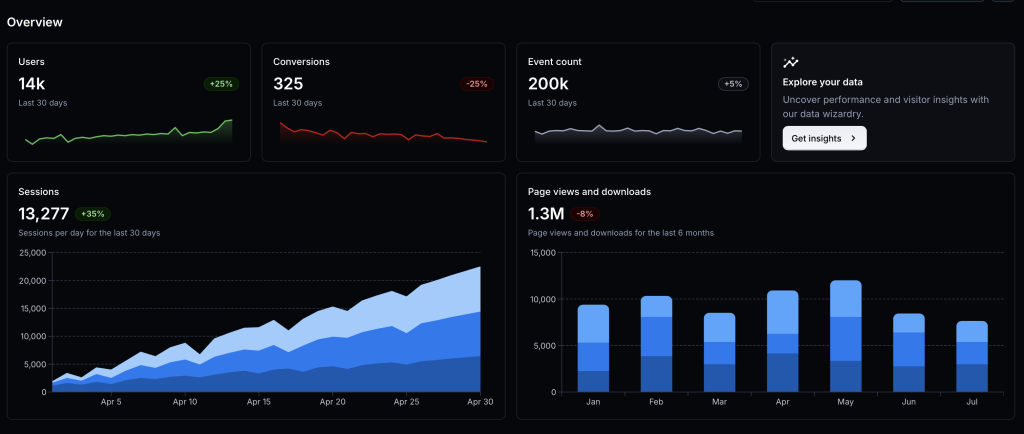
Here is a screen shot of the Material UI Dashboard Template that is referenced.
For now we need the cards for:
Accounts in place of Users with the active count below. We will add a data table for historical trends and a graph below it in the future. Clicking on the user count in the account card should redirect the UX to load the Manage Customers page at /wp-admin/network/admin.php?page=customer_list
Payments in place of Conversions with the total payment amount below. This too will eventually have trends stored in a data table that we will create later.
AI Summary
Junie Pro Summary
Completed setup and implementation prep for the accounting dashboard work in myslp-dashboard, including running required start-revision on branch accounting.

• Implemented Stage 1 accounting UI scaffold: new Accounting admin page, React entrypoint, and overview metrics/cards with click-through to Manage Customers.

• Added new files: include/accounting/MySLP_Accounting.php, src/accounting/accounting.tsx, and src/accounting/block.json.

• Updated integration points in include/MySLP.php and constants/version metadata in myslp-dashboard.php and package.json.

• Validation status: lint checks for new files passed (only a non-blocking TS import style warning noted earlier), diff checks passed, and you confirmed npm install + npm run build succeeded locally with generated build/accounting/accounting.js and build/accounting/accounting.asset.php present.

• Environment note: Junie shell still lacks local php tooling and direct GitHub auth; you requested follow-up guidance on PAT-based auth after task completion.
Junie Release Notes • Scope: No new product-code changes were made after the previously summarized accounting dashboard work in myslp-dashboard. • Skills/Environment updates this session: Reloaded skills via Vendors/JetBrains/relink_skills.sh; available skills now include /wordpress-release-notes. • Code impact since last implementation summary: None. • Build/Test status: No additional build or test runs were performed after the earlier confirmed successful npm install and npm run build for myslp-dashboard. Included Previously Completed Work (for continuity) • Added Accounting admin page scaffold and React entry (include/accounting/MySLP_Accounting.php, src/accounting/accounting.tsx, src/accounting/block.json). • Wired menu/render integration in include/MySLP.php and version bump artifacts from start-revision (myslp-dashboard.php, package.json).
The Settings Interface architecture drives most of the legacy Store Locator Plus admin interfaces. These are the interfaces customers interact with most often, especially on the SaaS platform. It is the main component of the SLP Dashboard for SaaS.
It was originally written to manage the UI surfaces that present the myriad of settings (options) available to customers. It presents the “dials the users turn” to change how their store locator maps and directory presentations are configured. It grew to cover other admin UI interfaces including the Locations Interface.
Outputs the HTML for settings pages, including the location details page (it uses the “settings” page construct). The output all ends up in a HTML element: <div class=’dashboard-wrapper’>…</div>.
General layout:
<div class=’dashboard-wrapper’>
<header id=”dashboard-header” class=”dashboard-header”> = React blue bar header
		// -- include the asset file to get the WordPress Scripts defined dependencies and version ID
		$asset = include SLPLUS_PLUGINDIR . 'build/slp_adminheader/script.asset.php';

		wp_enqueue_script( 'slp_adminheader', SLPLUS_PLUGINURL . '/build/slp_adminheader/script.js', $asset['dependencies'], $asset['version'], true );

		wp_add_inline_script( 'slp_adminheader', 'const slpReact = ' . wp_json_encode( $this->get_vars_for_react() ) . ';', 'before' );
Rendered via the React component at wp-content/plugins/store-locator-plus/src/components/AdminHeader.js
In the current version the header element DOES NOT contain the sub navbar.
It is rendered via SLP_Settings::sublevel_navbar deep inside the <div class=’dashboard-wrapper’>…</div> element.
React Update To Render Subnavbar
The goal is to render the \SLP_Settings::sublevel_navbar HTML output using React instead of the current PHP and HTML implementation.

The AdminHeader at wp-content/plugins/store-locator-plus/src/components/AdminHeader.js renders the top-of-page header with the page name and some interactive icon buttons.

The task is to add a submenu below the Toolbar that is comprised of the sections currently residing in $this->sections in the \SLP_Settings::sublevel_navbar method.  Using the $titleText ($section->name) within.  The wp_kses_post function current used to set $titleText is not necessary as the $section->name is already considered "clean".

The best way to get the variables into React so they are accessible in JavaScript is to modify the \SLP_Base_ReactObject::get_vars_for_react method.  Instead of attempting to override or extend the base \SLP_Base_ReactObject::get_vars_for_react method, add a filter in \SLP_Settings for slp_react_vars.   That will extend the react variable array via this return method on the end of the get_vars_for_react method:
apply_filters( 'slp_react_vars', $defaultVars );

You will find a good reference implementation of the slp_react_vars filter via:
\Customer_Profile_Site_Info::initialize - adds the filter for that class
\Customer_Profile_Site_Info::extendReactVars - extends the available JavaScript variables for React

In our case we are not extending MySLP variables, so the SLP_Settings::extendReactVars method should be more like this:
$vars['SLP']['sections'][] = array(
'name' => $section->name,
'div_id' => ! empty( $section->div_id ) ? $section->div_id : $section->slug,
'link_id' => "wpcsl-option-{$div_id}"
);
This should be set up by looping through $this->sections in a new extendReactVars method in SLP_Settings.

This should create a horizontal navbar that shows and reveals each section by the div id. This may require further refinement as the current system uses outdated JavaScript and jQuery to hide and reveal subsequent divs by using the div IDS as noted in the link_id property.   For now we will assume that if React renders the components correctly the pre-existing JavaScript will take over.
Initial Results
Works on locations page. Does not work on Settings page. Spacing is not well defined, needs more space between menu items.
The locations page is a bastardized combination of the SLP_Settings class and WP_List_Table.
The top-of-page header appears to be handled by SLP_Settings. SLP_Settings extends SLP_Base_ReactObject To start rendering the page is calls \SLP_Base_ReactObject::render with these attributes: – $scriptHandle = ‘slp_settings’ – $scriptFilebase = ‘slp_settings’ This methodology ends up render the SLPSettingsPanel React component (wp-content/plugins/store-locator-plus/src/slp_settings/slp_settings.tsx)
That means the page header is rendering using the Reactionary standard <AdminHeader> for the page. Currently SLP_Settings is only leverage the pageName property, but it also supports sections as a property which is the submenu.
With the 2606.26.01 release the Settings system uses the React AdminHeader menu.
\SLP_Settings::render_settings_page
$this->sections may have is_topmenu set, this indicates the top level menus in the app
Locations Card (Defunct?)
This may no longer be used: \SLP_Admin_Locations::create_location_details_box
SLP_Admin_Locations
extends WP_List_Table – this is already going to be a shit show. The WP_List_Table interface is from 1902. Maybe before that. It is awful.
Referenced by:
\MySLP_Admin::do_admin_startup()
Setting the screen property , probably not needed: SLP_Admin_Locations::get_instance()->screen = ‘store-locator-plus_page_slp_manage_locations’;
\SLP_Power_Pages_Admin::extend_location_edit()
Only if Store Pages is active, add an edit section to show an “edit Store Page” link
\SLP_Power_Pages_Admin::set_page_actions()
Add the recreate store page action hyperlink under each location on the table
\SLP_Actions::save_screen_options()
To save the screen options, which is currently only the page (table rows) length.
\SLP_Admin_Locations_Add::
initialize
extended_data_block – for extended data fields
\SLP_Admin_UI::renderLocationsPage
To render the UI
\SLP_Location_LoadFromWP::import
To only report back any URL the person puts in is invalid.
This is called from \SLP_Admin_Locations_Actions::process_actions when the current_action is load_from_wp
This is setup from \SLP_Admin_Locations_Load
\SLP_Settings_manage_locations_table::display
A shim for $this->settings->add_ItemToGroup( array( ‘group_params’ => $group_params, ‘type’ => ‘manage_locations_table’, ) );
SLP_Admin_Locations
Hooks & Filters Fired
slp_locations_manage_bulkactions : creates the list of bulk action dropdown items
SLP_Power_Admin_Locations
SLP_Experience_Admin
SLP_Power_Pages_Admin
slp_locations_manage_filters : The filter location drop down items
SLP_Power_Admin
slp_locations_manage_cssclass : Adds extra CSS classes
SLP_Experience_Admin
slp_column_data : Change the data rendered in a column
slp_manage_locations_actionbar_ui : modify the action bar on top of the table
slp_modify_admin_locations_script_data : modify the script data for the JavaScript on the page
slp_manage_location_columns
pls_manage_location_where
slp_manage_locations_buttons
slp_build_locations_panels
Not used:
slp_invalid_highlight
slp_edit_location_change_extended_data_info
slp_manage_expanded_location_columns
Screen for WP_List_Table
This is messing up the UI. Let’s see if we can drop this, start peeling away layers to simplify this interface as we work toward a React version.
locations_per_page
Tracked via \SLPlus::$userMetaKeys
Stored in user meta via \SLP_AJAX::update_slp_user_meta
\SLP_Actions::init sets a filter on set-screen-option … it calls…
\SLP_Actions::save_screen_options … which only runs if the current page is slp_manage_locations… if so it calls…
\SLP_Admin_Locations::save_screen_options
Which returns the value of locations_per_page
Best option is to make this a React interface for page length / pagination
homeUrl most likely comes from the PHP class \MySLP_Manage_Customers::extendReactVars set to WordPress get_home_url()
REST Backend
SaaS App backend via MySLP Dashboard plugin.
— Fetching Customers PHP method \MySLP_REST_API::register_routes defines the registered routes for WordPress. register_rest_route( $this->myslp_namespace, ‘/customers’,…) Calls the PHP method \MySLP_REST_API::get_customers
Location count is coming from $this->myslp->User->location_count
Root Cause Theory
This appears to be using a meta_query to fetch the user location data. This is NOT accurate.
In some cases the MySLP_User object does not have a location_count user_meta property set. If that is the case, it should call \SLP_Location_Manager::get_location_count for that user and store the result with
User Location Count Architecture
\MySLP_User::__get
Fetched from user_meta with the location_count property. This is likely where the AI decided to make this a source of truth for location counts.
				case 'location_count':
				case 'mapview_count':
					$this->__get( 'user_meta' );
					$this->$property = (int) ( $this->user_meta[ $property ][0] ?? 0 );
					break;
\MySLP_REST_API::get_location_count_for_user
Currently unused anywhere in the project. This would ensure the app switched to the user’s blog and set_database_meta() then called: \SLP_Location_Manager::get_location_count
\SLP_Location_Manager::get_location_count
This is the original method from the legacy app code to fetch location counts. It queries the custom SLP database that is added for every user to get the count of records. It comes from the linchpin Store Locator Plus base plugin.
With the SaaS dashboard there is a Manage | Customers option that displays the customer list. It is using a default WordPress table style presentation that has been modified by one of the SaaS plugins, most likely MySLP Dashboard (myslp-dashboard). I would like to make improvements to this interface.
This issue comes up for older accounts where their wp_options table has their theme set to twentytwelve. If these accounts time out it does NOT flush the cookie (shit WordPress design) and when you re-visit the SaaS dashboard site (staging or production) you get the error message noted above.
In JavaScript console on the Location Details page: Description
[Error] Warning: ReactDOM.render is no longer supported in React 18. Use createRoot instead. Until you switch to the new API, your app will behave as if it’s running React 17. Learn more: https://reactjs.org/link/switch-to-createroot printWarning (react-dom.js:73) error (react-dom.js:47) render (react-dom.js:29680) (anonymous function) (script.js:101:67958) Global Code (script.js:101:68032)