/**
	 * Check if it is OK to enqueue the admin JavaScript, assume so if the hook starts with our prefix.
	 *
	 * @param $hook
	 *
	 * @return boolean
	 */
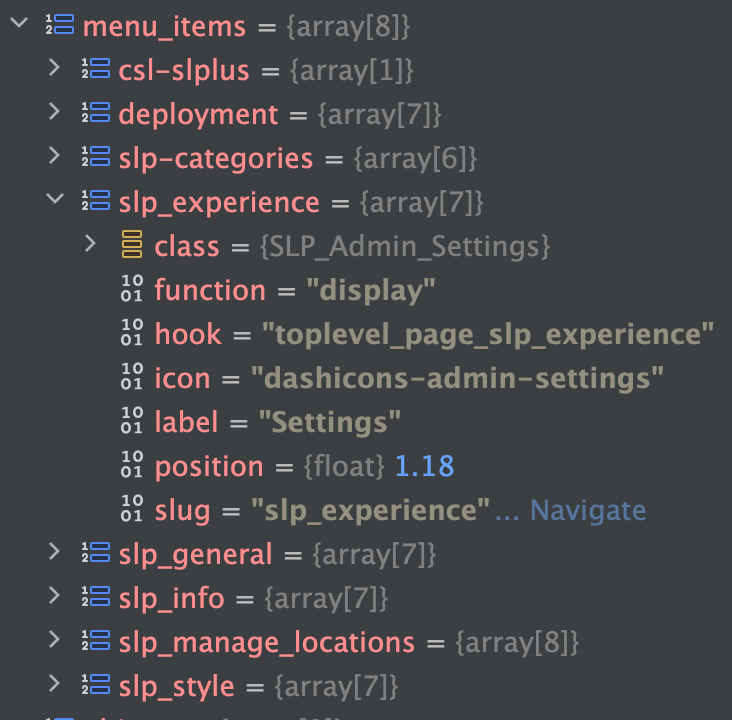
Loops over the \SLP_Admin_UI::menu_items[] array which is an array of arrays where the key is the page key and the subarray contains the dislpay class, the hook name, label, etc. like this:
Saving/changing the Style ID (Smart Option: style_id) is what applies the pre-made styles from the Style Server (running on the main SLP site at the moment).
\SLP_SmartOptions::view_appearance()
This method defines the Smart Option for style_id. It is a hidden field (changed with JS on the old Settings | View interface). When changed it calls \SLP_SmartOptions::change_style_id() which directly calls \SLP_Style_Manager->change_style() to load the style changes from the style server.
This also sets up related style Smart Option which displays the “style_vision_list” vue based listing.
The now-defunct theme Smart Option is also set, but this is for legacy support and no longer used.
Only the Style Vision list currently caches style info by setting a transient via \SLP_Style_Manager::cache_style(), it does this as it renders each style response returned from the style server while rendering the vision list.
The cache is kept for one week.
The current style comes from a transient that caches the style server responses.
This is also used to cache the style settings from the server by comparing \SLP_Style_Manager::current_style->slug versus the \SLP_SmartOptions::style value
Used By
\SLP_Style_Manager::style_matches_slug()
which is used by \SLP_Style_Manager::set_active_style()
which is used by \SLP_Style_Manager::apply_style()
Fatal error: Uncaught Error: Call to a member function set_database_meta() on null in /var/www/html/wp-content/plugins/store-locator-plus/include/module/admin/SLP_Admin_Activation.php:450
New local docker WP install activating SLP on clean database.
Resolution
This bug was resolved already.
\SLP_Data::initialize() no longer calls $this->set_database_meta(); on a fresh database installation.
AI Analysis
From gpt-5.3-codex (high) with a RAG hook via a proxy interface on the Spark…
Script 2025-06-18 15:04:06 -0400 345)
b77cbd0e3 include/module/admin/SLP_Admin_Activation.php (SaaS Update Script 2025-06-18 15:04:06 -0400 346) 		if ( ! defined( 'MYSLP_VERSION' ) ) {
b77cbd0e3 include/module/admin/SLP_Admin_Activation.php (SaaS Update Script 2025-06-18 15:04:06 -0400 347) 			$this->check_for_addon_updates();
b77cbd0e3 include/module/admin/SLP_Admin_Activation.php (SaaS Update Script 2025-06-18 15:04:06 -0400 348) 		}
727b4970a include/SLP_Activation.php                    (Lance Cleveland    2017-12-28 11:20:55 -0500 349) 	}
727b4970a include/SLP_Activation.php                    (Lance Cleveland    2017-12-28 11:20:55 -0500 350)

diff --git a/include/module/admin/SLP_Admin_Activation.php b/include/module/admin/SLP_Admin_Activation.php
index f9bd70e9..132cfb50 100644
--- a/include/module/admin/SLP_Admin_Activation.php
+++ b/include/module/admin/SLP_Admin_Activation.php
@@ -10,7 +10,7 @@ class SLP_Admin_Activation extends SLPlus_BaseClass_Object {
 	/**
 	 * Add roles and cap.
 	 */
-	private function add_slplus_roles_and_caps() {
+	private function add_slplus_roles_and_caps(): void {
 		$role = get_role( 'administrator' );
 		if ( is_object( $role ) && ! $role->has_cap( 'manage_slp_admin' ) ) {
 			$role->add_cap( 'manage_slp' );
@@ -24,7 +24,7 @@ class SLP_Admin_Activation extends SLPlus_BaseClass_Object {
 	 *
 	 * @return bool
 	 */
-	public function being_deactivated() {
+	public function being_deactivated(): bool {
 		if ( empty( $_REQUEST ) ) {
 			return false;
 		}
@@ -48,7 +48,7 @@ class SLP_Admin_Activation extends SLPlus_BaseClass_Object {
 	/**
 	 * Check if there are any add on updates.  Inactive plugins too.
 	 */
-	private function check_for_addon_updates() {
+	private function check_for_addon_updates(): void {
 		$plugins = get_plugins();  // contains all plugins active or not key = slug (store-locator-le/store-locator-le.php)

 		// Check all plugins

Cause is very likely a hook-order race on fresh installs.
1.
SLP_Admin_Activation::update() is invoked on plugins_loaded via [SLPlus.php:349](/Users/lancecleveland/phpStorm Projects/WordPress/wp-content/plugins/store-locator-plus/include/SLPlus.php:349) and [SLPlus.php:359](/Users/lancecleveland/phpStorm Projects/WordPress/wp-content/plugins/store-locator-plus/include/SLPlus.php:359).
2.
slplus->database is only created later on WP init in [SLP_Actions.php:103](/Users/lancecleveland/phpStorm Projects/WordPress/wp-content/plugins/store-locator-plus/include/module/actions/SLP_Actions.php:103) and [SLP_Actions.php:106](/Users/lancecleveland/phpStorm Projects/WordPress/wp-content/plugins/store-locator-plus/include/module/actions/SLP_Actions.php:106).
3.
In the failing build, activation line ~450 calls $this->slplus->database->set_database_meta() during fresh install, so database is still null and fatals.
4.
This exact issue was already fixed upstream in commit 21478780 (Jan 7, 2025) by removing that activation-time call.
Suggested patches (no code changed yet):
1.
Recommended backport: remove the fresh-install call to $this->slplus->database->set_database_meta() from SLP_Admin_Activation::update() (the exact 21478780 fix).
2.
Defensive hardening: if you keep any similar call, guard with isset($this->slplus->database) and is_object(...) before method invocation.
3.
Lifecycle hardening (optional): run version/activation update on init (after DB object creation) instead of plugins_loaded, or split update logic so anything touching slplus->database runs only after init.
Note: your local checkout at WordPress/wp-content/plugins/store-locator-plus already appears to have this fix; the reported crash likely comes from an older packaged artifact (stale Docker/plugin build) missing commit 21478780.
SITE_ID_CURRENT_SITE vs BLOG_ID_CURRENT_SITE vs BLOGID_CURRENT_SITE
Why different options?
MySLP uses a lot of SITE_ID_CURRENT_SITE. looks to be related to get_network_option() calls.
Some places use BLOG_ID_CURRENT_SITE. Mostly, but not exclusively, for swith_to_blog() calls.
Both are defined in the Docker composer and both are set to 1.
Looks to be a legacy thing where there was (is?) a plan to have a network (the SITE ID) of blogs (the blog ID). In our case they will be one and the same.
[14-Nov-2024 19:52:23 UTC] PHP Notice:  Function register_rest_route was called incorrectly. The REST API route definition for myslp-signup/v2/account/(?P\d+) is missing the required permission_callback argument. For REST API routes that are intended to be public, use __return_true as the permission callback. Please see <a>Debugging in WordPress</a> for more information. (This message was added in version 5.5.0.) in /var/www/html/wp-includes/functions.php on line 6031
[14-Nov-2024 19:52:23 UTC] PHP Notice:  Function register_rest_route was called incorrectly. The REST API route definition for myslp-signup/v2/account is missing the required permission_callback argument. For REST API routes that are intended to be public, use __return_true as the permission callback. Please see <a>Debugging in WordPress</a> for more information. (This message was added in version 5.5.0.) in /var/www/html/wp-includes/functions.php on line 6031
[14-Nov-2024 19:52:23 UTC] PHP Notice:  Function register_rest_route was called incorrectly. The REST API route definition for myslp-signup/v2/site-architect is missing the required permission_callback argument. For REST API routes that are intended to be public, use __return_true as the permission callback. Please see <a>Debugging in WordPress</a> for more information. (This message was added in version 5.5.0.) in /var/www/html/wp-includes/functions.php on line 6031
[14-Nov-2024 19:52:23 UTC] PHP Notice:  Function register_rest_route was called incorrectly. The REST API route definition for myslp-signup/v2/site-architect/allowed-plugins is missing the required permission_callback argument. For REST API routes that are intended to be public, use __return_true as the permission callback. Please see <a>Debugging in WordPress</a> for more information. (This message was added in version 5.5.0.) in /var/www/html/wp-includes/functions.php on line 6031
[14-Nov-2024 19:52:23 UTC] PHP Notice:  Function register_rest_route was called incorrectly. The REST API route definition for myslp-signup/v2/account/get_payment_meta is missing the required permission_callback argument. For REST API routes that are intended to be public, use __return_true as the permission callback. Please see <a>Debugging in WordPress</a> for more information. (This message was added in version 5.5.0.) in /var/www/html/wp-includes/functions.php on line 6031
[14-Nov-2024 19:25:43 UTC] PHP Notice:  Function wp_dequeue_script was called incorrectly. Scripts and styles should not be registered or enqueued until the wp_enqueue_scripts, admin_enqueue_scripts, or login_enqueue_scripts hooks. This notice was triggered by the google_maps handle. Please see <a>Debugging in WordPress</a> for more information. (This message was added in version 3.3.0.) in /var/www/html/wp-includes/functions.php on line 6031

[14-Nov-2024 19:25:43 UTC] PHP Notice:  Function wp_deregister_script was called incorrectly. Scripts and styles should not be registered or enqueued until the wp_enqueue_scripts, admin_enqueue_scripts, or login_enqueue_scripts hooks. This notice was triggered by the google_maps handle. Please see <a>Debugging in WordPress</a> for more information. (This message was added in version 3.3.0.) in /var/www/html/wp-includes/functions.php on line 6031
If you change settings in Staging , Under Map or View get errors , example:
Deprecated: Calling get_class() without arguments is deprecated in
mu-plugins/store-locator-plus/include/module/admin_tabs/SLP_BaseClass_Admin.php on line 592
Reproduction
Login or switch to Feeding America San Diego on local develop (or staging)
Select a new Locator Style (“Feeding America”)
Click Select
Dev Notes
Added get_class($this) to the method in SLP_BaseClass_Admin on line 592 as required by PHP 8.
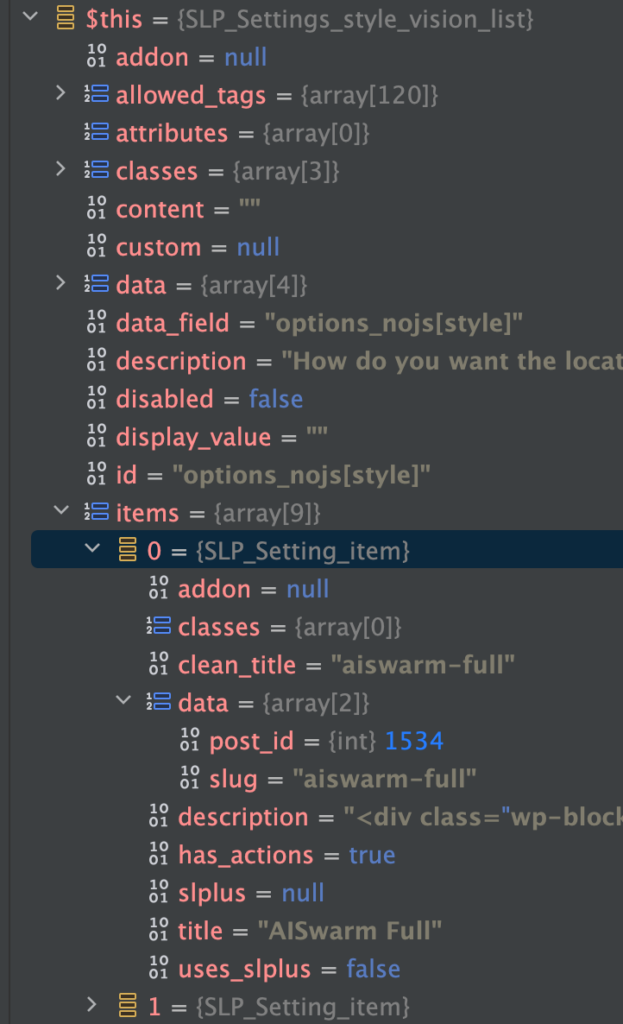
This setting is stored in the options_nojs[‘style’] option setting.
It is managed by an instantiation of the SLP_Settings_style_vision_list object.
data_field: options_nojs[style]
label: ‘Locator Style’
type: ‘style_vision_list’
This is a “smart option” managed by SLP_SmartOptions. It is defined in \SLP_SmartOptions:view_appearance() It has a ‘vue’ object type for rendering assistance.
Stack Trace : SLP | Settings
Triggered selecting – Menu : Store Locator Plus® | Settings
The Settings | View | Locator Style interface has been replaced with a new React based Style top-level interface. The selected style is now highlighted properly after multiple fixes to the architecture. This is part of the early 2025 release updates to SaaS and is in the Store Locator Plus® WordPress plugin version 2502.05.xx release.
Problem
On staging the user selected styles are not highlighted.
For example , Feeding America San Diego — On production the “Feeding America” style is highlighted. On staging NONE are highlighted.
Reproduction
Login as a user , or switch to a user from a SA account.
Go to menu item Store Locator Plus | Settings
Click “View” tab
The user’s selected style should appear – “Feeding America” for the *_feedingsandiego* map for instance. It is not highlighted as selected.
This method uses the options_nojs[‘style_id’] when it loops over all users and set the active_style_css. It uses the \SLP_Style_Manager->apply_style( $style_id , ‘active_style_css’ ) to set the value, then saves it.
This is called from the Admin UI via a Super Admin on menu MySLP | Manage Customers and clicking “Fix Active Style CSS” via the Customers section.
Notes
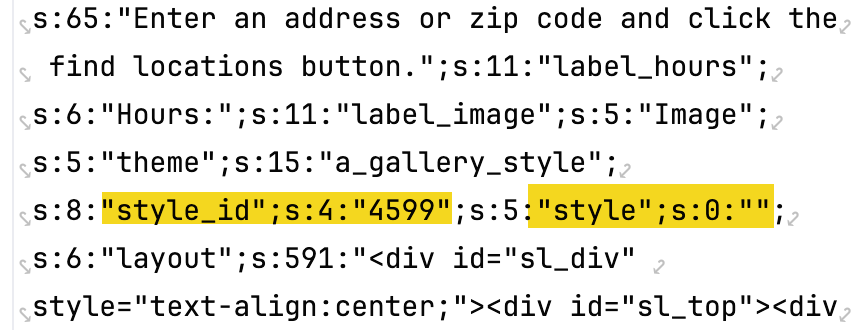
On the develop database (outdated) the ‘style’ setting is “” (like production) but the ‘style_id’ is set to 0 (does not match production, on production it is something like 4599 — the post id for the “Feeding America” style).
This indicates the develop database is out of sync , as happens during development and testing.
As such the production database definitely needs to be copied to develop to re-test this update and make sure it retains existing customer settings and renders properly. This MAY need to happen on staging as well.
Development Database Updated, Problem Persisted
Turns out the SLP Smart Options were being loaded via \SLP_SmartOptions::initialize_after_plugins_loaded() which is called from…
This is BEFORE the multisite user is logged in, which loads the smart options prematurely (from the main site) and thus is wrong with the current underlying platform (WP 6.4.X, PHP 8, MySQL 8).
Resolution
The options_nojs[‘style_id’] seems to hold the actual post ID of the selected style. For some reason on production options_nojs[‘style’] is empty indicating this method of saving the locator style is partly deprecated in the codebase.
For the 2411.XX.YY releases, starting with SLP 2411.19.01 the code now uses the style_id to determine which locator style is the active one when rendering the vision list.
This required a new is_selected() method in the \SLP_Settings_card_list class which is overridden in the extended \SLP_Settings_style_vision_list class. In \SLP_Settings_style_vision_list it compares the options_nojs[‘style_id’] against the post-id for each locator style listed, and if they match returns true.
This seems to address the issue on local develop box.
This did NOT fix the issue — see notes about Smart Options being loaded prematurely above.
Had to create a new method – \SLP_SmartOptions::slp_init_complete() that fires after the WordPress :: init hook and load the user options then.
revised in SLP version: 2411.21.01
Recap
The code that worked for years to load a users settings (talking multisite i.e. SaaS specifically) has been firing off too early.
I have no idea WHEN this started happening, but probably when the SaaS was upgraded to run on WordPress 6.0 (18 months ago) — at least partially.
WordPress 6.4.X changed when users are activated in their startup cycle, it is much later than before. Always.
The impact –
TONS (all) of user settings on staging are loading from the main site (site #1) instead of their own site.
SOME user settings on production are likely doing the same. No idea why not ALL users, but my guess is WordPress 6.0 was a partial change. 6.4 finished that change (it is undocumented as far as I can tell).
The update –
SLP 2411.21.01 which should be on staging soon should address that problem.
All of the SLP options (user settings) are now loaded later, after WordPress 6.4.5 finished logging the user in.
This should resolve a lot of oddities we are seeing in testing with user settings.
Update : 2025.01.06 (Jan 6th)
It does not look like the admin-settings-tab.js file is being loaded in the new SaaS interface, likely due to changing of the menu position which changes the WordPress hook name for the page.
This is very fragile.
The new hook name is toplevel_page_slp_experience
The scripts are enqueued from a WP hook that calls