Customer Report from (cvtsoft : 834.832)
Number to show after search is set to 25.
Enabled Pagination is checked.
Pages are not showing up when results are returned.
SLP Internal Documentation
Number to show after search is set to 25.
Enabled Pagination is checked.
Pages are not showing up when results are returned.
In the debug logs , any time super admin would list customers it would throw an error from
\MySLP_User::load() saying could not load blog for user #310.
Turns out this was caused by user 310 (cici) not having an associated site ID as it is a super admin account. Set the fallback to point to the main site (Site #1) when super admin does not have a site id.
Fixed in MySLP Dashboard 2503.04.01 and MySLP Architect 2503.04.01.
The problem here was that some users, older users, were not loading the Premier plugin when switching to the user. This problem ONLY manifests on staging and development servers.
Turns out the wp_blogs domain column MUST match the primary site domain or the user elements that are loaded very early by WordPress will not load properly. That means things that load early like mu_plugins or plugins themselves may not load because they are being only loaded for the primary site for the entire blog. Honestly not a great design from WordPress core to use a PATH from user meta versus looking at the actual user info and pulling related sites that way. Very fragile.
Reworked the MySLP dashboard to detect and reset the domain value in wp_blogs when not on production and the site url is a mismatch. Worked well on dev test. Needs staging test.
The wp_blogs table needs the domains the be changed to match the main URL or get_sites() and get_site_by_path() will not work.
The issue was in Dashboard where the AJAX mode was being forced to ‘load’ (initial look) all the time and ignoring the search mode.
Also SLP was flipping logic of search and load limits with search pulling the initial limit and load pulling the after search limit.
Resolved in Dashboard 2303.05.01 and SLP 2303.05.01
Concur > Cici
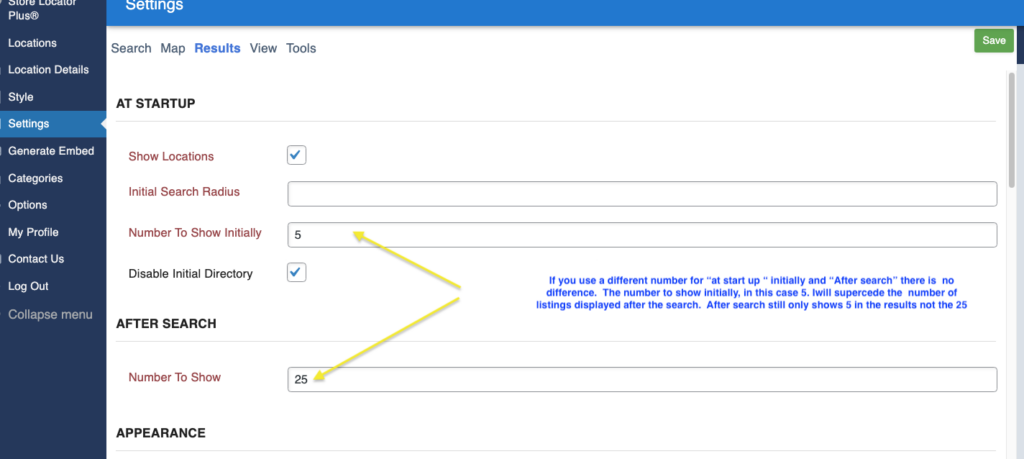
RESOLVED by unchecking results setting ” Disable Initial Directory.”
May have been as the result of Map hidden checked off so the first search only made the map appear without listing the results under the MAP
when doing an initial search on the map, the locations do now show up under the map on first search

For example, it's set to ALL by default in the category type, if you enter a zip code and don't change any of the dropdown boxes it will not show the results,

if you select a category or a radius it will show the results under the map.

https://americanbreastcare.com/retailers-near-me/Some users are not seeing the proper map marker urls (schmiggitty).
Saved: https://local.storelocatorplus.com/schmiggitty_at_gmail_dot_com/wp-content/mu-plugins/store-locator-le/images/icons/bulb_yellow.png (empty)
Corrected: https://local.storelocatorplus.com/wp-content/mu-plugins/store-locator-plus/images/icons/bulb_yellow.png
Saved: https://local.storelocatorplus.com/schmiggitty_at_gmail_dot_com/wp-content/mu-plugins/store-locator-le/images/icons/bulb_azure.png (empty)
Corrected: https://local.storelocatorplus.com/wp-content/mu-plugins/store-locator-plus/images/icons/bulb_azure.png
https://storelocatorplus.youtrack.cloud/issue/SLP-11/Map-Marker-Icons-AWOL
On staging (and production I assume) these both work as expected. The long URL with the customer ID works.
Enterprise customers are seeing the boundaries setting even when Boundaries Influences Guess is set to None.
The Premier Admin JavaScript should be managing that information and hiding the div when the setting is none.
Turns out the JS was not loading due to the page name change with the menu update. It also requires Google Maps to be loaded for this JavaScript to initialize.
Had to add a new SLP Google Maps loader as the existing enqueue_google_maps is really designed for the front end and attached to the ‘google_maps’ handle. A new gmaps handle and enqueue without an init callback is in place to allow for non-user presentation (admin) maps.
A new feature to track settings history.
These are the option names we want to keep track of.
While testing the generate embed Directory By State feature for Enterprise users it was noted that clicking on a state generates a “mySLP.POWER.directory” is undefined noted on the generate embed tab.
On the Generate Embed feature the JavaScript console reports the following when trying to fetch the map_marker_tooltip (Enterprise feature) option:
{
    "code": "invalid_option",
    "message": "Not a valid option slug.",
    "data": null
}I have always had the reporting functionality turned on. I noticed it no longer is on and when enabled it displays this code:
Fatal error: Uncaught Error: Class \"SLP_Power\" not found in /var/www/html/wp-content/plugins/slp-power/include/module/admin/SLP_Power_Admin_Reports2022.php on line 37
Error: Class \"SLP_Power\" not found in /var/www/html/wp-content/plugins/slp-power/include/module/admin/SLP_Power_Admin_Reports2022.php on line 37
A basic typo in the reports module was performing an include in the wrong place.
Resolved in Power 2502.25.02.


