Notice: Function WP_Scripts::add was called incorrectly.
The script with the handle “google_maps” was enqueued with dependencies that are not registered: slp_core.
Reproduction
- Login as admin on WordPress (http://localhost/wp-admin/)
- Make sure the SLP base plugin is active
- No other plugins are needed
- Go to the Location Details page (http://localhost/wp-admin/admin.php?page=slp_manage_locations)
Dev Notes
SLP Architecture
slp_core (WordPress/wp-content/plugins/store-locator-plus/js/slp_core.js)
slp_core is the WordPress handle for the slp_core.js file.
slp_core.js is the primary Google maps interface between WordPress and JavaScript
Where the slp_core is found in store-locator-plus v2603.03.01
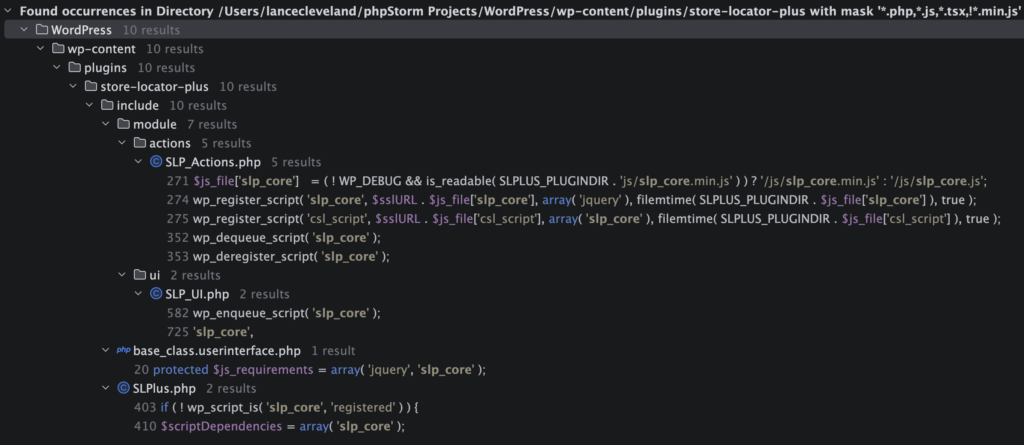
slp_core is REGISTERED here: \SLP_Actions::wp_enqueue_scripts
slp_core is currently only enqueued here: \SLP_UI::render_shortcode
google_maps (Google public Google Map JavaScript loader)
This loads a URL similar to:
https://maps.googleapis.com/maps/api/js?libraries=geometry,marker&v=quarterly&language=en®ion=US&key=<GOOGLE_API_KEY>&loading=async
In the JavaScript this is referenced as google.maps.*
Google Maps is only enqueued here with the google_maps hook: \SLPlus::enqueue_google_maps_script
* @used-by \SLPlus::nqGoogleMaps
* @used-by \SLP_Actions::wp_enqueue_scripts
* @used-by \SLP_Admin_UI::initialize via the WordPress admin_enqueue_scripts hook
Non Admin Implementation
google_maps is used for users that are not logged in (non-admin) when rendering the SLPLUS shortcode.
This is managed via \SLP_UI::render_shortcode
\SLP_Power_UI::at_startup adds google_maps as a js_requirement (managed by \SLP_BaseClass_UI as part of normal UI interface management). This is likely unnecessary.
JavaScript References
- SLP
- js/slp_core.js
- Power add on (slp-power)
- slp-power_userinterface.js
- Premier add on (slp-premier)
- js/markerclusterer.js
- slp-premier_userinterface.js
Admin Implementation
This is called on the slp_manage_locations (Location Details) admin page: \SLP_Admin_UI::initialize
via add_action( ‘admin_enqueue_scripts’, array( $this, ‘enqueue_slp_core_and_google_maps’ ) );
JavaScript References
- SLP
- js/slp_core.js
- admin-locations-tab.js
- Premier add on (slp-premier)
- admin-locations-tab.js
- admin-settings-tab.js
- admin.js
AI Actions
Prompt
@amelia – We need to fix a script enqueue issue on the Location Details page
___
The script with the handle “google_maps” was enqueued with dependencies that are not registered: slp_core.
__
This error is caused because the WordPress script with the handle slp_core is not enqueued.
__
Option 1: We could enqueue this by calling \SLP_UI::render_shortcode
For the JavaScript in slp_core to be fully functional it requires localized variables.
Currently this only happens in \SLP_UI::render_shortcode
The problem is that \SLP_UI::render_shortcode has the extra overhead:
– Generating a large HTML output string
– Firing a slp_after_render_shortcode action
We only want the JavaScript variables configured and then localized via \SLP_UI::localize_script
If we use this method, we would need to bypass the HTML output and slp_after_render_shortcode action hook processing.
The best way to hook that would be to rewrite \SLP_Admin_UI::initialize to call a new method:
– Replace add_action( ‘admin_enqueue_scripts’, array( $this->slplus, ‘enqueue_google_maps_script’ ) );
– With add_action( ‘admin_enqueue_scripts’, array( $this, ‘enqueue_slp_core_and_google_maps’ ) );
Create a new method \SLP_UI::enqueue_slp_core
– Extracts the first chunk of \SLP_UI::render_shortcode up to the wp_enqueue_script( ‘slp_core’ );
– It needs to accept the parameters from \SLP_UI::render_shortcode
Create a new method \SLP_Admin_UI::enqueue_slp_core_and_google_maps
– call the new \SLP_UI::enqueue_slp_core method
– call \SLPlus::enqueue_google_maps_script
Update \SLP_UI::render_shortcode to call \SLP_UI::enqueue_slp_core to replace the code that was moved to the new \SLP_UI::enqueue_slp_core method
AI Results
\SLP_UI::register_slp_scripts_if_needed is a duplicate of \SLP_Actions::wp_enqueue_scripts.
This unnecessary extra code.
Duplicate code should be avoided when possible.
Created \SLP_UI::enqueue_slp_core with admin_safe flag resulting in inefficient architecture.
This is only called with the admin_safe flag from \SLP_Admin_UI::enqueue_slp_core_and_google_maps.
The register_slp_scripts_if_needed call in the admin_safe short circuit block can be put inline in the calling method as a call to \SLP_Actions::wp_enqueue_scripts.
The admin_safe only method localize_script_admin_safe could should be in SLP_Admin_UI as it is an admin only method: \SLP_Admin_UI::localize_script_admin_safe.
The wp_enqueue_script( ‘slp_core’ ); call can be in the calling method as well.
Returning the $attributes array is not necessary.
My fixes to the AI work:
Rip out the admin_safe short circuit from SLP_UI and place the equivalent code in SLP_Admin_UI as these updates only related to admin hooks. SLP_UI relates to non-admin code and should not have admin-only methods in there. Us nqGoogleMaps in admin as that can certainly load in async versus defer mode.
in SLP_Admin_UI
	public function enqueue_slp_core_and_google_maps( string $hook = '' ): void {
		$slp_actions = SLP_Actions::get_instance();
		$slp_actions->wp_enqueue_scripts(); // misnomer - registers the slp_core script

		$this->localize_script_admin_safe();
		wp_enqueue_script( 'slp_core' );

		$this->slplus->nqGoogleMaps( $hook );
	}

	/**
	 * Localize only the data needed for admin enqueue paths without invoking shortcode SmartOptions callbacks.
	 */
	private function localize_script_admin_safe(): void {
		$scriptData = array(
			'options'              => is_array( $this->slplus->options ) ? $this->slplus->options : array(),
			'environment'          => array(
				'addons'      => $this->slplus->AddOns->get_versions(),
				'slp_version' => SLPLUS_VERSION,
			),
			'plugin_url'           => SLPLUS_PLUGINURL,
			'ajaxurl'              => admin_url( 'admin-ajax.php' ),
			'nonce'                => wp_create_nonce( 'wp_rest' ),
			'apikey'               => SLPlus::get_instance()->get_apikey(),
			'rest_url'             => rest_url( 'store-locator-plus/v2/' ),
			'messages'             => $this->get_messages(),
			'shortcode_attributes' => $this->js_attributes,
		);

		ksort( $scriptData['options'] );
		wp_add_inline_script(
			'slp_core',
			'const slplus = ' . wp_json_encode( $scriptData )
		);
	}

	/**
	 * Set the messages for us in the JS array.
	 *
	 * @return string[]
	 */
	private function get_messages(): array {
		$messages = $this->slplus->Text->get_text_group( 'messages' );

		return apply_filters( 'slp_js_messages', $messages );
	}
In SLP_UI
Move the localize_script_admin_save to the SLP_Admin_UI module where it belongs. Have register_slp-scripts_if_needed method call SLP_Actions->wp_enqueue_scripts in SLP_Actions.
	private function register_slp_scripts_if_needed(): void {
		$slp_actions = SLP_Actions::get_instance();
		$slp_actions->wp_enqueue_scripts();
	}
Update
The latest update needs to be reviewed. It is calling enqueue_google_maps_script from \SLP_Admin_UI::initialize
With add_action( ‘admin_enqueue_scripts’, array( $this, ‘enqueue_slp_core_and_google_maps’ ) );
Need to look at Premier interfaces listed above for Google Maps interactions.
Settings | Map | Map Center Fallback
This should be showing the Google Map to show the map center.